
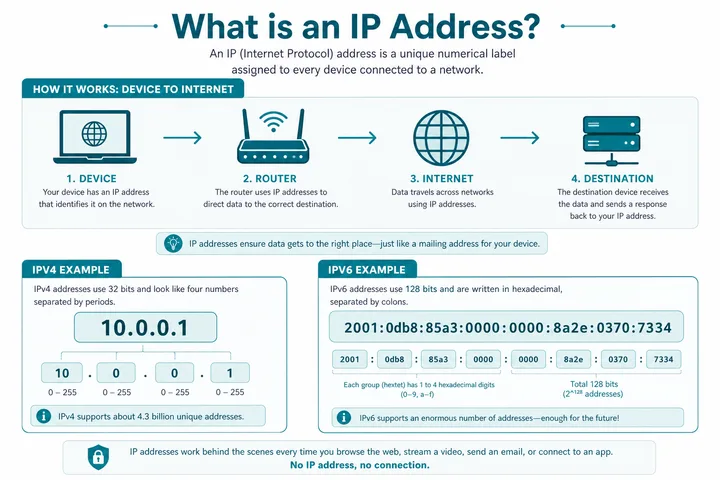
An IP address is a numeric address that identifies a network interface and lets IP traffic be routed to it. 10.0.0.1 is a valid private IPv4 address commonly assigned to a router or hotspot gateway, including many Piso WiFi portals; it is not a public internet address.
Key Takeaways
- An IP address is a numeric address that identifies a network interface and lets IP traffic be routed to it.
- 10.0.0.1 is a valid private IPv4 address commonly assigned to a router or hotspot gateway, including many Piso WiFi portals; it is not a public internet address.
- IPv4 and IPv6 are address formats.
- Public/private and static/dynamic describe reachability or assignment.
IPv4 and IPv6 are address formats. Public/private and static/dynamic describe reachability or assignment. Gateway, DNS, and MAC are related network concepts, but they are not synonyms for an IP address.
On this page: Definition · IPv4 vs IPv6 · Public vs private · Static vs dynamic · IP vs gateway, DNS, MAC · What 10.0.0.1 means · Private ranges · Piso WiFi context · Invalid lookalikes · FAQ
What Is an IP Address?
Internet Protocol gives network interfaces logical addresses. Routers read the destination IP in each packet and decide where to send it next. An IP address identifies an interface at a point in a network; it is not necessarily a permanent identity for a person or physical device.
| Example | Type | What it tells you |
|---|---|---|
10.0.0.1 | Private IPv4 | A host or gateway inside a local network |
192.168.1.25 | Private IPv4 | A local device address on many home LANs |
203.0.113.25 | Documentation IPv4 | Example public-format address, reserved for documentation |
2001:db8::25 | Documentation IPv6 | Example IPv6 address, reserved for documentation |
The network prefix says which part identifies the network; the remaining bits identify an interface within that prefix. For example, 10.0.0.1/24 is usually in the local network 10.0.0.0/24.
IPv4 vs IPv6
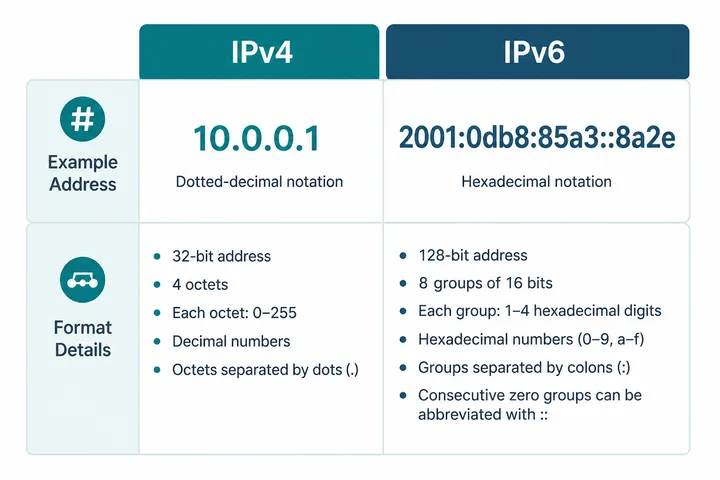
| Feature | IPv4 | IPv6 |
|---|---|---|
| Length | 32 bits | 128 bits |
| Typical form | 10.0.0.1 | 2001:db8::1 |
| Number notation | Four decimal octets, 0–255 | Eight hexadecimal groups; zeros may be compressed |
| Local addressing | RFC 1918 private ranges | Link-local fe80::/10 and unique-local fc00::/7 |
| NAT | Common because public IPv4 is scarce | Not required for address conservation, though firewalls still matter |
10.0.0.1 is IPv4. An IPv6-capable device can have IPv4 and IPv6 addresses simultaneously; that dual-stack state is normal.
Public vs Private IP Addresses
A public IP is globally routable when announced and permitted. A private IP is intended for local networks and is not routed across the public internet. Home routers commonly translate many private IPv4 clients to one public IPv4 using NAT.
| Question | Public IP | Private IP |
|---|---|---|
| Unique scope | Globally unique while assigned/routed | Must be unique only inside its local network |
| Internet-routable | Generally yes, subject to routing/firewalls | No; requires translation or a gateway |
| Assigned by | ISP, hosting provider, or registry allocation chain | Router administrator or DHCP server |
| Example | ISP WAN address | 10.0.0.1 gateway and 10.0.0.25 client |
Static vs Dynamic IP Addresses
Static means the address is deliberately kept stable. Dynamic means DHCP, an ISP, or another mechanism can change it. These labels apply independently of public/private scope.
| Assignment | Local example | Typical use |
|---|---|---|
| Dynamic private | Phone receives 10.0.0.42 by DHCP | Most WiFi clients |
| Reserved private | Printer always receives 10.0.0.50 | Stable local services |
| Static private | Gateway manually configured as 10.0.0.1 | Router/controller interface |
| Dynamic public | ISP changes WAN address periodically | Most residential internet |
| Static public | ISP assigns a stable WAN address | Hosted services, business VPNs |
A DHCP reservation can keep a client stable while still letting DHCP manage the configuration. Avoid manually choosing an address inside the active DHCP pool unless the network administrator planned it.
IP Address vs Gateway vs DNS vs MAC
| Term | Role | Example |
|---|---|---|
| IP address | Logical address for an interface and routing | Phone: 10.0.0.23 |
| Default gateway | Next-hop router used for destinations outside the local subnet | Router: 10.0.0.1 |
| DNS server | Translates names such as example.com to IP addresses | Router proxy or public resolver |
| MAC address | Link-layer identifier used on the local network segment | 02:1A:2B:3C:4D:5E |
| Subnet mask / prefix | Defines which addresses are local | 255.255.255.0 or /24 |
One Interface, Several Identifiers
A phone may have a WiFi MAC, a private IPv4 address, one or more IPv6 addresses, a default gateway, and DNS servers at the same time. Randomized WiFi MAC addresses can change the local identity without changing what an IP address means.
What Is the 10.0.0.1 IP Address?
10.0.0.1 is valid private IPv4. It lies inside 10.0.0.0/8, the largest RFC 1918 private block. Network operators often choose an address ending in .1 for a router or controller interface, but that is convention—not a protocol requirement.
10.0.0.1can be a default gateway, router admin host, captive portal, server, or another local interface.- It is reachable only when routing and network membership permit it.
- Different homes or hotspots can reuse
10.0.0.1because their private networks are isolated. - The address alone does not prove a brand, password, or page type.
For the site’s direct login and typo guide, visit 10.0.0.1.
IPv4 Private Address Ranges
| Private block | Address span | Common context |
|---|---|---|
10.0.0.0/8 | 10.0.0.0–10.255.255.255 | Large networks, hotspots, some home routers |
172.16.0.0/12 | 172.16.0.0–172.31.255.255 | Business networks, containers, VPNs |
192.168.0.0/16 | 192.168.0.0–192.168.255.255 | Home routers and ISP equipment |
Not every non-public-looking address is private. Link-local 169.254.0.0/16, loopback 127.0.0.0/8, documentation ranges, multicast, and other special-use blocks have different purposes.
10.0.0.1 in a Piso WiFi Network
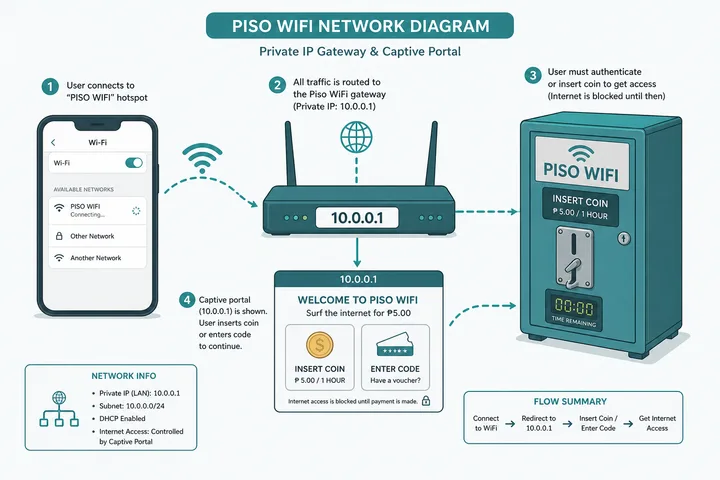
On many Piso WiFi networks, the controller uses 10.0.0.1 as the local gateway and serves the payment, voucher, pause, or status portal from the same address. That does not make 10.0.0.1 a Piso-only address; ordinary routers and other LANs use it too.
| Piso component | Possible address role |
|---|---|
| Customer phone | Receives a private client IP such as 10.0.0.27 |
| Controller/router | Uses 10.0.0.1 as gateway and portal host |
| Captive portal | Local web page before internet authorization |
| ISP uplink | Separate WAN/public or carrier-grade NAT address |
10.0.0.0.1 and 0.0.0.1 Are Not 10.0.0.1
| Typed value | Validity / meaning | What to use |
|---|---|---|
10.0.0.1 | Valid private IPv4 | 10.0.0.1 guide |
10.0.0.0.1 | Invalid IPv4: five octets | Usually 10.0.0.1 |
0.0.0.1 | Special-use 0/8, not a normal private gateway | Check the actual gateway |
10.0.0.l | Invalid: letter L | Use digit 1 → 10.0.0.1 |
10.0.0.256 | Invalid: an octet exceeds 255 | Verify the sticker or gateway |
If you are unsure which local address is active, use the device’s network details or read how to find the default gateway.
IP Address, Prefix and Route: the Missing Relationship
To see these ideas applied, the free tools hub walks through narrowing a real local address, captive portal shows how sign-in redirects use them, and 10.10.10.1 illustrates why two addresses inside the same private range are not interchangeable.
An IP address is interpreted with a prefix length or subnet mask. For example, 192.168.1.25/24 identifies an interface address plus a 24-bit network prefix. The device compares destination prefixes to its routing table: local destinations can be reached directly on the link, while other destinations normally go to a router such as the default gateway.
A hostname is not an IP address. DNS may translate a name into one or more IP addresses, while local discovery systems can use other mechanisms. Likewise, a socket/connection is identified by more than an IP alone: transport protocols use port numbers, and IPv6 link-local addresses may also require an interface scope.
- One interface can hold multiple IPv4 and IPv6 addresses.
- One public IP can represent many private clients behind NAT.
- One hostname can resolve to multiple IPs for resilience or distribution.
- A MAC address identifies a link-layer interface on the local network; routers forward IP packets between networks.
Sources, Scope, and Corrections
Claim basis: Standards-based networking behavior is treated as Protocol fact; addresses, redirects, labels, and menus are marked as common or device-dependent where they can vary. See our Editorial Policy for claim labels and source priorities.
Found a mismatch? Send the page URL and privacy-safe evidence using the correction process. This block does not claim a hands-on test or a fact-review date.
Related Guides
- Free tools hub — Choose a gateway checker, session helper or rate calculator
- Router IP address list — Compare common and uncommon private gateways
- Default gateway guide — Find the router address used by your device
- Captive portal guide — Understand redirects and force a sign-in page to open
IP Address FAQ
What Is an IP Address?
An IP address is a numeric network address used to identify an interface and route data to it. IPv4 looks like 10.0.0.1; IPv6 uses hexadecimal groups such as 2001:db8::1.
What Is the 10.0.0.1 IP Address?
10.0.0.1 is a valid private IPv4 address. Routers and hotspot controllers often use it as a local gateway or portal, including many Piso WiFi networks. It is not globally routable on the public internet.
Is 10.0.0.0.1 a Valid IP Address?
No. IPv4 has exactly four decimal octets; 10.0.0.0.1 has five. Most people mean 10.0.0.1.
What Is 0.0.0.1?
0.0.0.1 belongs to the special 0.0.0.0/8 block reserved for “this network” semantics and is not a normal private router gateway. It is distinct from 10.0.0.1.
Can Two Devices Have the Same Private IP Address?
They can use the same private address on separate isolated networks. They must not use the same address on the same LAN at the same time, or an address conflict occurs.
Does My IP Address Identify My Exact Location?
A public IP may suggest an ISP and approximate region, but it usually does not reveal a precise home address. Private addresses such as 10.0.0.1 reveal only local network structure.
Related IP and Gateway Guides
- 10.0.0.1 — private gateway and portal guide
- Router IP addresses — common local login addresses
- Default gateway — what the next-hop router does