
LPB Piso WiFi (also lpb.wifi / lpb wifi) is a popular Piso WiFi vendo portal in the Philippines. Connect to the hotspot, open http://10.0.0.1 for coins, vouchers, or Pause Time — owner admin is usually http://10.0.0.1/admin with default admin / 123456789.
Key Takeaways
- LPB Piso WiFi (also lpb.wifi / lpb wifi ) is a popular Piso WiFi vendo portal in the Philippines.
- Connect to the hotspot, open http://10.0.0.1 for coins, vouchers, or Pause Time — owner admin is usually http://10.0.0.1/admin with default admin / 123456789 .
- This hub covers LPB login, pause, admin password, and portal use — then links out to deep guides so you do not need five doorway pages.
- Quick path: WiFi connected → mobile data OFF → http://10.0.0.1 → pay or Pause → owners: /admin with admin / 123456789.
This hub covers LPB login, pause, admin password, and portal use — then links out to deep guides so you do not need five doorway pages.
Quick path: WiFi connected → mobile data OFF → http://10.0.0.1 → pay or Pause → owners: /admin with admin / 123456789.
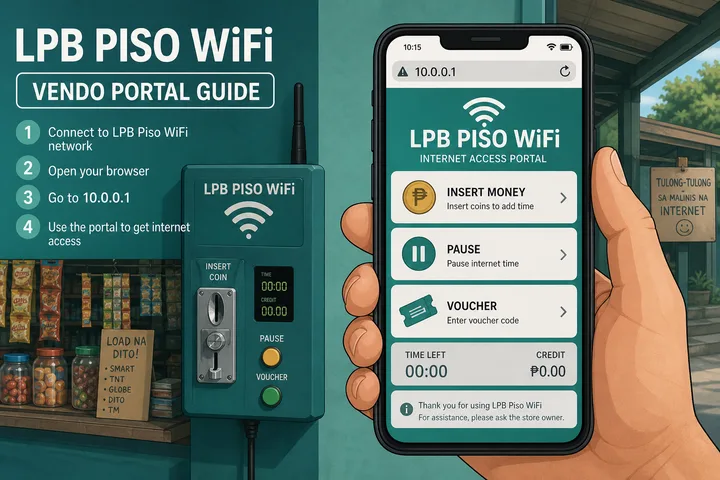
On this page: What is LPB · Login / portal · Pause time · Admin password · Name variants · vs other portals · FAQ
What Is LPB Piso WiFi?
LPB Piso WiFi is portal software that runs on many coin-operated WiFi vendos. Users search it as lpb piso wifi, lpb.wifi, lpb wifi, and lpb.wifi 10.0.0.1 — same entity.
You connect to an SSID often labeled LPB or Piso WiFi, open the captive portal (almost always http://10.0.0.1), pay with coins or a voucher, then browse. Pause Time freezes remaining minutes when the owner enabled it.
- Category: Piso WiFi (service type)
- Brand/platform: LPB
- Gateway: usually
10.0.0.1— typo swarm covered on the homepage - Owner panel:
http://10.0.0.1/admin
LPB Piso WiFi Login at 10.0.0.1
Customer login means opening the user portal — not the admin panel. Type http://10.0.0.1 in the browser address bar while connected to the LPB hotspot.
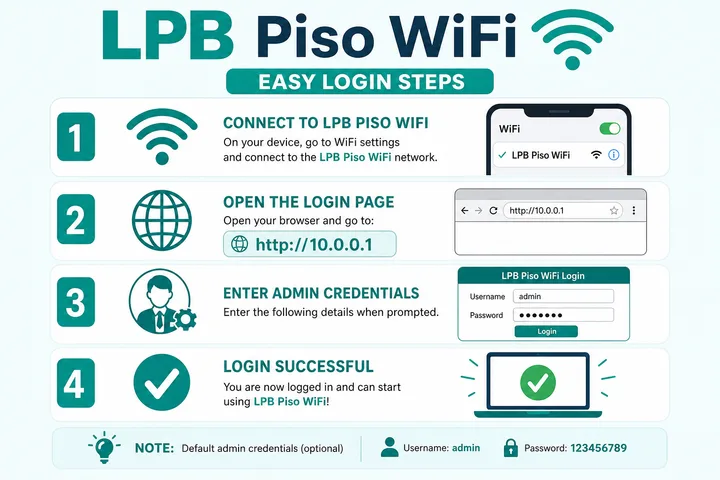
- Connect to the LPB / Piso WiFi SSID (often open — no WiFi password).
- Turn mobile data OFF and disable Smart Network Switch.
- Open Chrome, Safari, or any browser.
- Type
http://10.0.0.1in the address bar (not Google search). Usehttp://, not https. - Choose Insert Money (coins) or enter a voucher code.
- Browse until time ends — or pause remaining minutes.
| Intent | URL | Credentials |
|---|---|---|
| Customer portal | http://10.0.0.1 | None — coins / voucher |
| Owner admin | http://10.0.0.1/admin | Default admin / 123456789 |
| Session status | http://10.0.0.1/status (many builds) | Active session device |
Deeper gateway, typos, and admin paths: 10.0.0.1 login guide.
LPB Piso WiFi Pause Time
LPB piso wifi pause time: on an active paid session, open http://10.0.0.1 and tap Pause Time. The timer freezes; tap Resume on the same device when you return.
- Stay connected to the LPB hotspot; mobile data off.
- Open
http://10.0.0.1— you must already have paid time. - Tap Pause Time / Pause.
- Later: same phone/laptop → same SSID → portal → Resume.
If the Pause button is missing, the owner has not enabled it in admin (Portal / Insert Coin settings → Pause/Resume Time on many LPB builds). This page answers the LPB-specific query; for Chrome/Android/iPhone troubleshooting and MAC binding, use the full guide:
LPB Default Admin Password
Default LPB admin credentials are commonly username: admin and password: 123456789. Open http://10.0.0.1/admin while connected to the machine network.
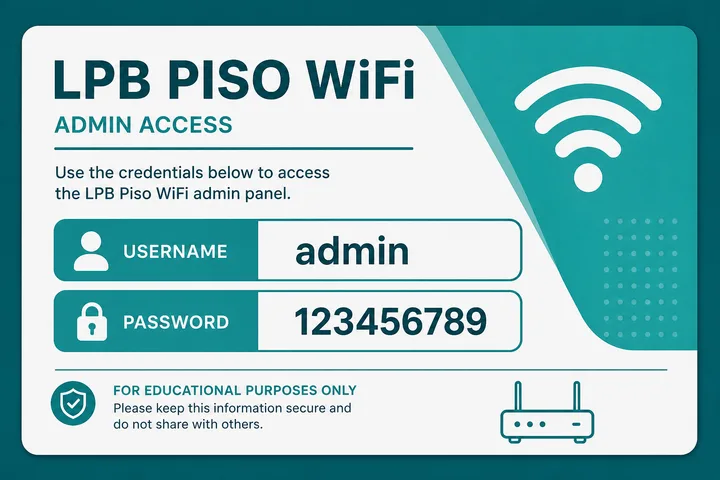
| Field | Default (common LPB) |
|---|---|
| Username | admin |
| Password | 123456789 |
| Admin URL | http://10.0.0.1/admin |
| Alternate (some older builds) | administrator / admin1234 |
- Admin password ≠ WiFi password. Admin opens settings; WiFi password (if any) joins the SSID.
- Change the default after install —
123456789is widely known. - If login fails, the owner already changed it — use reset/recovery, not random guesses on someone else’s machine.
- Password reset overview: 10.0.0.1 password reset.
LPB Name and Search Variants
Google still means this page for these strings:
| Typed / searched | Means |
|---|---|
| lpb.wifi / lpb wifi | LPB Piso WiFi brand |
| lpb.wifi 10.0.0.1 | LPB portal at 10.0.0.1 |
| 10.0.0.1 lpb piso wifi | Same portal + brand |
| 10.0.0.0.1 lpb piso wifi | Typo for 10.0.0.1 + LPB |
| lpb piso wifi pause time | Pause on LPB portal |
LPB vs Other Piso Portals
| Platform | Typical portal | Default admin (common) |
|---|---|---|
| LPB | 10.0.0.1 | admin / 123456789 |
| 1Click | Often 10.0.0.1 | Check sticker / installer |
| AdoPisoft | 10.0.0.1 | admin / admin |
| PisoFi | 10.0.0.1 / portal.pisofi.com | administrator / admin12345 |
Category hub: What is Piso WiFi.
LPB Address, Hostname and Dashboard Variants
Do not carry LPB defaults across brands. LBS Piso WiFi is a separate label despite the similar letters, and JuanFi uses a different controller stack again. Owners comparing platforms on cost and operations should read Piso WiFi business.
lpb.wifi is a local hostname label used in some LPB environments, while an address such as 10.0.0.1 or 10.5.50.1 is a numeric private-network address. Neither is universal. The correct destination is the gateway or portal assigned by the connected hotspot. If a hostname does not resolve, inspect the connected network’s router/gateway field instead of assuming the machine is offline.
| Variant | Possible role | Use safely |
|---|---|---|
http://lpb.wifi | Friendly local portal hostname on supported setups | Try only while connected to the intended LPB hotspot |
http://10.0.0.1 | Common customer portal or gateway | Confirm it matches the current network |
http://10.5.50.1 | Alternate private mapping seen in some installations | Treat as confirm-first, not an LPB universal default |
/status or a Status button | Customer session time and connection state | Open from the portal navigation; paths vary |
/admin, Dashboard or Management | Owner controls | Owners only; use installer/sticker credentials and change defaults |
Firmware and installer setup vary. A skin can rename Home, Status, Dashboard, Insert Coin or Voucher, and an installer can change the LAN range, admin path and credentials. Do not apply a password or route copied from another LPB machine; confirm the installed version and owner records first.
Sources, Scope, and Corrections
Claim basis: Login addresses and menu paths are common defaults, not universal settings. Confirm them on the device label, portal, official documentation, or provider support because firmware and owner configuration can differ. See our Editorial Policy for claim labels and source priorities.
Independence: 10001ip.co is not affiliated with, sponsored by, or an official support channel for the brand, ISP, or platform discussed on this page.
Found a mismatch? Send the page URL and privacy-safe evidence using the correction process. This block does not claim a hands-on test or a fact-review date.
Related Guides
- Piso WiFi guide — Understand the portal, sessions, rates and owner side
- Piso WiFi pause time — Pause and resume a paid session without losing minutes
- Piso WiFi machine — Compare hardware, startup cost and owner requirements
- Piso WiFi rate calculator — Model timer rates, sales and potential income
LPB Piso WiFi FAQ
What Is LPB Piso WiFi?
LPB Piso WiFi (also searched as lpb.wifi or lpb wifi) is a common coin/voucher vendo portal platform in the Philippines. The user portal is usually http://10.0.0.1.
What Is the LPB Piso WiFi Admin Password?
The default LPB admin login is often username admin and password 123456789 at http://10.0.0.1/admin. Owners should change this after setup. It is not the WiFi join password.
How Do I Pause LPB Piso WiFi Time?
Connect to the LPB hotspot, turn mobile data off, open http://10.0.0.1 on an active paid session, then tap Pause Time. Resume on the same device later. Full steps: /piso-wifi-pause-time/
How Do I Log in to Lpb.wifi at 10.0.0.1?
For customers: open http://10.0.0.1, then Insert Money or enter a voucher. For owners: open http://10.0.0.1/admin with admin / 123456789 (if unchanged).
Ano Ang LPB Piso WiFi?
Isa itong popular na Piso WiFi portal software sa Pilipinas. Buksan ang http://10.0.0.1 para magbayad o mag-pause. Default admin: admin / 123456789.
Next Guides
- Pause time — full device-by-device tutorial
- Piso WiFi — category pillar
- 10.0.0.1 — gateway, typos, admin paths
- Voucher codes
- Gateway checker — if 10.0.0.1 fails