
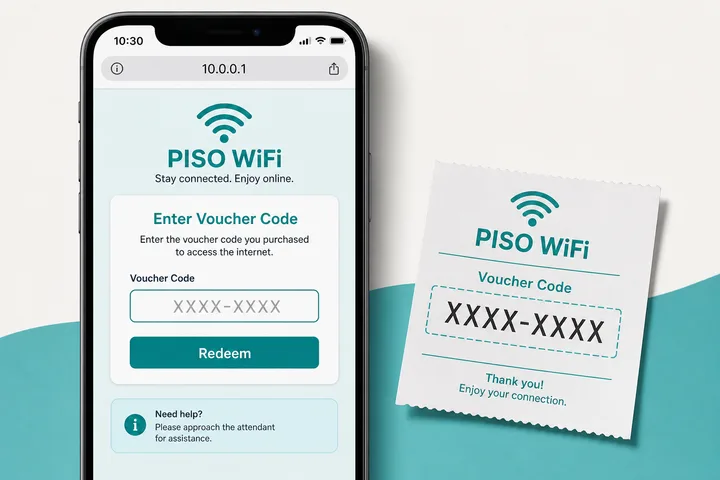
A Piso WiFi voucher code is a prepaid access code you redeem on the portal — usually at http://10.0.0.1 — to start timed internet without inserting coins. Enter the code under Voucher, confirm, then browse (and pause if enabled).
Key Takeaways
- A Piso WiFi voucher code is a prepaid access code you redeem on the portal — usually at http://10.0.0.1 — to start timed internet without inserting coins.
- Enter the code under Voucher , confirm, then browse (and pause if enabled).
- This page covers how to redeem codes, free-code myths, voucher vs coins, status checks, generators, and why “free voucher lists” online almost never work on a real vendo.
- It is a one-time (or limited-use) code created by the machine owner’s software.
This page covers how to redeem codes, free-code myths, voucher vs coins, status checks, generators, and why “free voucher lists” online almost never work on a real vendo.
On this page: What a voucher is · How to redeem · Free codes · Voucher vs coins · Owner generation · Errors · FAQ
What Is a 10.0.0.1 Piso WiFi Voucher Code?
It is a one-time (or limited-use) code created by the machine owner’s software. When redeemed on that machine’s portal, it grants a fixed amount of session time.
Codes are local to that vendo / controller. A code from Store A will not unlock Store B. Public “voucher code lists” scraped online cannot magically work everywhere.
How to Redeem a Piso WiFi Voucher Code
Connect to the hotspot, open http://10.0.0.1, choose Voucher, type the code exactly, and confirm. Mobile data must be off.
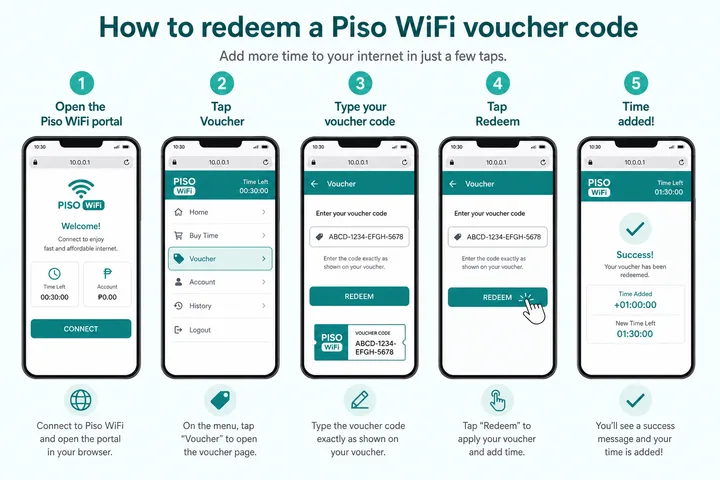
- Join the Piso WiFi SSID; turn mobile data off.
- Open browser →
http://10.0.0.1(not https, not Google search). - Tap Voucher / Voucher Code.
- Enter the code exactly (watch 0 vs O, dashes, spaces).
- Confirm / Redeem — timer should show remaining time.
- Optional: use Pause Time if you need to stop the meter later.
Free Voucher Code Lists (2024–2026) — Usually Fake
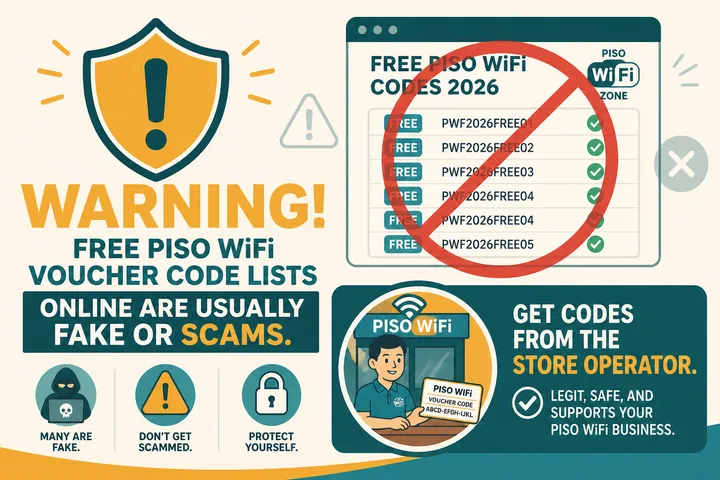
Searches for 10.0.0.1 piso wifi voucher code free almost always lead to recycled lists that do not work on your machine. Real free/promo codes only come from the store operator who generated them.
| Source or year claim | Likely result |
|---|---|
| Printed slip / QR from the store | Works on that vendo |
| Operator GCash promo / loyalty code | Works if still unused |
| “Free voucher codes 2024” | Old, machine-specific, and likely expired or already used |
| “Working free codes 2025” | Usually recycled from another vendo or invented for clicks |
| “Updated free codes 2026” | A current year label does not make a code valid on your controller |
| Telegram “generator” bots | High scam / malware risk |
Voucher Code vs Insert Coins
| Coins | Voucher | |
|---|---|---|
| How you pay | Physical coins in the machine | Code from owner / purchase |
| Portal button | Insert Money | Voucher Code |
| Good for | Walk-up cash users | Remote sales, packs, promos |
| Pause | If enabled | If enabled (same portal) |
Owner: Voucher Generator / Admin
Owners generate codes in admin (often http://10.0.0.1/admin) under Voucher / Voucher Generator. Users cannot create working codes from public “generators” on the internet.
- Connect locally and sign in with the credentials configured for that controller. Change any factory default during setup.
- Open Voucher, Voucher Generator, or Codes; labels differ by platform.
- Set the time value, number of codes, price or rate, usage limit, and expiry date if those options are available.
- Generate a small test batch, redeem one code on the customer portal, and verify that the correct minutes and limits apply.
- Print or send codes securely. Keep an owner record so the same one-time voucher is not sold twice.
- Use Voucher Manager or reports to check unused, active, redeemed, expired, and disabled codes. Revoke compromised codes rather than posting them publicly.
Expiry can mean two different things: a deadline to redeem an unused code, or a session/account validity period after redemption. Confirm which rule the firmware uses. Batch size, simultaneous-device limits, and reusable-code options should stay conservative to prevent accidental overselling or shared-code abuse.
Voucher Errors and Fixes
| Error / symptom | Likely cause | Fix |
|---|---|---|
| Invalid code | Wrong machine, typo, disabled, or already used | Check 0/O and 1/I, preserve dashes, then ask the issuing owner to check status |
| Expired | Redemption deadline passed | Ask the owner for a replacement; changing the phone date will not renew it |
| Voucher button missing | Different portal mode or vouchers disabled | Reload the correct local portal and ask the operator how that machine accepts codes |
| Portal won’t open | Wrong SSID, mobile data, VPN, or HTTPS | Join the Piso network, disable data/VPN, and open http://10.0.0.1 |
| Redeem button does nothing | Weak WiFi, stale page, or controller offline | Reconnect near the vendo, reload once, and submit the code once |
| Code accepted but wrong time | Incorrect voucher profile | Save the code/receipt and ask the owner to inspect its configured minutes |
| Code works but no internet | Session grant or upstream connection problem | Check the timer, reconnect, and ask the owner if the network itself is offline |
| Looking for status URL | Paths vary by software | Use the customer status/session page linked from http://10.0.0.1; owners use the admin Voucher Manager |
Why Online “Free Voucher Code” Lists Do Not Work
A voucher is checked against one owner’s local database, so there is no universal free code for every Piso WiFi. A valid-looking code copied from a 2024 or 2025 list may belong to another controller, may already be redeemed, or may never have existed. Changing the year in a search does not create a current code.
| Online claim | Why it fails | Risk |
|---|---|---|
| “Working on all 10.0.0.1 machines” | Each owner has a separate voucher database | Misleading ads or redirects |
| “Voucher generator” | It cannot write a code into the local admin system | Phishing, malware or paid-survey traps |
| “Human verification before code reveal” | The task earns the publisher money but does not validate a voucher | Personal-data or subscription loss |
| Code posted publicly | Even a real promo code is likely used by the first person | Usually harmless but unreliable |
Never enter a GCash or Maya MPIN, one-time password, Facebook password, or card details into a voucher generator. A legitimate store may ask for payment through its named merchant account, but it does not need your wallet login credentials.
Owner Voucher Status and Management Path
Owners commonly start at http://10.0.0.1/admin, then open Voucher, Voucher Manager, Codes or Sales. Menu names depend on the installed firmware. The manager should show whether a code is unused, active, redeemed, expired or disabled, plus its assigned minutes and creation date.
- Use the credentials supplied by the installer or changed during setup; do not assume another platform’s default password.
- Search or filter by the exact voucher code before replacing it.
- Check the expiry policy and usage log. A redeemed one-time code should not be reissued.
- If
/adminis not the correct path, consult the controller documentation or LPB Piso WiFi guide for that platform.
Case, Spaces, Expiry and Pause Time
Enter the code exactly as supplied. Some systems normalize upper- and lowercase; others treat them differently. Remove accidental spaces copied before or after the code, but keep printed dashes if the owner’s format uses them. Compare similar characters such as zero and O, one and I, or five and S. “Invalid” can also mean expired, disabled, already used or issued by another shop.
After a voucher starts the session, Pause Time works the same way as it does for coin time if the owner enabled it. Open the portal on the same device, tap Pause, and later Resume before any platform-specific expiry window. Pausing saves remaining session minutes; it does not extend the voucher’s separate calendar expiry or make the code reusable.
Voucher Batch Planning and Code Lifecycle
An owner batch is a controlled set of codes tied to a package profile. Before generating hundreds, define the minutes, price, redemption deadline, one-time or reusable rule, simultaneous-device limit if offered, and who is allowed to sell the batch. Generate a small sample first and reconcile issued codes against payments.
| Status | What it normally means | Owner action |
|---|---|---|
| Unused / available | Generated but not yet redeemed | Keep private; sell or distribute once |
| Active | Redeemed and associated with a current session or validity period | Check device/session rules before intervening |
| Redeemed / used | One-time entitlement has already been consumed | Do not resell or reissue |
| Expired | Redemption or validity deadline passed | Apply the operator’s stated replacement policy |
| Disabled / revoked | Owner intentionally blocked the code | Record the reason and issue a replacement only when justified |
Selling a Voucher through GCash or Maya
Payment method does not change how the session ends: review Piso WiFi logout so a paid slot is not left occupied. Community hotspots handle payment differently again — see WiFi ng Bayan. Owners deciding whether to sell vouchers at all should read the economics in Piso WiFi business.
This flow is platform- and operator-dependent. GCash or Maya does not automatically create a Piso WiFi voucher unless the owner’s chosen sales system has a documented integration. In a common manual flow, the customer pays the operator’s verified merchant or wallet account, sends the required transaction reference through the operator’s stated channel, and the operator releases one unused code after confirming payment. Some controller vendors or resellers may offer their own automation; follow their official documentation and fee rules.
- Customer confirms the package price and the operator’s exact payment account.
- Customer pays without sharing an MPIN, OTP or wallet password.
- Operator verifies the payment in the operator-controlled account; a screenshot alone may not prove settlement.
- Operator marks one batch code as sold and sends it privately.
- Customer redeems it only on the issuing hotspot’s portal and keeps the receipt until the correct time appears.
There is no legitimate universal “free-code generator.” A public website cannot add a code to a private controller database. Promotions, when offered, must come from the machine operator and still follow that machine’s status and expiry rules.
Sources, Scope, and Corrections
Claim basis: Network behavior is separated from common portal defaults. Addresses, buttons, rates, credentials, and session behavior can vary by firmware, platform, owner configuration, and device. See our Editorial Policy for claim labels and source priorities.
Found a mismatch? Send the page URL and privacy-safe evidence using the correction process. This block does not claim a hands-on test or a fact-review date.
Related Guides
- Piso WiFi guide — Understand the portal, sessions, rates and owner side
- Piso WiFi pause time — Pause and resume a paid session without losing minutes
- Piso WiFi logout — End a session correctly instead of only disconnecting
- Piso WiFi not working — Fix portal, payment and connection problems
FAQ
Where Do I Enter the Voucher Code?
On the Piso portal at http://10.0.0.1 under Voucher / Voucher Code.
Are Free Voucher Codes Online Real?
Almost never for your specific machine. Get codes from the store that owns the vendo.
Can I Pause after Using a Voucher?
Yes if Pause is enabled — same as coin sessions. See pause time.
Is There a Public Voucher Generator?
Only the owner’s admin panel can generate valid codes for that controller. Public generators are not legitimate unlockers.
Are Piso WiFi Voucher Codes Case-sensitive?
They can be, depending on the controller. Copy the code exactly, remove accidental leading or trailing spaces, preserve printed dashes, and check look-alike characters such as 0/O and 1/I.
Where Can an Owner Check Voucher Status?
Open the local admin dashboard, commonly http://10.0.0.1/admin, and look for Voucher Manager, Codes or Sales. It can show whether a code is unused, redeemed, expired or disabled.
What Should I Do with an Expired Voucher Code?
Ask the operator who issued it to verify the status and replacement policy. An expired or already-redeemed code cannot be renewed by changing your phone settings or entering it on another Piso WiFi machine.