
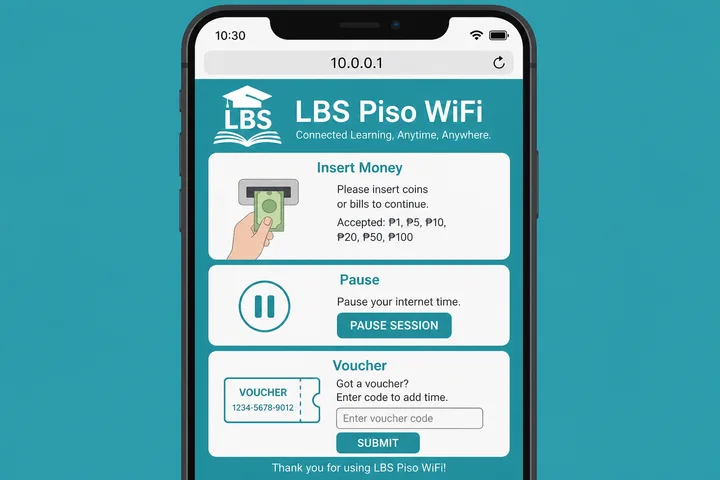
LBS Piso WiFi (also lbs.wifi / lbs wifi) is a Piso WiFi vendo portal brand in the Philippines. Connect to the hotspot, open http://10.0.0.1 for coins, vouchers, or Pause Time — same customer pattern as other local portals.
Key Takeaways
- LBS Piso WiFi (also lbs.wifi / lbs wifi ) is a Piso WiFi vendo portal brand in the Philippines.
- Connect to the hotspot, open http://10.0.0.1 for coins, vouchers, or Pause Time — same customer pattern as other local portals.
- This hub covers LBS login, pause, portal use, and how it differs from LPB — then links to deep guides so you do not need duplicate doorway pages.
- Quick path: WiFi connected → mobile data OFF → http://10.0.0.1 → pay or Pause → owners: admin path on sticker.
This hub covers LBS login, pause, portal use, and how it differs from LPB — then links to deep guides so you do not need duplicate doorway pages.
Quick path: WiFi connected → mobile data OFF → http://10.0.0.1 → pay or Pause → owners: admin path on sticker.
On this page: What is LBS · Login / portal · Pause time · Owner admin · Name variants · vs LPB · FAQ
What Is LBS Piso WiFi?
LBS Piso WiFi is portal software/branding on many coin-operated WiFi vendos. Searchers also type lbs piso wifi, lbs.wifi, lbs wifi, and lbs.wifi 10.0.0.1 — same entity.
You connect to an SSID often labeled LBS or Piso WiFi, open the captive portal (almost always http://10.0.0.1), pay with coins or a voucher, then browse. Pause Time freezes remaining minutes when the owner enabled it.
- Category: Piso WiFi (service type)
- Brand/platform: LBS
- Gateway: usually
10.0.0.1 - Related brand hub: LPB Piso WiFi (different entity)
LBS Piso WiFi Login at 10.0.0.1
Customer login means opening the user portal — not Facebook or Gmail. Type http://10.0.0.1 in the browser address bar while connected to the LBS hotspot.
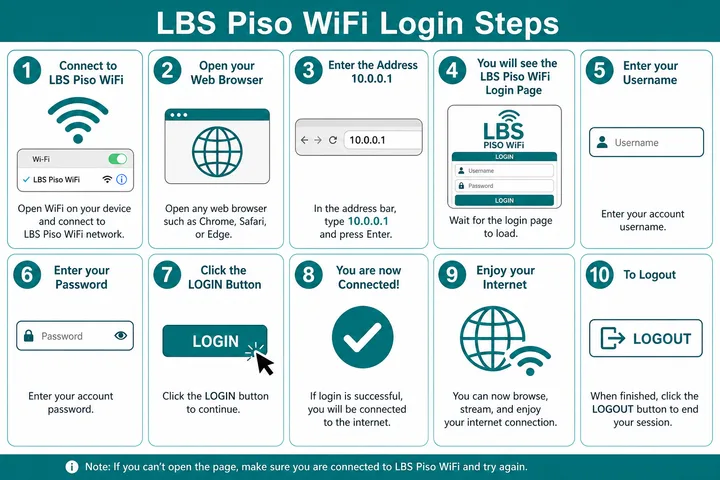
- Connect to the LBS / Piso WiFi SSID (often open — no WiFi password).
- Turn mobile data OFF and disable Smart Network Switch.
- Open Chrome, Safari, or any browser.
- Type
http://10.0.0.1in the address bar (not Google search). Usehttp://, not https. - Choose Insert Money (coins) or enter a voucher code.
- Browse until time ends — or pause remaining minutes.
| Intent | URL | Credentials |
|---|---|---|
| Customer portal | http://10.0.0.1 | None — coins / voucher |
| Owner admin | Admin path on device / sticker | Printed defaults (change after setup) |
| Session status | http://10.0.0.1/status (many builds) | Active session device |
Deeper gateway, typos, and admin paths: 10.0.0.1 login guide.
LBS Piso WiFi Pause Time
LBS piso wifi pause time: on an active paid session, open http://10.0.0.1 and tap Pause Time. The timer freezes; tap Resume on the same device when you return.
- Stay connected to the LBS hotspot; mobile data off.
- Open
http://10.0.0.1— you must already have paid time. - Tap Pause Time / Pause.
- Later: same phone/laptop → same SSID → portal → Resume.
If the Pause button is missing, the owner has not enabled it in admin. Brand-specific answer above; full Chrome/Android/iPhone troubleshooting:
LBS Owner Admin
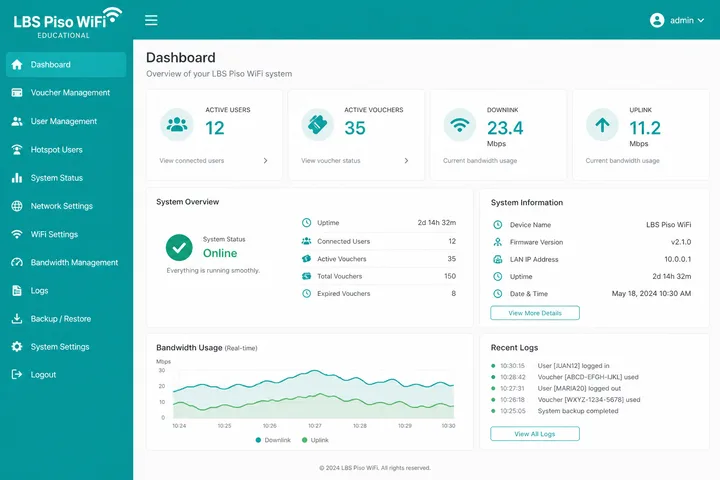
Owner credentials vary by LBS build and installer. Check the sticker on the controller or the paperwork that shipped with the vendo.
- Admin password ≠ WiFi join password.
- Change defaults after install.
- Rates, pause enable, and vouchers live in admin — see Piso WiFi machine for the owner stack.
- Reset overview: 10.0.0.1 password reset.
LBS Name and Search Variants
| Typed / searched | Means |
|---|---|
| lbs.wifi / lbs wifi | LBS Piso WiFi brand |
| lbs.wifi 10.0.0.1 | LBS portal at 10.0.0.1 |
| 10.0.0.1 lbs piso wifi | Same portal + brand |
| lbs piso wifi pause time | Pause on LBS portal |
| lbs vs lpb piso wifi | Brand comparison intent |
LBS vs LPB Piso WiFi
| LBS | LPB | |
|---|---|---|
| What it is | Portal brand | Portal brand |
| User portal | Usually 10.0.0.1 | Usually 10.0.0.1 |
| Pause | Portal Pause Time if enabled | Same pattern |
| Default admin | Sticker / installer | Often admin / 123456789 |
| Deep page | This page | LPB guide |
If you are unsure which brand the shop uses, look at the portal logo/title on 10.0.0.1 or the sticker on the vendo. Category hub: What is Piso WiFi.
LBS Identification: Do Not Assume It Means LPB
For a different controller architecture entirely, compare JuanFi. If the hotspot is community-run rather than privately owned, the operator rules in WiFi ng Bayan may apply instead. Owner-side cost and pricing planning is covered in Piso WiFi business, with package math in the free tools hub.
LBS and LPB are visually similar letter sequences but should be treated as separate labels unless the machine’s portal or owner documentation explicitly connects them. A shared private IP such as 10.0.0.1 only shows that both installations chose the same local address; it does not prove common firmware, ownership or credentials.
LBS-only search intents this page owns: lbs.wifi, lbs wifi login, lbs.wifi 10.0.0.1, and sticker wording that spells L-B-S. If the captive portal header, printed logo, or owner paperwork clearly shows LPB / lpb.wifi instead, leave this page and use the LPB Piso WiFi guide. Do not copy rates, voucher formats, or admin passwords across brands.
- Customer checklist for LBS: confirm SSID/portal label → pay on the LBS screen → use Pause only if that LBS build shows the button.
- Owner checklist for LBS: photograph the controller sticker, change default admin credentials, and record the actual admin path before changing rates.
- Not covered here: LPB dashboard variants such as lpb.wifi hostnames or 10.5.50.1 status pages — those belong on the LPB page.
If a machine was rebranded, refurbished, or flashed with another controller, the SSID name can lie. Trust the live portal chrome and sticker text over neighborhood nicknames. When evidence conflicts, treat the identity as Confirm on device rather than forcing an LBS or LPB label.
- Check the portal footer, login title, controller label and installer documentation for the exact product name.
- Confirm the admin route and credentials locally; never try an LPB default merely because the SSID contains “LBS.”
- Record firmware/version details before updating, resetting or replacing storage.
- Keep generic pause troubleshooting in the Pause Time guide; LBS-specific menus vary by installation.
Sources, Scope, and Corrections
Claim basis: Login addresses and menu paths are common defaults, not universal settings. Confirm them on the device label, portal, official documentation, or provider support because firmware and owner configuration can differ. See our Editorial Policy for claim labels and source priorities.
Independence: 10001ip.co is not affiliated with, sponsored by, or an official support channel for the brand, ISP, or platform discussed on this page.
Found a mismatch? Send the page URL and privacy-safe evidence using the correction process. This block does not claim a hands-on test or a fact-review date.
Related Guides
- Piso WiFi guide — Understand the portal, sessions, rates and owner side
- Piso WiFi pause time — Pause and resume a paid session without losing minutes
- Piso WiFi machine — Compare hardware, startup cost and owner requirements
- Piso WiFi rate calculator — Model timer rates, sales and potential income
LBS Piso WiFi FAQ
What Is LBS Piso WiFi?
LBS Piso WiFi is a Philippine Piso WiFi portal/brand used on coin and voucher vendos (also searched as lbs wifi / lbs.wifi). The user portal is usually http://10.0.0.1.
How Do I Log in to LBS Piso WiFi at 10.0.0.1?
Connect to the LBS / Piso WiFi SSID, turn mobile data off, open http://10.0.0.1 in the browser address bar, then insert coins or enter a voucher. Owners use the admin path printed on the device.
How Do I Pause LBS Piso WiFi Time?
On an active paid session, open http://10.0.0.1 and tap Pause Time, then Resume on the same device. Full steps: /piso-wifi-pause-time/
Is LBS the Same as LPB Piso WiFi?
No. LBS and LPB are different portal brands. Customer flow is similar (local portal, often 10.0.0.1), but logos, admin menus, and defaults differ. LPB guide: /lpb-piso-wifi/
Ano Ang LBS Piso WiFi?
Isa itong Piso WiFi portal/brand sa Pilipinas. Buksan ang http://10.0.0.1 para magbayad o mag-pause habang naka-connect sa hotspot.
Next Guides
- Pause time — full device-by-device tutorial
- LPB Piso WiFi — similar brand hub
- Piso WiFi — category pillar
- Piso WiFi machine — owner setup
- 10.0.0.1 — gateway, typos, admin paths