
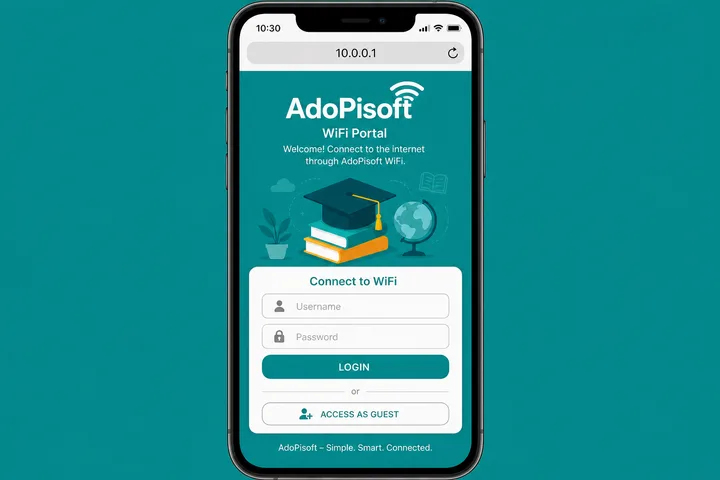
AdoPisoft (also Ado Piso WiFi / AdoPisoFi) is a widely used Piso WiFi portal. Customers open http://10.0.0.1 to pay or pause. Owner defaults are often admin / admin or administrator / admin1234.
Key Takeaways
- AdoPisoft (also Ado Piso WiFi / AdoPisoFi ) is a widely used Piso WiFi portal.
- Customers open http://10.0.0.1 to pay or pause.
- Owner defaults are often admin / admin or administrator / admin1234 .
- This page covers AdoPisoft login, pause (including where owners enable it), admin passwords, and how it fits next to LPB and PisoFi.
This page covers AdoPisoft login, pause (including where owners enable it), admin passwords, and how it fits next to LPB and PisoFi.
Quick path: Connect → mobile data OFF → http://10.0.0.1 → pay / Pause → owners: enable Pause under session controls; admin admin/admin.
On this page: What is AdoPisoft · Login · Pause / enable · Admin password · Name variants · vs LPB / PisoFi · FAQ
What Is AdoPisoft / Ado Piso WiFi?
AdoPisoft is Piso WiFi vendo software also searched as ado piso wifi, AdoPisoFi, and adopisowifi. It runs the captive portal that sells timed internet via coins or vouchers.
Shops like it for relatively simple setup. Users still do the same loop: join SSID → open portal → pay → browse → pause if allowed.
AdoPisoft Login at 10.0.0.1
Customer access is the portal at http://10.0.0.1. Some builds also expose a client dashboard at http://10.0.0.1/client?page=dashboard.
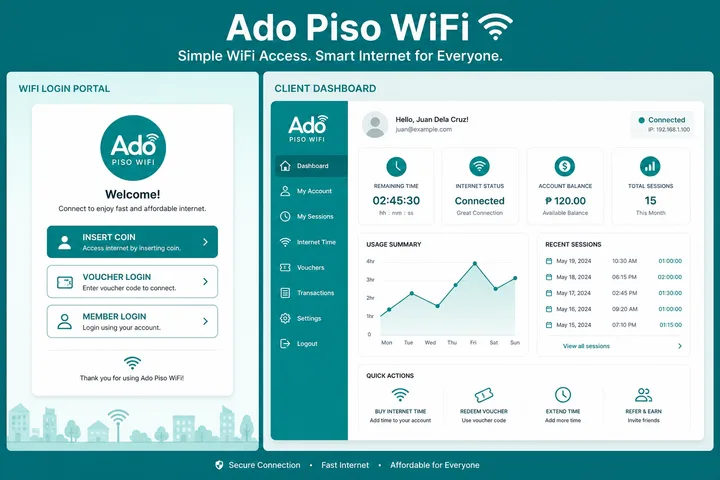
- Connect to the Ado / Piso WiFi SSID.
- Turn mobile data OFF.
- Open
http://10.0.0.1in the address bar. - Insert Money or redeem a voucher.
- Optional: check session via client dashboard path if your build shows it.
| URL | Purpose |
|---|---|
http://10.0.0.1 | Main captive portal |
http://10.0.0.1/client?page=dashboard | Client dashboard (many Ado builds) |
| Admin URL on device | Owner rates, pause enable, vouchers |
More on gateways: 10.0.0.1 guide.
AdoPisoft Pause Time (Use + Enable)
ado piso wifi pause: users open http://10.0.0.1 on an active session and tap Pause Time, then Resume on the same device.
For Users
- Active paid session on this device.
- Portal → Pause Time.
- Return → Resume (same MAC / device).
For Owners — Enable Path
If customers do not see Pause, enable it in admin:
- Log in to the AdoPisoft admin panel.
- Open User portal / session controls (wording varies by version).
- Enable Allow Pause Time (or Pause/Resume).
- Save — then test from a phone with a live session.
Full user troubleshooting: Piso WiFi pause time.
AdoPisoft Default Admin Password
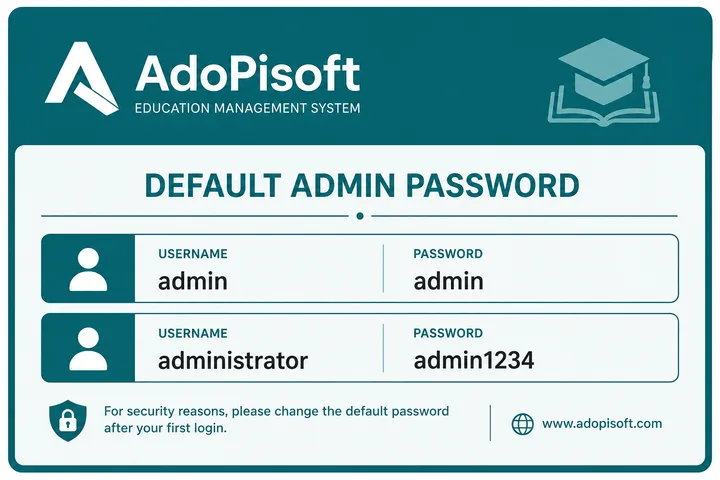
| Build | Username | Password |
|---|---|---|
| Common / older | admin | admin |
| Newer builds (often) | administrator | admin1234 |
- Change defaults after install.
- Admin ≠ WiFi join password.
- Reset overview: password reset.
AdoPisoft Search Variants
| Typed | Means |
|---|---|
| adopisoft | Platform name |
| ado piso wifi | Spoken brand form |
| AdoPisoFi / adopisofi | Alternate spellings |
| ado piso wifi 10.0.0.1 pause | Pause intent on Ado |
| alvarado piso wifi | Related/misspelled brand searches sometimes mapped here |
AdoPisoft vs LPB vs PisoFi
| AdoPisoft | LPB | PisoFi | |
|---|---|---|---|
| Portal | 10.0.0.1 | 10.0.0.1 | 10.0.0.1 / portal.pisofi.com |
| Default admin | admin/admin or administrator/admin1234 | admin/123456789 | administrator/admin12345 |
| Guide | This page | LPB | PisoFi |
AdoPisoft-specific Portal Attributes
When comparing controllers, check what each one exposes to the owner rather than the marketing name: JuanFi and LBS Piso WiFi organise admin differently. Operating cost and pricing decisions sit in Piso WiFi business, with package math in the free tools hub.
AdoPisoft is identified by its own controller interface and client dashboard conventions, not merely by the generic 10.0.0.1 address. Some installations expose a client route such as /client?page=dashboard for time, connection or session controls, while owners work in a separate administrative area. Treat the visible product name, route and installed version together when identifying it.
- Client dashboard and owner admin are different permission levels even when hosted on the same private gateway.
- Rates, voucher profiles, splash-page text and session options can be customized by the operator.
- A route copied from another AdoPisoft build may redirect or fail after firmware changes; start at the portal home.
- For pause mechanics and device troubleshooting, use the dedicated Pause Time guide instead of assuming every AdoPisoft menu is identical.
Sources, Scope, and Corrections
Claim basis: Login addresses and menu paths are common defaults, not universal settings. Confirm them on the device label, portal, official documentation, or provider support because firmware and owner configuration can differ. See our Editorial Policy for claim labels and source priorities.
Independence: 10001ip.co is not affiliated with, sponsored by, or an official support channel for the brand, ISP, or platform discussed on this page.
Found a mismatch? Send the page URL and privacy-safe evidence using the correction process. This block does not claim a hands-on test or a fact-review date.
Related Guides
- Piso WiFi guide — Understand the portal, sessions, rates and owner side
- Piso WiFi pause time — Pause and resume a paid session without losing minutes
- Piso WiFi machine — Compare hardware, startup cost and owner requirements
- Piso WiFi rate calculator — Model timer rates, sales and potential income
AdoPisoft FAQ
What Is AdoPisoft?
AdoPisoft (also Ado Piso WiFi / AdoPisoFi) is a popular Piso WiFi portal platform in the Philippines. The user portal is usually http://10.0.0.1.
What Is the AdoPisoft Admin Password?
Common defaults are admin / admin, or on newer builds administrator / admin1234. Check the sticker on the device.
How Do I Log in to Ado Piso WiFi?
Connect to the hotspot, turn mobile data off, open http://10.0.0.1, then insert coins or enter a voucher. Owners use the admin panel with their credentials.
How Do I Enable or Use Pause on AdoPisoft?
Users: open 10.0.0.1 on an active session and tap Pause Time. Owners: enable Allow Pause Time under user portal / session controls, then save. Full user steps: /piso-wifi-pause-time/
What Is 10.0.0.1/client?page=dashboard on AdoPisoft?
That path is a client dashboard URL used on some AdoPisoft builds for session status. The main captive portal remains http://10.0.0.1.