
Globe At Home / Globe Fiber / GFiber admin: join your home Globe WiFi, then open http://192.168.1.1 and sign in with sticker credentials — or use the GlobeOne / GFiber app for basic WiFi changes. This is not the Piso 10.0.0.1 portal.
Key Takeaways
- Globe At Home / Globe Fiber / GFiber admin: join your home Globe WiFi, then open http://192.168.1.1 and sign in with sticker credentials — or use the GlobeOne / GFiber app for basic WiFi changes.
- This is not the Piso 10.0.0.1 portal.
- Below: browser login steps, app vs web, sticker passwords, and how to avoid the 10.0.0.1 mix-up.
- If 192.168.1.1 fails, read the gateway from phone WiFi details or run the gateway checker .
Below: browser login steps, app vs web, sticker passwords, and how to avoid the 10.0.0.1 mix-up.
On this page: Browser gateway login · App vs browser · Sticker credentials · vs 10.0.0.1 · Troubleshooting · FAQ
Globe At Home / GFiber Gateway Login (Browser)
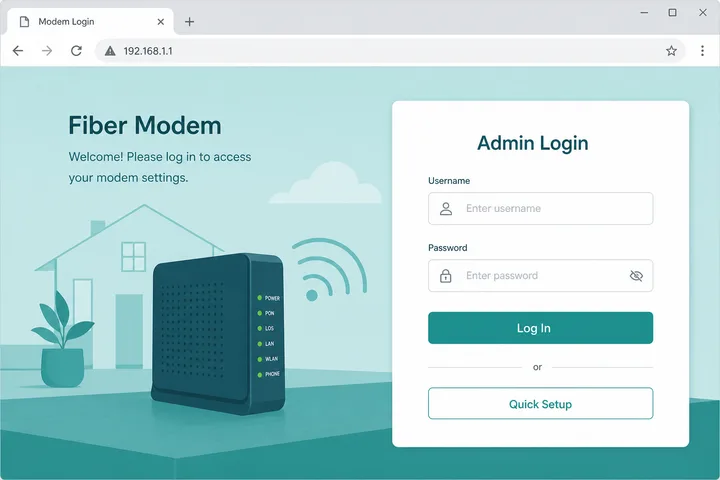
- Connect to your Globe At Home or GFiber SSID.
- Turn mobile data OFF.
- Type
http://192.168.1.1in the browser address bar. - Enter username and password from the modem sticker.
- Open Wireless / WiFi settings to change SSID or WiFi key; save and reconnect devices.
If 192.168.1.1 fails, read the gateway from phone WiFi details or run the gateway checker. Overview: 192.168.1.1.
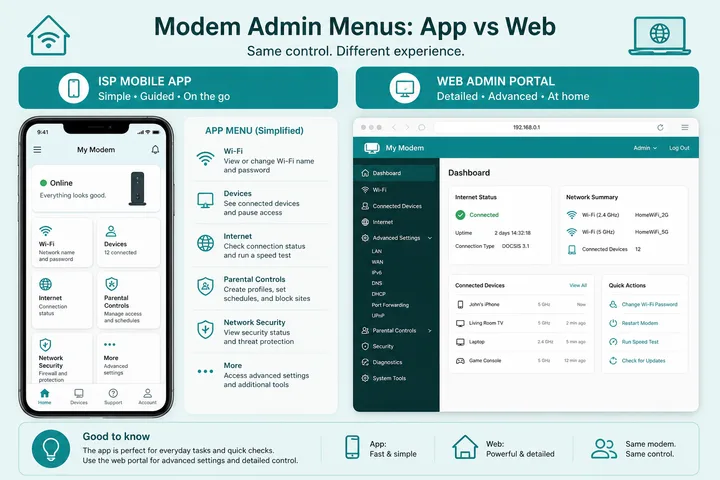
GlobeOne / GFiber App vs Browser Admin
| Task | App (GlobeOne / GFiber) | Browser (192.168.1.1) |
|---|---|---|
| Rename WiFi / change WiFi password | Often yes | Yes |
| View plan / billing / tickets | Yes | No |
| Advanced LAN / DHCP / port options | Limited / none | Yes (model-dependent) |
| Works without local WiFi | Account features online | Needs home LAN |
Use the app for everyday WiFi renames when it works. Use the local browser admin when you need deeper modem settings or the app cannot reach the device.
Sticker Credentials on Globe Fiber Modems
- Look on the bottom/back of the ONT or WiFi router for Username, Password, SSID, and WiFi Key.
- Admin login and WiFi join password are different fields — do not mix them.
- If a previous installer changed admin, sticker defaults may fail until reset.
- After first successful login, change the admin password if the UI offers it.
| Credential | Used for |
|---|---|
| Admin username/password | Opening 192.168.1.1 settings |
| WiFi SSID + WiFi key | Connecting phones and laptops |
| Globe account / app login | Billing, support, some remote WiFi tools |
Globe Home Admin vs 10.0.0.1
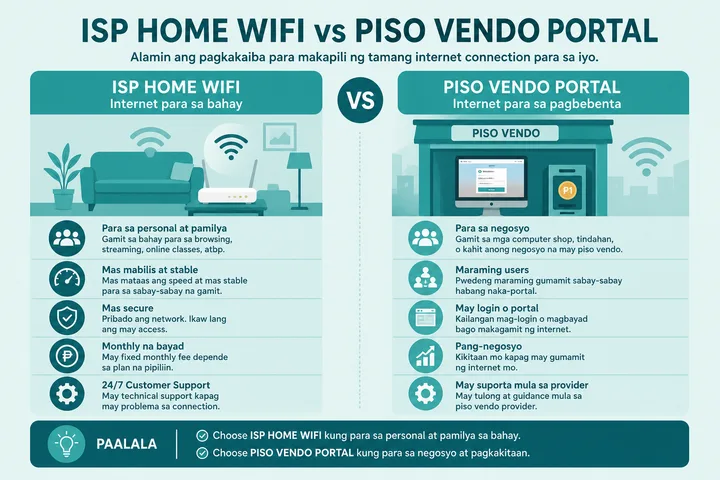
Not the same network: Globe At Home / GFiber admin is typically 192.168.1.1. 10.0.0.1 usually means you are on a Piso WiFi machine. If you see Insert Money, leave that hotspot and reconnect to your Globe SSID.
Confirm the gateway: gateway checker · IP guide: 192.168.1.1.
Cannot Open Globe At Home Admin
| Symptom | Fix |
|---|---|
| Blank / timeout | Data off; correct Globe SSID; http://192.168.1.1 |
| Wrong password | Exact sticker; try app WiFi tools; prior change |
| Opens coin portal | On Piso WiFi — switch to Globe home SSID |
| App works, browser fails | Confirm local IP via WiFi details / gateway checker |
| After outage | Wait for ONT lights stable (2–5 min), retry |
Gateway, App and Sticker Disambiguation
Hardware supplied under this plan varies, so the vendor guide is often the faster route: see Huawei router login or TP-Link router login. If you cannot reach the page at all, what is an IP address explains why a private gateway never resolves over mobile data.
Globe At Home and GFiber customers may have different ONT/router models, mesh equipment and account-management options. The GlobeOne app manages supported service/account tasks; a browser gateway manages whatever local settings the installed device exposes. They are related to the same connection but are not interchangeable login screens.
- Read the exact model and printed management details before trying any address.
- The SSID and WiFi key are not necessarily browser-admin credentials.
- A connected mesh satellite may not expose the main gateway’s admin page.
- Use the gateway shown in the current WiFi connection, then consult official Globe support or model documentation if sticker details no longer work.
Independent-site disclaimer: 10001IP is not affiliated with, endorsed by, or an official support channel for Globe Telecom, Globe At Home or GFiber.
Sources, Scope, and Corrections
Claim basis: Login addresses and menu paths are common defaults, not universal settings. Confirm them on the device label, portal, official documentation, or provider support because firmware and owner configuration can differ. See our Editorial Policy for claim labels and source priorities.
Independence: 10001ip.co is not affiliated with, sponsored by, or an official support channel for the brand, ISP, or platform discussed on this page.
Found a mismatch? Send the page URL and privacy-safe evidence using the correction process. This block does not claim a hands-on test or a fact-review date.
Related Guides
- Router IP address list — Compare common and uncommon private gateways
- Default gateway guide — Find the router address used by your device
- Gateway checker — Find the correct local router or portal address
- 192.168.100.1 login — Access fibre ONTs and cable modems
FAQ — Globe At Home / GFiber Admin
How Do I Open Globe At Home / GFiber Admin?
Connect to the Globe At Home or Globe Fiber WiFi, turn mobile data off, then open http://192.168.1.1 in a browser. Log in with the sticker username and password. Some accounts also manage WiFi from the GlobeOne / GFiber app.
Is Globe Fiber Admin the Same as the Globe App?
Partly. The app can rename WiFi, view status, and handle account/billing tasks. Full modem menus (advanced LAN, some security options) still use the browser at the local gateway, usually 192.168.1.1.
What Is the Default Globe At Home Router Password?
Use the password printed on the modem sticker. Common patterns include admin / admin or a unique printed key. Do not assume one password for every Globe kit.
Does Globe At Home Use 10.0.0.1?
Usually no. Home Globe Fiber / GFiber gateways are typically 192.168.1.1-class. 10.0.0.1 is the common Piso WiFi portal address.
Globe Admin Page Will Not Load — What Should I Do?
Confirm you are on the Globe home SSID, disable mobile data, try http://192.168.1.1, try sticker creds, use the gateway checker, or open WiFi settings in the GlobeOne / GFiber app if browser login fails.
Related: 192.168.1.1 · Gateway checker · 10.0.0.1 (Piso portal)