
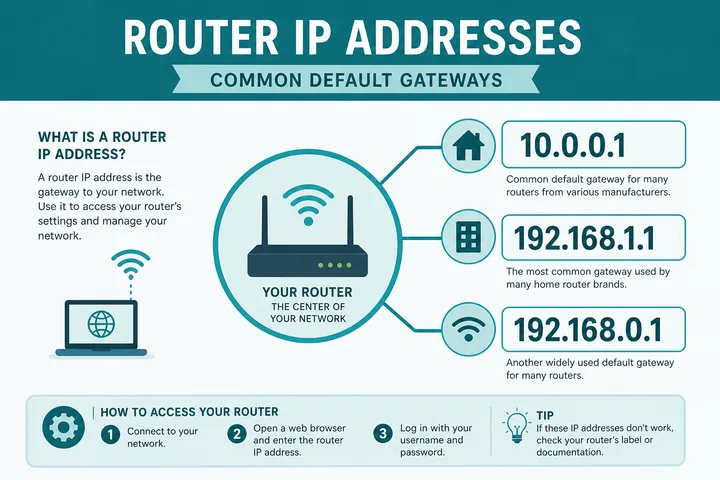
Router IP addresses (WiFi login portal IPs) are private gateways like 192.168.1.1, 192.168.0.1, and 10.0.0.1. Type yours in the browser address bar while on that network — or use the table below to jump to the right guide.
Key Takeaways
- Router IP addresses are private gateways for admin / portal login — use the one your network assigned.
- Invalid strings like
10.1.1.1.0,192.168.1001, and192168254254map to real four-octet pages above. - Confirm with sticker, OS gateway, or the gateway checker.
- Related: 192.168.1.1 · 192.168.0.1 · 10.0.0.1 · Tenda · Piso WiFi
This hub maps common admin gateways, absorbs invalid searches like 10.1.1.1.0, 192.168.81, 192.168.1001, and 192168254254, and shows how to find your real gateway with the gateway checker.
On this page: Gateway comparison · How to find yours · Invalid / rare typos · Piso vs home router · FAQ
Common Router IP Addresses (Comparison)
Pick the address your sticker or WiFi details show. Each row links to a dedicated login guide on 10001ip.
| Gateway | Typical devices | Guide |
|---|---|---|
| 10.0.0.1 | Some routers + many Piso WiFi portals | 10.0.0.1 · Piso WiFi |
| 192.168.1.1 | Most home / ISP routers (PLDT, Globe, Converge often) | 192.168.1.1 login |
| 192.168.0.1 | Many home routers; common Tenda default | 192.168.0.1 · Tenda login |
| 192.168.254.254 | Some ISP modems / CPE | 192.168.254.254 guide |
| 192.168.100.1 | Huawei ONT / fiber modem admin | 192.168.100.1 guide |
| 10.10.10.1 | Some routers + custom / hotspot portals | 10.10.10.1 guide |
| 192.168.10.1 | Some home / ISP WiFi routers | 192.168.10.1 guide |
| 192.168.8.1 | Huawei mobile WiFi / 4G CPE | 192.168.8.1 guide |
| 192.168.18.1 | Huawei-class home routers / CPE | 192.168.18.1 guide |
How to Find Your Router IP / WiFi Login Portal
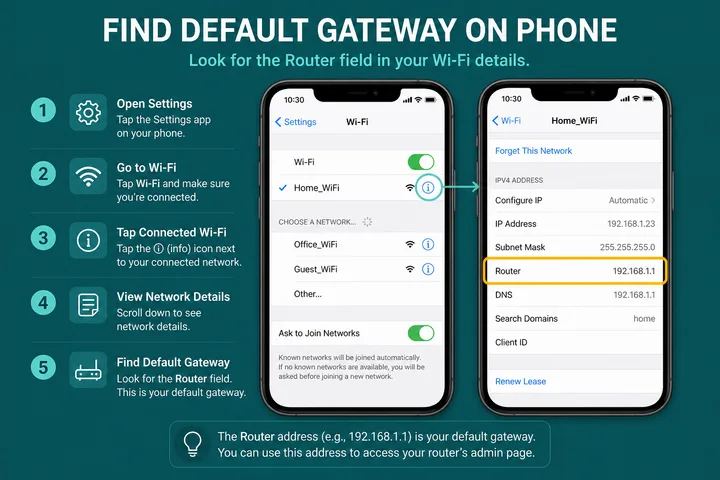
Answer-first: use the sticker, OS gateway, or the checker — do not random-guess every address in the table.
- Read the label on the modem/router/pocket WiFi (often lists Default Gateway or IP).
- On phone: WiFi network details → Gateway / Router.
- On Windows:
ipconfig→ Default Gateway. On Mac: System Settings → Network → Details → TCP/IP. - Or open the gateway checker and follow the on-page steps.
- Type
http://+ that IP in the browser address bar (try http before https).
Invalid and Rare Searches → Correct Pages
Some queries are incomplete, smashed, or not valid IPv4. Map them to a real four-octet gateway:
| You typed / searched | Valid meaning | Go to |
|---|---|---|
| 10.1.1.1.0 (too many parts) | Not a valid IPv4 — often meant 10.0.0.1 | 10.0.0.1 |
| 10.1.1.1 | Valid private IP but uncommon as default gateway; confirm yours | Gateway checker · often 10.0.0.1 |
| 192.168.81 | Incomplete — usually 192.168.8.1 or 192.168.81.x | 192.168.8.1 |
| 192.168.1001 | Invalid octet — usually 192.168.100.1 | 192.168.100.1 |
| 192168254254 | Smashed dots — 192.168.254.254 | 192.168.254.254 |
| 192.168.o.1 / 192.168.l.1 | Letter O or L → digit 0 or 1 | 192.168.0.1 · 192.168.1.1 |
Piso WiFi Portals vs Home Router Admin
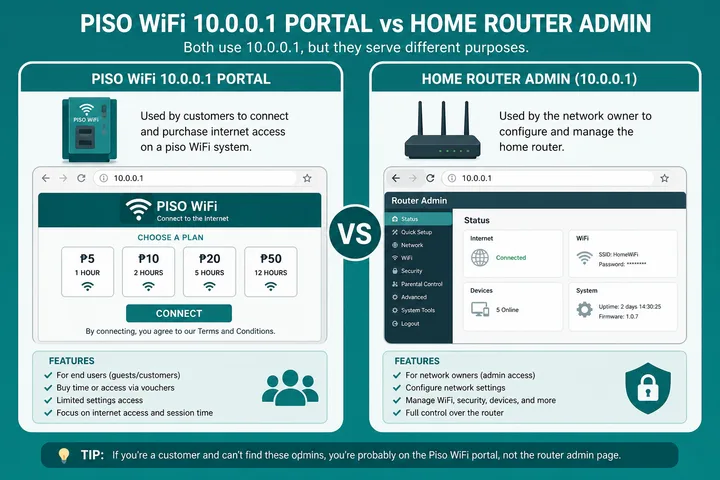
Coin WiFi / hotspot portals and home ISP routers both use private IPs — but not the same job.
| Need | Typical IP | Start here |
|---|---|---|
| Piso pause / voucher / coin portal | Often 10.0.0.1 (sometimes 10.10.10.1) | Piso WiFi · 10.0.0.1 |
| Change home WiFi password | Often 192.168.1.1 or 192.168.0.1 | 192.168.1.1 · 192.168.0.1 |
| Tenda admin | Often 192.168.0.1 | Tenda router login |
| Huawei pocket WiFi / 4G CPE | Often 192.168.8.1 | 192.168.8.1 |
Rare and Platform-specific Mappings: Confirm First
Once you have narrowed the address, switch to the brand guide for menu paths and credential caveats: TP-Link and Huawei cover the two most common families in the Philippines. If the numbering itself is the blocker, read what is an IP address, or work through the free tools hub.
The following are discovery hints, not dedicated login doorways. A private IP can be reused by unrelated networks, and a path can change with firmware. Connect to the intended network, read its assigned gateway, and confirm branding before entering credentials.
| Address or path | Reported association / possible role | How to treat it |
|---|---|---|
10.5.50.1 | Alternate local portal or controller mapping in some hotspot setups | Confirm from the connected network; not a universal LPB address |
10.10.1.1 | Private gateway used by some routers or managed networks | Check the gateway field and device label first |
192.168.31.1 | Common local management range on some Xiaomi-family router configurations | Model and firmware can differ; use the printed/official setup guidance |
| Ardcom status path | A named status/dashboard route reported on certain hotspot builds | Start from portal home; do not assume a universal URL or credential |
These rows are intentionally kept in the comparison page rather than expanded into thin address pages. If the observed gateway is different, follow the observed gateway and the equipment documentation.
Sources, Scope, and Corrections
Claim basis: Standards-based networking behavior is treated as Protocol fact; addresses, redirects, labels, and menus are marked as common or device-dependent where they can vary. See our Editorial Policy for claim labels and source priorities.
Found a mismatch? Send the page URL and privacy-safe evidence using the correction process. This block does not claim a hands-on test or a fact-review date.
Related Guides
- Default gateway guide — Find the router address used by your device
- Gateway checker — Find the correct local router or portal address
- What is an IP address? — Understand IPv4, IPv6, public and private addresses
- 192.168.1.1 login — Open the common home-router admin gateway
FAQ
What Are Router IP Addresses?
Router IP addresses (default gateways) are private IPv4 addresses used to open your modem or WiFi admin login — for example 192.168.1.1 or 10.0.0.1. They only work on that local network.
How Do I Find My Router IP / WiFi Login Portal?
Check the sticker on the device, view WiFi or Ethernet gateway details on your phone or PC, or use the free gateway checker tool on this site.
Is 10.1.1.1.0 a Real Router IP?
No. That string has too many octets (and is not a valid IPv4 address). Most people mean 10.0.0.1 or another four-octet private gateway — confirm with the gateway checker.
What About 192.168.81 or 192168254254?
Those are incomplete or smashed typings. 192.168.81 needs a fourth octet (often .1). 192168254254 usually means 192.168.254.254. Use dotted four-octet form.
Is 192.168.1001 a Valid Gateway?
No. Octets must be 0–255. People often mean 192.168.100.1 (Huawei ONT) or 192.168.1.1.