
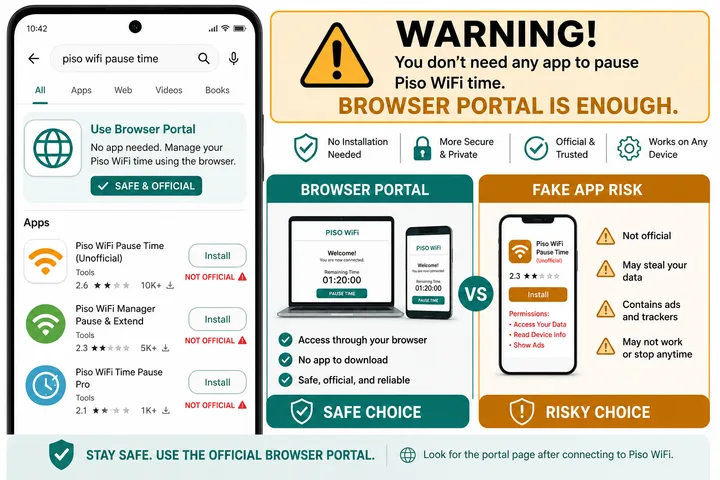
Piso WiFi pause time app is usually unnecessary. Pause works in your phone browser at http://10.0.0.1 — no APK required. Prefer the portal over unknown “pause time app download” files.
Key Takeaways
- Piso WiFi pause time app is usually unnecessary.
- Pause works in your phone browser at http://10.0.0.1 — no APK required.
- Prefer the portal over unknown “pause time app download” files.
- This page covers Android / iPhone app searches, why Chrome is enough, fake download risks, and when a real operator companion app might exist versus random APKs.
This page covers Android / iPhone app searches, why Chrome is enough, fake download risks, and when a real operator companion app might exist versus random APKs.
On this page: Do you need an app? · Android · iPhone · Download risks · App not working · FAQ
Do You Need a Piso WiFi Pause Time App?
No for most users. There is usually no official, universal Piso WiFi pause app. Pause Time is a button on the local captive portal, and the browser portal is effectively the app. Searches like piso wifi 10.0.0.1 pause time app and pause time app download usually mean people want an easier shortcut — not a separate product requirement.
The pause command is processed by the hotspot controller, not by software installed on your phone. An Android APK or iPhone app cannot add Pause when the machine owner has disabled it. Connect to the correct Piso WiFi network first, open http://10.0.0.1, and use the session controls shown there.
| Option | Works? | Risk |
|---|---|---|
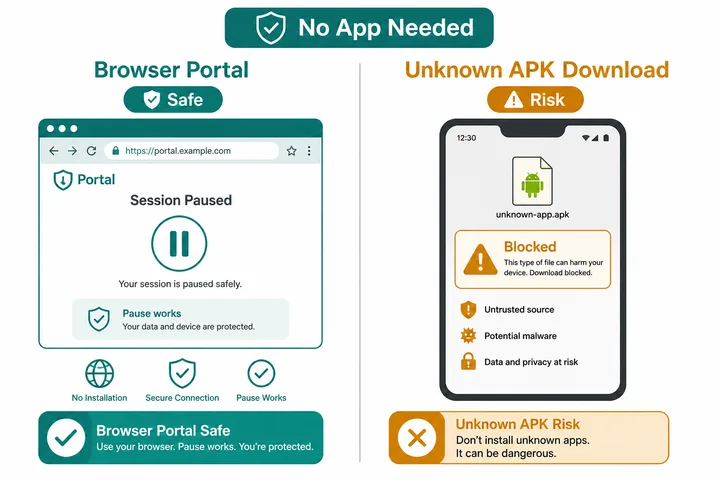
| Chrome / Safari → http://10.0.0.1 → Pause | Yes (if owner enabled pause) | Low |
| Bookmark the portal | Yes — fastest “app-like” shortcut | Low |
| Official store / operator app (rare) | Only if your operator publishes one | Low if from Play Store / operator |
| Random APK from blogs / Telegram | Often fake or unrelated | High (malware / phishing) |
Android: Pause without Installing an App
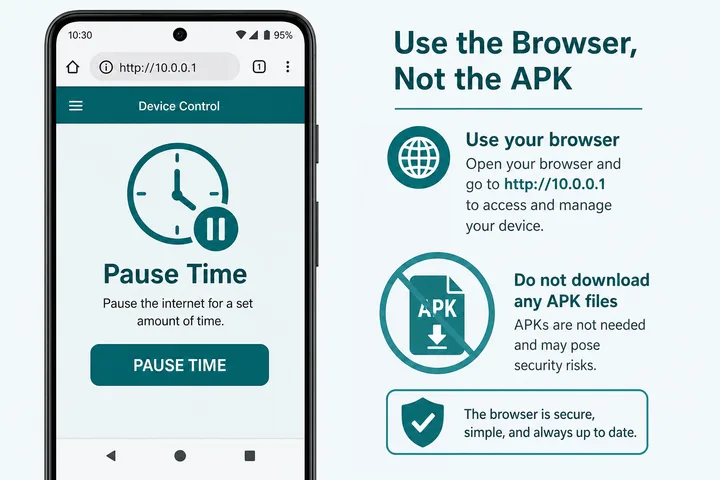
On Android, use Chrome (or any browser) on the Piso network. You do not need a “piso wifi pause time android” APK.
- Connect to the exact Piso WiFi SSID used for your paid session.
- Turn mobile data off temporarily. Also disable any setting that automatically switches away from WiFi with no internet.
- Open Chrome and type
http://10.0.0.1directly in the address bar. Usehttp, nothttps, and do not enter it as a Google search. - If Android shows a “Sign in to WiFi network” notification, tap it to open the captive portal.
- Wait for your active timer to appear, then tap Pause Time once. Confirm that the portal says paused before disconnecting.
- Add a Home screen shortcut or bookmark for one-tap return.
Samsung and Android Auto-switch Settings
Samsung phones may leave the hotspot because it has no internet before login. In Settings → Connections → Wi-Fi → Intelligent Wi-Fi, temporarily turn off Switch to mobile data. Names vary by Android version: look for Adaptive Connectivity, WiFi Assistant, Avoid bad WiFi, or Auto switch to mobile network. Re-enable your preferred setting after pausing.
Make a Home-screen Shortcut (App-like)
- Chrome: open the portal → menu ⋮ → Add to Home screen / Install app (if offered).
- Samsung Internet: similar Add page to → Home screen.
- Keep Use device MAC for that WiFi so Resume still matches your session.
This shortcut is the safest answer to “pause time app download.” It opens the real local page with an app-like icon but installs no unknown code. The shortcut only works while connected to that Piso WiFi network.
iPhone: No App Store Download Needed
For piso wifi 10.0.0.1 pause time app iPhone, use Safari → http://10.0.0.1 → Pause / Resume. No App Store download is normally required. If iOS displays a captive-portal “Sign In” sheet or notification after joining the network, open it and wait for the session page.
- Open Settings → Wi-Fi and join the Piso WiFi network.
- Tap the network’s ⓘ button. Keep Auto-Join on if you want the iPhone to reconnect for Resume; turn it off if your phone keeps joining that hotspot accidentally.
- Temporarily turn cellular data off if Safari bypasses the local portal.
- Open Safari and enter
http://10.0.0.1. Tap Pause Time and verify the paused status. - For an app-like icon, tap Share → Add to Home Screen.
Do not use Private Relay, a VPN, or a changing Private Wi-Fi Address while troubleshooting. A changed device address can make the controller treat the iPhone as a different user and hide the existing session.
“Pause Time App Download” Risks
Unknown APKs promising free pause, free vouchers, unlimited time, or “force pause” cannot override a vendo that disabled Pause. Pause is controlled on the machine. A download that claims otherwise may be an unrelated app, an advertising trap, a phishing screen, or malware.
- Do not install APKs from random SEO blogs or chat groups.
- Do not grant Accessibility / Device Admin to “pause unlocker” apps.
- Do not enter payment details, portal credentials, or one-time codes into a third-party app.
- Do not disable Play Protect merely to install a file advertised as “Piso WiFi Pause APK 2026.” A recent year in the filename proves nothing.
- If Pause is missing, ask the store owner — only admin settings enable it.
A legitimate operator-specific app should be linked by the hotspot owner, identify the same operator as its publisher, and come from Google Play or the App Store. Even then, it only works with that operator’s system. The default safe choice remains the local browser portal.
Pause Time App Not Working
Rather than installing an unofficial APK, work through the browser checklist in the pause time helper. If the session is already unusable, Piso WiFi logout explains how to release the slot properly, and the free tools hub collects the remaining browser-based aids.
If a third-party app fails, switch to the browser portal. If the portal Pause fails, the issue is session/network/owner settings — not a missing APK.
| Problem | Likely cause | What to do |
|---|---|---|
| 10.0.0.1 will not open | Wrong network, mobile data, VPN, or HTTPS | Join the Piso SSID, disable data/VPN, and type http://10.0.0.1 |
| Phone switches to cellular | Android/Samsung auto-switch | Temporarily disable Switch to mobile data or WiFi Assistant |
| Pause button is missing | No active session or owner disabled pause | Confirm the timer is active; ask the operator if Pause is supported |
| Tap Pause but time still falls | Request did not reach controller | Stay connected, reload once, tap Pause once, and check for a paused confirmation |
| Paused session is not found | Different SSID or phone MAC address | Reconnect to the original network and restore the device/private address used when paying |
| Captive portal closes immediately | Phone moved to mobile data | Turn mobile data off and open the address in Chrome or Safari |
| Third-party app crashes | Unofficial or incompatible APK | Uninstall it and use the browser; see the full pause guide |
Samsung, Xiaomi and Oppo Settings to Check
Keep the phone connected when Android warns that the Piso WiFi has no internet. The warning is expected before login and while a session is paused. Automatic cellular switching sends the browser away from the local portal.
| Phone family | Setting name may include | Temporary fix |
|---|---|---|
| Samsung Galaxy | Intelligent Wi-Fi / Switch to mobile data | Turn switching off and choose to stay connected |
| Xiaomi, Redmi or POCO | Wi-Fi Assistant / Select best networks | Disable automatic mobile-data fallback |
| Oppo or Realme | Wi-Fi Assistant / Auto switch to mobile network | Turn fallback off until Pause or Resume finishes |
Names vary by One UI, MIUI/HyperOS and ColorOS version. If the menu is different, simply turn mobile data off, reconnect to the Piso SSID, accept Stay connected, and type http://10.0.0.1 in Chrome.
Pause Time Helper Versus a Downloaded App
The Pause Time Helper is an educational browser checklist: it checks whether you are on the right WiFi, using the portal, and have an active resumable session. It does not install an APK, request phone permissions, create free time or bypass the operator’s settings. A downloaded “force pause” app cannot enable a server-side button that the owner disabled.
Sources, Scope, and Corrections
Claim basis: Network behavior is separated from common portal defaults. Addresses, buttons, rates, credentials, and session behavior can vary by firmware, platform, owner configuration, and device. See our Editorial Policy for claim labels and source priorities.
Found a mismatch? Send the page URL and privacy-safe evidence using the correction process. This block does not claim a hands-on test or a fact-review date.
Related Guides
- Piso WiFi guide — Understand the portal, sessions, rates and owner side
- Piso WiFi pause time — Pause and resume a paid session without losing minutes
- Pause time helper — Estimate whether a paused session is still usable
- Piso WiFi not working — Fix portal, payment and connection problems
FAQ
Is There an Official Piso WiFi Pause Time App?
Most users should use the browser portal. Some operators may publish their own apps — only trust Play Store / App Store listings from that operator.
How Do I Pause on Android without an App?
Chrome → http://10.0.0.1 → Pause Time on an active session.
Can I Download a Pause Time APK Safely?
Avoid random APKs. Bookmark the portal instead.
Why Does Pause Fail on My Samsung Phone?
Samsung may switch from WiFi to mobile data when the Piso network has no internet. Turn off Switch to mobile data under Intelligent Wi-Fi, stay connected to the SSID, and reopen http://10.0.0.1.
Where Is the Official Pause Time App Download?
Most vendos have no app download because Pause is part of the local browser portal. Ask the operator for a verified store link if that specific shop advertises an official app; otherwise use Chrome or Safari.
Why Are Play Store Piso WiFi Pause Apps Unrelated?
Play Store matches names and keywords, but different Piso vendos run different local controllers. A generic app cannot control every machine or enable a server-side Pause feature that the owner disabled.
Related Guides
- Piso WiFi pause time — full pause/resume intent
- Piso WiFi — entity hub
- 10.0.0.1 — portal login