
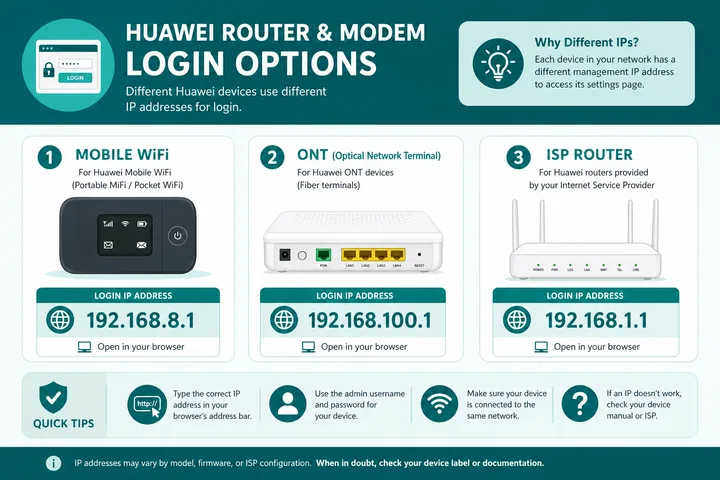
Huawei router login / Huawei modem login: connect to the Huawei WiFi or LAN and open the address printed on the device. Common gateways are http://192.168.8.1 for Mobile WiFi/CPE, http://192.168.100.1 for some ONTs, and http://192.168.1.1 for many ISP units. Use the sticker or ISP-issued credentials; there is no safe universal Huawei password.
Key Takeaways
- Huawei router login / Huawei modem login: connect to the Huawei WiFi or LAN and open the address printed on the device.
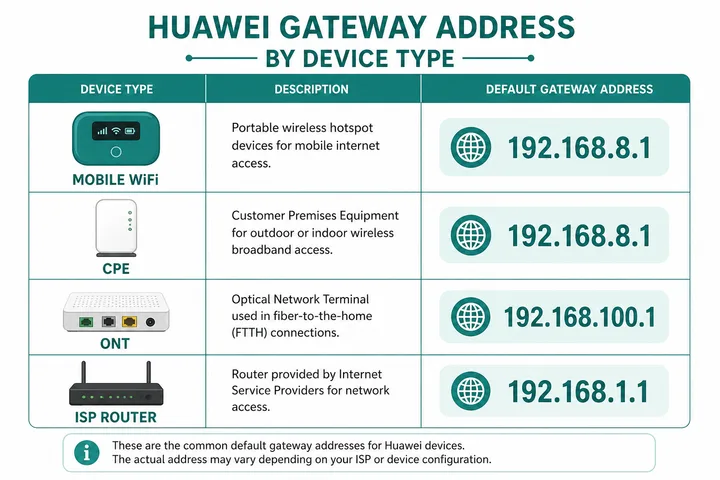
- Common gateways are http://192.168.8.1 for Mobile WiFi/CPE, http://192.168.100.1 for some ONTs, and http://192.168.1.1 for many ISP units.
- Use the sticker or ISP-issued credentials ; there is no safe universal Huawei password.
- Legacy admin / admin works only on some older, unchanged devices.
Legacy admin / admin works only on some older, unchanged devices. Huawei AI Life can manage supported consumer routers, while an ISP fiber ONT may require its browser panel or provider support.
On this page: Login steps · Gateway table · Sticker credentials · Browser vs AI Life · Change WiFi · HG8145V5 · Philippine ISP context · 10.0.0.1 confusion · Not working · After login · FAQ
How to Log in to a Huawei Router or Modem
- Connect to the Huawei device by its WiFi or a LAN cable. Turn mobile data and VPN off.
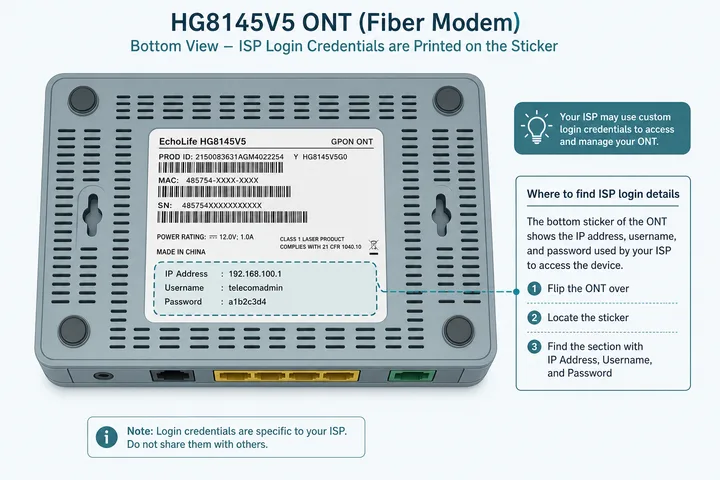
- Read the bottom/back label for the management IP, web address, username, and password.
- Open the printed address in the browser address bar. If the label is unclear, test the device-type addresses below.
- Enter the exact sticker or ISP-issued administrator credentials. Do not start by guessing internet password lists.
- If no common address works, read the active gateway in WiFi/Ethernet details or run the gateway checker.
Internet access is not required to open a local management page, but you must be on the correct LAN. An ISP may restrict advanced ONT accounts even when the basic user login works.
Huawei Login Addresses by Device Type
| Gateway | Common Huawei context | Notes |
|---|---|---|
| 192.168.8.1 | Mobile WiFi, LTE/5G CPE, many consumer cellular routers | Often seen on E-series and B-series devices; verify label |
| 192.168.100.1 | Some fiber ONTs in bridge or provider layouts | Management access can depend on ISP configuration |
| 192.168.1.1 | Many ISP-supplied gateway/ONT combinations | Also used by many non-Huawei brands |
| Active network gateway | Customized or provider-provisioned device | Most reliable after the LAN address has changed |
A model family does not guarantee one address. The label and gateway shown by the connected client are stronger evidence than a generic model list.
Huawei Credentials: Trust the Sticker, Not a Universal Password
| Device state | What to use | Important caveat |
|---|---|---|
| New retail router / Mobile WiFi | Label or first-setup password | Some models make the owner create a password |
| Older unchanged unit | admin / admin may apply | Legacy possibility—not a Huawei-wide rule |
| ISP-supplied ONT | Sticker or provider-issued user account | ISP firmware may use unique credentials and limited permissions |
| Previously configured device | Current owner-set password | Printed default may no longer work |
| HG8145V5 | Device label / specific ISP instructions | Credentials and privilege levels vary by provisioning |
- Admin credentials open settings; the WiFi key only joins the SSID.
- Passwords are case-sensitive. Distinguish zero from O and one from lowercase L.
- Do not factory-reset an ISP ONT casually: internet, voice, and VLAN settings may be lost or require reprovisioning.
- If the ISP intentionally hides advanced settings, use its support channel rather than trying credentials from another network.
Browser Admin vs Huawei AI Life App
| Method | Typical use | Limitations |
|---|---|---|
| Browser at local gateway | Local web settings, status, WLAN and model-specific advanced options | Menus and access depend on firmware and ISP role |
| HUAWEI AI Life | Setup and everyday controls on supported consumer routers | Not every Mobile WiFi, CPE, or ISP ONT is supported |
| ISP account app | Billing, line status, tickets, sometimes WiFi tools | Not the same as full local Huawei admin |
AI Life account sign-in and the router local administrator password are distinct identities. If AI Life does not discover the device, allow local-network permission, remain connected to its WiFi, and use the printed browser gateway.
Change the Huawei SSID and WiFi Password
- Sign in through the confirmed browser gateway, or select a supported router in AI Life.
- Open Wi-Fi, WLAN, My Wi-Fi, or a similarly named menu.
- Edit the SSID for 2.4 GHz and 5 GHz. A combined-band feature may use one name.
- Set a strong WPA2 or WPA3 password; avoid open networks and WEP.
- Save/Apply and wait for the wireless radio to restart.
- Reconnect every device using the new name and password.
On an ISP ONT, some WLAN controls may be read-only or moved into the provider app. Changing SSID/password is normally safe; avoid WAN, VLAN, and optical settings unless the provider gave exact values.
Huawei EchoLife Hg8145v5 Login Context
The Huawei EchoLife HG8145V5 is an optical network terminal commonly supplied and provisioned by ISPs. The hardware model alone does not identify the gateway, username, password, or access level. Providers can change all four in firmware profiles.
| Question | Reliable answer |
|---|---|
| Which IP? | Use the label, ISP guide, or active gateway; 192.168.1.1 and 192.168.100.1 are possible contexts |
| Which username/password? | Use the exact sticker or provider-issued credentials |
| Why are menus missing? | The ISP may expose a limited user role while retaining provisioning controls |
| Should I reset it? | Only with provider guidance or complete reprovisioning details |
Avoid publishing or trying an “exact HG8145V5 super-admin password” without the ISP context. A credential from another provider may be wrong, unsafe, or intentionally disabled.
Huawei Modem Login on Globe, PLDT, and Converge
If the household also runs non-Huawei hardware, the equivalent steps are in TP-Link router login and Tenda router login. For the gateway family used by several ONT builds, see 192.168.18.1, and what is an IP address covers why these addresses stay inside the local network.
Philippine providers deploy multiple hardware brands and firmware profiles. A Huawei logo does not override the ISP-specific setup. Start with the device label, then use the provider guide that matches your subscription.
- Globe At Home admin — browser/app context and sticker-first login
- PLDT admin — common home gateway patterns and modem labels
- Converge admin — ISP fiber login and WiFi changes
- Gateway checker — identify the route your connected device is actually using
If a provider-managed unit offers only a basic account, that may be deliberate. Request changes from the ISP instead of altering fiber WAN, VLAN, TR-069, or voice settings.
Huawei 10.0.0.1 Search Confusion
10.0.0.1 is not a universal Huawei login. A network administrator can assign it to a Huawei LAN, but many Philippine searches lead to a Piso WiFi captive portal instead. Identify what the page does before entering credentials.
| What appears | Likely system | Next step |
|---|---|---|
| Huawei logo and router settings login | Huawei device on a custom 10.0.0.1 LAN | Use its sticker/owner credentials |
| Insert Money, voucher, Pause Time | Piso WiFi captive portal | This is customer access, not Huawei admin |
| No page | Wrong IP, wrong network, or blocked management | Check the active gateway |
| Search results | Address entered into search | Type http://10.0.0.1 in the address bar only if it is your gateway |
Huawei Router Login Not Working: Fixes
| Problem | Check | Fix |
|---|---|---|
| Page times out | Correct Huawei SSID/LAN and active gateway | Turn data/VPN off; use the label or gateway checker |
| 192.168.8.1 fails | Device may be an ONT or ISP gateway | Try its printed address; see 192.168.100.1 / 192.168.1.1 guides |
| Password rejected | Case, sticker field, changed or ISP-managed login | Use exact credentials; contact owner/ISP before reset |
| Privacy/certificate warning | Local self-signed HTTPS certificate | Try http://; proceed only when certain it is your local device |
| AI Life finds nothing | Unsupported device or missing local permission | Allow permission and use browser admin |
| Basic login has few menus | ISP-limited user role | Use provider support for restricted changes |
| Piso page opens | 10.0.0.1 captive portal | Find the Huawei management gateway instead |
What to Do after Huawei Login
- Change any unchanged legacy admin password when the interface permits it.
- Use WPA2-AES or WPA3 with a unique wireless password.
- Install only firmware intended for the exact model, region, and hardware revision; follow ISP policy for managed ONTs.
- Disable remote web management and WPS unless you specifically require them.
- Back up settings before owner-authorized changes.
- Leave optical, WAN, VLAN, VoIP, and provisioning fields unchanged unless you have provider values.
Sources, Scope, and Corrections
Claim basis: Login addresses and menu paths are common defaults, not universal settings. Confirm them on the device label, portal, official documentation, or provider support because firmware and owner configuration can differ. See our Editorial Policy for claim labels and source priorities.
Independence: 10001ip.co is not affiliated with, sponsored by, or an official support channel for the brand, ISP, or platform discussed on this page.
Found a mismatch? Send the page URL and privacy-safe evidence using the correction process. This block does not claim a hands-on test or a fact-review date.
Related Guides
- Router IP address list — Compare common and uncommon private gateways
- Default gateway guide — Find the router address used by your device
- Gateway checker — Find the correct local router or portal address
- 192.168.8.1 login — Access Huawei pocket WiFi and CPE devices
Huawei Router and Modem Login FAQ
What Is the Huawei Router Login IP?
Common Huawei addresses are http://192.168.8.1 for Mobile WiFi and many CPE devices, http://192.168.100.1 for some fiber ONTs, and http://192.168.1.1 for many ISP-supplied units. Check the device label and active gateway because none is universal.
What Is the Huawei Modem Login Password?
Use the username and password printed on the router or ONT label, or credentials supplied by the ISP. Legacy admin/admin applies only to some older or unchanged devices; many units use unique, changed, or provider-managed credentials.
Can I Use the Huawei AI Life App Instead of the Browser?
AI Life supports many consumer Huawei routers for guided setup and everyday WiFi controls, but not every Mobile WiFi, CPE, or ISP ONT exposes all settings there. Browser login at the local gateway remains separate and may offer different controls.
Does Every Huawei Router Use 10.0.0.1?
No. 10.0.0.1 can be a custom LAN address, but it is not Huawei’s universal gateway. In the Philippines it is also strongly associated with Piso WiFi captive portals, so identify the page and check your actual gateway.
What Are the Hg8145v5 Admin Credentials?
HG8145V5 credentials depend on the ISP provisioning profile and device label. Use the printed or provider-issued login. Do not rely on an exact password copied from another ISP because access levels and credentials can differ.
How Do I Change the Huawei WiFi Name and Password?
Log in at the confirmed local gateway or use AI Life on a supported consumer router, open Wi-Fi or WLAN settings, edit the SSID and wireless password, save, and reconnect your devices.