
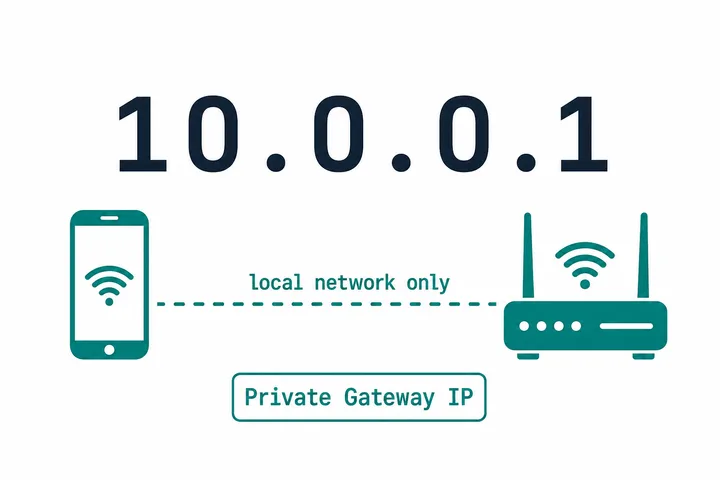
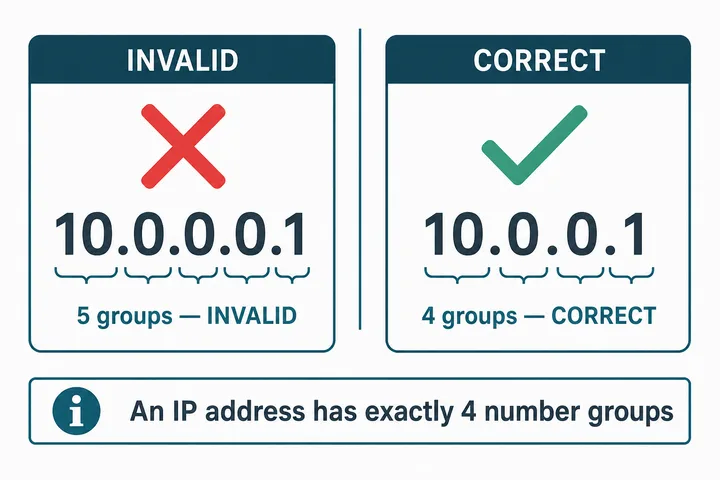
10.0.0.1 is a private IPv4 address used as the default gateway for routers and Piso WiFi vendo machines across the Philippines. Type http://10.0.0.1 in your browser’s address bar — not the search bar — to open the login portal, admin dashboard, or Piso WiFi captive portal. If you typed 10.0.0.0.1, that address is invalid. The correct one is always 10.0.0.1 — four numbers, three dots.
Quick access:
Piso WiFi user portal (coins, vouchers, pause): http://10.0.0.1
Admin panel (vendo / router settings): http://10.0.0.1/admin
Page not loading? Turn off mobile data → connect to the correct WiFi → retry in an incognito tab
Key Takeaways
- 10.0.0.1 is a private IPv4 address used as the default gateway for routers and Piso WiFi vendo machines across the Philippines.
- Type http://10.0.0.1 in your browser’s address bar — not the search bar — to open the login portal, admin dashboard, or Piso WiFi captive portal.
- If you typed 10.0.0.0.1 , that address is invalid.
- The correct one is always 10.0.0.1 — four numbers, three dots.
This page covers how to open the portal, how to log in, how to use the admin panel, and how to fix the problems that stop the page from loading. For pause and resume steps, use the dedicated Piso WiFi pause time guide.
On this page: Default passwords · What is 10.0.0.1 · 10.0.0.0.1 typo · How to log in · Piso WiFi portal · Pause time · Portal paths · Admin panel · Not working · Find gateway · Free tools · FAQ · All guides
Free 10.0.0.1 and Piso WiFi Tools
Three browser-based tools that answer the most common questions instantly. Nothing is installed and nothing is sent to a server — everything runs on your own device.
| Tool | Use it when |
|---|---|
| Gateway checker | 10.0.0.1 will not open and you need your router’s real gateway IP |
| Pause time helper | You paused your Piso WiFi session and want to know how much time is left before it expires |
| Piso WiFi rate calculator | You are an owner setting timer rates and want to see daily and monthly income |
Default Login Credentials for 10.0.0.1
Default credentials vary by platform. For LPB Piso WiFi the usual pair is admin / 123456789. For AdoPisoft it is often admin / admin. The admin password is not the same as the WiFi password — one opens settings, the other joins the wireless network.
| Platform | Username | Password |
|---|---|---|
| LPB Piso WiFi | admin | 123456789 |
| LPB (alternate / older) | administrator | admin1234 |
| AdoPisoft (AdoPisoFi) | admin | admin |
| AdoPisoft (newer builds) | administrator | admin1234 |
| PisoFi | administrator | admin12345 |
| JuanFi (MikroTik-based) | admin | admin |
| TP-Link | admin | admin |
| Xfinity / Comcast | admin | password |
| Netgear | admin | password |
| Cisco | admin / cisco | admin / cisco |
| Arris | admin / cusadmin | password / highspeed |
| Technicolor | admin | admin |
| SMC Networks | admin | smcadmin |
If every default fails, the password was changed — only a factory reset restores factory logins (and it wipes custom settings).
What Is 10.0.0.1?
10.0.0.1 is a private IPv4 address many routers use as their default gateway on a local network (LAN). Typing it into a browser opens the device’s admin panel or captive portal — the dashboard for WiFi settings, sessions, security, and (on Piso WiFi) coin/voucher access.
It belongs to the Class A private range 10.0.0.0–10.255.255.255, reserved by the IETF in RFC 1918 (1996) as the 10.0.0.0/8 block. An IPv4 address always has exactly four octets (0–255) separated by three dots — see what an IP address is for the full format rules.
The router typically keeps 10.0.0.1 for itself and uses DHCP to give phones and laptops local IPs. When devices browse the internet, the router uses NAT so many private devices share one public ISP address.
10.0.0.1 is not a public website. It only works while you are connected to the router or vendo that owns that gateway — not from another city, another WiFi, or mobile data.
In the Philippines, 10.0.0.1 is mainly known as the Piso WiFi portal. Connect to a hotspot at a sari-sari store, mall, barangay hall, or waiting area and the system often opens http://10.0.0.1 so you can insert coins, redeem vouchers, check time left, and pause or resume. Brands such as Xfinity, Cisco, Arris, Technicolor, and SMC also use this gateway; many PLDT, Globe, Converge, Smart, and Dito home routers use 192.168.1.1 or 192.168.0.1 instead. If 10.0.0.1 fails, check the sticker on the router or the gateway field in your WiFi settings.
What Is the Difference between 10.0.0.0.1 and 10.0.0.1?
10.0.0.0.1 is not a valid IP address. The correct address is 10.0.0.1. IPv4 needs four octets; 10.0.0.0.1 has five and breaks the format (RFC 791).
Despite that, “10.0.0.0.1” gets huge search volume in the Philippines because some vendo stickers print the wrong address, YouTube thumbnails copy the typo, people mix the network address 10.0.0.0 with the gateway 10.0.0.1, and word of mouth spreads the mistake. A few operators intercept common typos and redirect to the real portal — that is a local workaround, not a valid IP.
| 10.0.0.1 | 10.0.0.0.1 | |
|---|---|---|
| Valid IP | Yes | No |
| Octets | 4 | 5 |
| Opens the portal | Yes | Usually not |
| Use this | Always | Never |
Other Typos That Fail
| You typed | Type this instead |
|---|---|
| 10.0.0.0.1 / 0.0.0.0.1 / 1.0.0.0.10 | 10.0.0.1 |
| 1.0.0.0.1 | 10.0.0.1 |
| 10.0.0 (three groups) | 10.0.0.1 |
| 10.0 0.1 / 10 0.0.1 (spaces) | 10.0.0.1 |
| 10.0-0.0-1 (dashes) | 10.0.0.1 |
| 10.0.01 / 10.00.1 / 10.0.1 | 10.0.0.1 |
| 10.0.0.q / 10.0.0.@ | 10.0.0.1 |
| www.10.0.0.1 | 10.0.0.1 (no www) |
| 10.0.0.1.com | 10.0.0.1 (not a domain) |
| https://10.0.0.1 | http://10.0.0.1 (most portals have no trusted SSL) |
| 1001 piso wifi / 10001 piso wifi | 10.0.0.1 (the dots were dropped) |
| 10.0.0.1admin / admin/10.0.0.1 | 10.0.0.1/admin (slash before admin) |
| 10.10 0.1 | 10.10.10.1 — a different gateway, not 10.0.0.1 |
LPB, LBP or LBS — Which Brand Is It?
The brand is LPB Piso WiFi. “LBP” is a letter-swap typo of the same brand, while LBS Piso WiFi is a genuinely different system. All three still reach their portal at http://10.0.0.1, so the address does not change — only the admin defaults do.
| You searched | What you actually want |
|---|---|
| lbp piso wifi / lbp 10.0.0.1 | LPB Piso WiFi (letters swapped) |
| lbs piso wifi | LBS Piso WiFi (a separate brand) |
| piso wifi vendo | Piso WiFi vendo machine guide |
Always type in the address bar at the top — never the Google search box in the middle of the page. Bookmark http://10.0.0.1 on your phone so you stop retyping it.
How to Access the 10.0.0.1 Login Page
Connect to the router’s WiFi, open a browser, type http://10.0.0.1 in the address bar, and press Enter. The Piso WiFi portal or router login loads.
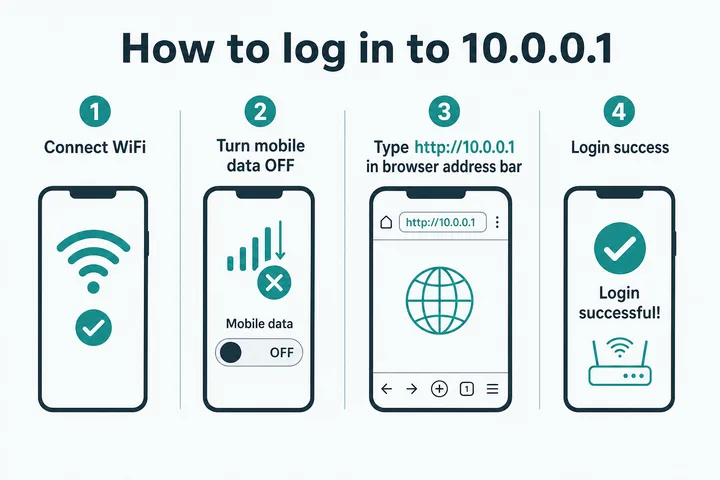
- Connect to the correct WiFi — usually named “Piso WiFi,” “LPB Piso WiFi,” or the operator’s SSID. Many Piso networks are open (no WiFi password to join). Turn mobile data OFF. This is the #1 failure in the Philippines. With data on, Android may auto-switch away from a WiFi network that has “no internet yet,” so you never reach the local portal. Disable Smart Network Switch / auto-switch to mobile data. On iPhone, turn off Auto-Join for other saved networks so iOS does not jump away from the hotspot.
- Open Chrome, Safari, Edge, or Firefox. On Android, tap the “Sign in to WiFi network” notification if it appears — it often opens the captive portal without typing.
- Type
http://10.0.0.1in the address bar — not10.0.0.0.1, notwww., nothttps://. - See the right screen — customers get Insert Money / Voucher / Pause; owners get an admin login form.
- Continue — customers follow on-screen payment; admins use the credentials table above.
If nothing appears, open an incognito tab and try again (old cache often blocks captive-portal redirects).
How to Use the Piso WiFi Portal at 10.0.0.1
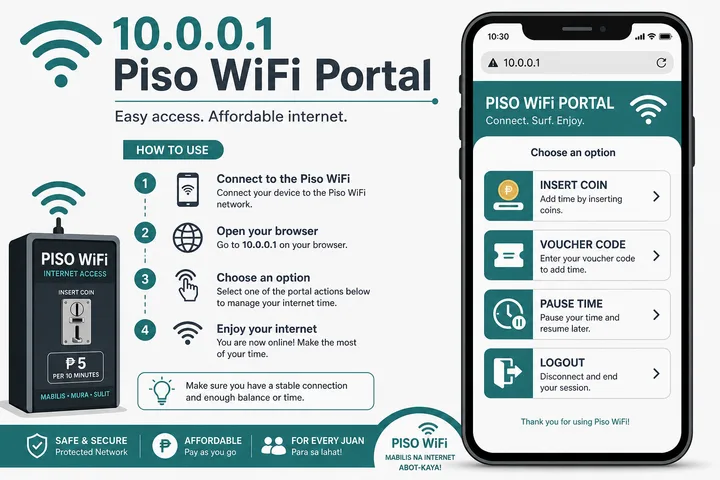
On a Piso WiFi machine, http://10.0.0.1 is the user portal — insert coins, redeem vouchers, check remaining time, and pause or resume. “Piso” is the Philippine peso: users buy short internet sessions by the minute at sari-sari stores, campuses, terminals, and barangay spots.
Insert Coins
- Connect to the Piso WiFi network
- Open
http://10.0.0.1 - Tap Insert Money
- Insert ₱1 / ₱5 / ₱10 coins
- Tap Done Paying when the portal shows your credited time
- Browse
Use a Voucher Instead
Open the portal → enter the voucher code → Submit/Redeem. Codes are created by the owner in the admin panel; some shops also sell GCash/Maya top-ups that return a code or direct credit. Guide: Piso WiFi voucher codes.
Common Platforms
| Platform | Notes |
|---|---|
| LPB Piso WiFi | Most common — portal 10.0.0.1, admin 10.0.0.1/admin |
| AdoPisoft | Simple setup, very common |
| JuanFi | Open-source MikroTik + NodeMCU stack |
| PisoFi | Often Raspberry Pi–based |
| 1Click Piso WiFi | Popular all-in-one vendo firmware |
| LBS Piso WiFi | Often confused with LPB — different brand |
| WiFi ng Bayan / local brands | Operator-specific portals |
More detail: What is Piso WiFi · LPB guide · AdoPisoft · PisoFi · JuanFi · How captive portals work
Need to Pause or Resume Piso WiFi?
Pause and resume steps vary by portal, device binding and the operator’s settings. Follow the dedicated Piso WiFi pause time guide for the full instructions and fixes.
Already paused? Use the pause time helper to estimate whether the session may still be available.
10.0.0.1 Portal Paths (/Admin, /Status, Dashboard)
Different firmwares put pages on different paths:
| Address | What it opens | Typical systems |
|---|---|---|
| 10.0.0.1 | User portal | All |
| 10.0.0.1/admin | Owner dashboard | LPB and most vendos |
| 10.0.0.1/client?page=dashboard | Client dashboard | AdoPisoft |
| 10.0.0.1/status | Session status | Many LPB builds |
| 10.0.0.1/home · portal.html | Portal variants | Firmware-dependent |
How to Access the 10.0.0.1 Admin Panel
http://10.0.0.1/admin is for owners and network admins — not regular customers. Connect to the network, open that URL, enter admin credentials (LPB default is often admin / 123456789), complete any CAPTCHA, and sign in.
From the dashboard you can usually manage sales, timer rates, portal buttons (Insert Money / Pause / Voucher), bandwidth limits, vouchers, connected devices (MAC/IP), WiFi SSID and password, DNS, parental controls, port forwarding, and firmware updates.
Security: change the default admin password on first login; never share it with customers; keep firmware updated.
Forgot the admin password? Hold the reset button 10–15 seconds to restore factory defaults — this also wipes timer rates, WiFi name/password, portal settings, and vouchers. Last resort only. Reset walkthrough: 10.0.0.1 password reset · Owner business side: Piso WiFi machine guide
Timer Rates and Portal Buttons (Owner Quick Path)
In admin → Timer Rates, set how many minutes each peso value buys (common examples: ₱1 = 5–15 min, ₱5 = 30–45 min, ₱10 = 1–2 hours). In Portal Settings, enable/disable Insert Money, Pause/Resume, and Voucher Code. Generate vouchers under Voucher Manager with time and speed limits. Full operator walkthroughs live on the machine and brand pages linked above.
Why Is 10.0.0.1 Not Working?
The three most common causes: mobile data is still on, you typed the IP in Google search instead of the address bar, or you typed invalid 10.0.0.0.1.
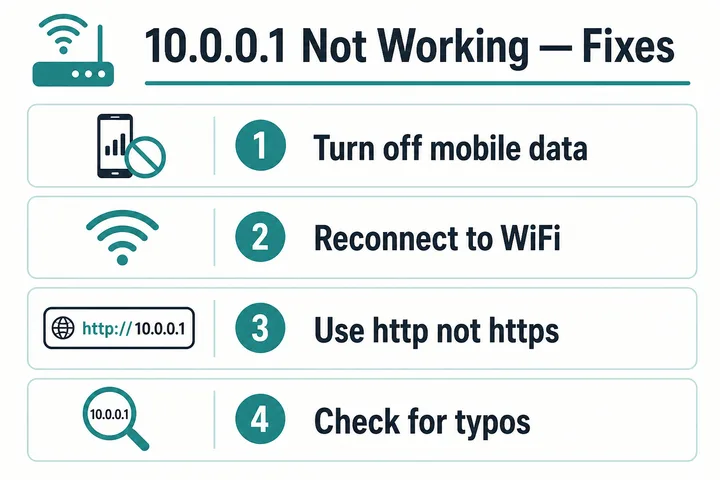
- Typed in the search bar — Use the top address bar with
http://10.0.0.1. - Mobile data still on — Turn it off. Android Smart Network Switch often abandons “no-internet” WiFi before the portal can load.
- Wrong address — Not
10.0.0.0.1, notwww., nothttps://. - Wrong WiFi — Phone auto-joined home/neighbor WiFi; match the SSID on the vendo.
- Cache blocking the portal — Clear cache or use incognito.
- VPN on — Disconnect VPN; it bypasses the local gateway.
- Different gateway — Router may be 192.168.1.1 / 192.168.0.1 (common on PH ISP routers). Check gateway in WiFi details.
- Router frozen — Unplug 30 seconds, wait 2 minutes after power-on.
- Factory reset (last resort) — Hold reset 10–15 seconds; erases all custom settings.
Hindi Ma-open Ang 10.0.0.1?
I-off ang mobile data, i-reconnect sa tamang WiFi, tapos i-type ulit ang http://10.0.0.1. More: Piso WiFi not working
How to Find Your Router’s Real Gateway
If 10.0.0.1 never answers, find the actual gateway:
- Android: Settings → WiFi → connected network → Gateway
- iPhone: Settings → WiFi → ⓘ → Router
- Windows: Win+R →
cmd→ipconfig→ Default Gateway - Mac: System Settings → WiFi → Details → Router
Not sure what the gateway field means? Read what a default gateway is, or run the gateway checker tool to narrow it down in one tap.
| Gateway | Typically used by |
|---|---|
| 192.168.1.1 | Most common home router gateway worldwide |
| 192.168.0.1 | TP-Link and many consumer routers (often mistyped 192.168.o.1) |
| 192.168.254.254 | PLDT Home Fibre and DSL modems |
| 192.168.100.1 | Fibre ONTs and cable modems |
| 192.168.8.1 | Huawei pocket WiFi and CPE units |
| 192.168.10.1 | Some Piso WiFi and business routers |
| 192.168.18.1 | Selected ISP-issued routers |
| 10.10.10.1 | Alternate vendo and access-point gateway |
Full list: every common router IP address · Brand logins: TP-Link · Tenda · Huawei · ISP portals: PLDT · Globe At Home · Converge
Which Devices Use 10.0.0.1?
TP-Link, Cisco, Xfinity/Comcast, Arris, Technicolor, Netgear, Aztech, and SMC often ship with this gateway. In the Philippines, TP-Link units are especially common behind LPB and similar firmware. Tenda and Huawei units usually use a different gateway. Full hardware and pricing for operators: Piso WiFi machine guide · Income planning: rate calculator
All 10.0.0.1 and Piso WiFi Guides
Every guide on this site, grouped by what you are trying to do. Each page answers one question completely so you do not have to read three articles to solve one problem.
Piso WiFi Portal and Sessions
| Guide | What it answers |
|---|---|
| Piso WiFi | What Piso WiFi is, how it works, and what it costs |
| Piso WiFi pause time | Pause and resume your timer on every major portal |
| Piso WiFi pause time app | Whether an official app exists and what to use instead |
| Piso WiFi voucher code | Redeeming codes and how owners generate them |
| Piso WiFi logout | Ending a session and freeing your slot |
| Piso WiFi not working | Taglish troubleshooting for connection failures |
Piso WiFi Platforms and Brands
| Platform | What it answers |
|---|---|
| LPB Piso WiFi | Portal, admin access and defaults for the most common firmware |
| AdoPisoft | Setup, client dashboard and admin login |
| PisoFi | Raspberry Pi based portal and credentials |
| JuanFi | Open-source MikroTik and NodeMCU vendo stack |
| 1Click Piso WiFi | All-in-one vendo firmware walkthrough |
| LBS Piso WiFi | How LBS differs from LPB |
| WiFi ng Bayan | Government and community hotspot access |
Router IP Addresses
| Address | What it answers |
|---|---|
| Router IP address list | Every common gateway in one hub, including rare ones |
| 192.168.0.1 | Login guide, plus the 192.168.o.1 letter-O typo |
| 192.168.1.1 | Login guide, plus 192.168.l.1 letter-L typos |
| 192.168.100.1 | Fibre ONT and cable modem gateway |
| 192.168.254.254 | PLDT modem gateway |
| 192.168.10.1 | Business and vendo router gateway |
| 192.168.18.1 | Selected ISP router gateway |
| 192.168.8.1 | Huawei pocket WiFi and CPE gateway |
| 10.10.10.1 | The 10.10.10.x gateway family |
Router and ISP Admin Logins
| Guide | What it answers |
|---|---|
| TP-Link router login | tplinkwifi.net, gateway IPs, passwords and Tether |
| Tenda router login | Tenda admin access and default credentials |
| Huawei router login | Modem IPs, AI Life app and HG8145V5 access |
| PLDT admin | PLDT Home Fibre admin login and WiFi changes |
| Globe At Home admin | Globe router admin access |
| Converge admin | Converge router admin access |
Networking Basics
| Guide | What it answers |
|---|---|
| What is an IP address | IPv4 and IPv6, public and private, static and dynamic |
| Default gateway | What it is and how to find it on any device |
| Captive portal | Why a sign-in page appears and how to force it open |
Owner, Security and Tools
| Guide | What it answers |
|---|---|
| Piso WiFi machine | Hardware, pricing and profitability for operators |
| Piso WiFi business | Owner economics, costs, pricing and operating risk |
| 10.0.0.1 password reset | Recovering admin access without losing settings |
| Free tools hub | Choose gateway checker, pause helper, or rate calculator |
| Gateway checker | Find your router’s real gateway IP |
| Pause time helper | Track remaining paused session time |
| Rate calculator | Model timer rates and vendo income |
| About 10001ip.co | Who publishes these guides, editorial standards, independence and contact |
Frequently Asked Questions About 10.0.0.1
Is 10.0.0.0.1 a Valid IP Address?
No. IPv4 needs four octets. 10.0.0.0.1 has five. Use 10.0.0.1.
Can I Open 10.0.0.1 on Mobile Data?
No. It is a private LAN address. Turn data off and use the router’s WiFi.
What Is the Default Password for 10.0.0.1 Piso WiFi?
LPB is commonly admin / 123456789. AdoPisoft is often admin / admin. PisoFi may use administrator / admin12345. JuanFi is often admin / admin. Check the sticker on the device.
Why Does Typing 10.0.0.1 Open Google?
You used the search box. Use the browser address bar at the top.
What Is the Difference between 10.0.0.1 and 192.168.1.1?
Both are private gateways. Piso WiFi / some US gateways often use 10.0.0.1; many PH home ISP routers use 192.168.1.1. Your WiFi settings show which one you have.
Paano Mag-login Sa 10.0.0.1 Gamit Ang Cellphone?
I-connect sa Piso WiFi, i-off ang mobile data, buksan ang browser, i-type ang http://10.0.0.1 sa address bar.
Can I Change the Admin Password?
Yes — in http://10.0.0.1/admin under system/security settings. Use a strong unique password.
What If I Forgot the Admin Password?
Factory reset (10–15 seconds on the reset pin). This restores defaults and erases custom rates, WiFi, and portal settings.
What Is a Captive Portal?
The payment/login page that appears on networks that block internet until you insert coins, redeem a voucher, or authenticate — on Piso WiFi that page is usually http://10.0.0.1. Full explanation: how captive portals work.
Can I See Who Is Connected?
Yes, from the admin panel under Connected Devices / Active Sessions (MAC, IP, session time). Customers cannot see this without admin login.
What Is 10.0.0.1 Admin?
http://10.0.0.1/admin is the owner dashboard for a router or Piso WiFi vendo. It controls timer rates, vouchers, portal buttons, bandwidth and connected devices. Customers only need http://10.0.0.1; the /admin path will simply ask for a password.
Why Does https://10.0.0.1 Fail but http://10.0.0.1 Work?
A trusted SSL certificate cannot be issued for a private IP address, so most portals only serve plain HTTP. Typing https:// produces a privacy or connection error. Use http://10.0.0.1, and ignore any browser warning about the page not being secure — it is a local device on your own network.
Why Does www.10.0.0.1 Not Work?
www. is a hostname prefix used by domain names, and 10.0.0.1 is an IP address, not a domain. Adding www. or .com sends the request to a public DNS lookup that fails. Type the four numbers on their own.
What Is 10.0.0.1/client?page=dashboard?
That is the AdoPisoft client dashboard, where a customer sees remaining time, pause controls and session details. Other firmwares use /status, /home or /portal.html for the same screen. If the path returns an error, open http://10.0.0.1 and let the portal redirect you.
Magkano Ang Bayad Sa Piso WiFi?
Depende sa owner. Karaniwan ang ₱1 ay 5 hanggang 15 minuto, ang ₱5 ay 30 hanggang 45 minuto, at ang ₱10 ay 1 hanggang 2 oras. Nakikita mo ang eksaktong rate sa portal bago ka magbayad.
Key Takeaways
- 10.0.0.1 is correct — 10.0.0.0.1 is a five-octet typo
- Type
http://10.0.0.1in the address bar, not Google search - Turn mobile data off — the portal is local WiFi only
- Users:
http://10.0.0.1· Owners:http://10.0.0.1/admin - LPB default is often admin / 123456789 — change it after first login
- Pause freezes your timer; resume on the same device before auto-expiry
- If it fails: wrong WiFi, data on, typo, cache, VPN, or a different gateway
- Factory reset is last resort — it wipes everything