
Piso WiFi / 10.0.0.1 not working? Most failures are simple: mobile data still ON, wrong WiFi, typo 10.0.0.0.1, or forcing https://. Turn data off, reconnect to the vendo SSID, then open http://10.0.0.1 in the address bar.
Key Takeaways
- Piso WiFi / 10.0.0.1 not working?
- Most failures are simple: mobile data still ON, wrong WiFi, typo 10.0.0.0.1 , or forcing https:// .
- Turn data off, reconnect to the vendo SSID, then open http://10.0.0.1 in the address bar.
- Use the Taglish troubleshooting sections below, then the fix table.
Use the Taglish troubleshooting sections below, then the fix table. Still stuck? Try the gateway checker.
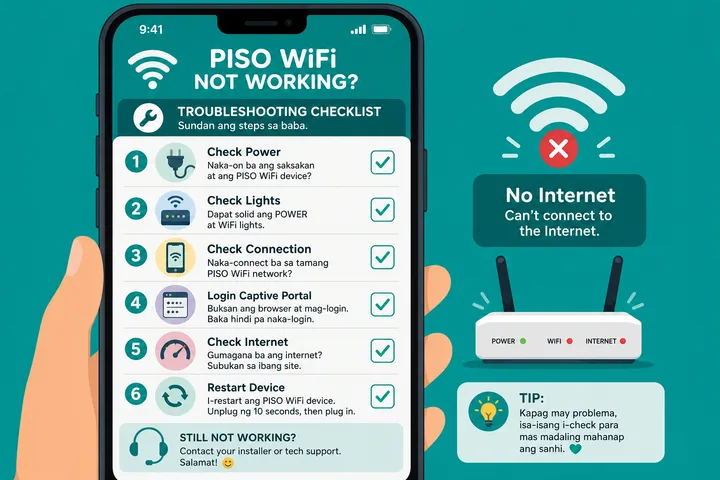
On this page: Bakit hindi gumagana · Ayaw mag-open ang portal · Mobile data off muna · Troubleshooting table · Maling IP / typo · Next steps · FAQ
Bakit Hindi Gumagana Ang 10.0.0.1?
The address only works when your phone is on the same local network as the Piso controller or router. If Chrome searches Google instead, or the page spins forever, fix connection basics before blaming the machine.
- Hindi connected sa tamang Piso / vendo WiFi
- Mobile data / Smart Network Switch still ON
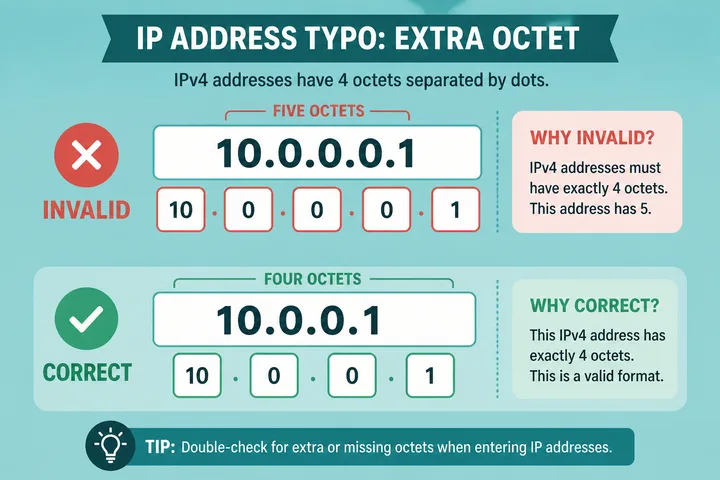
- Typo:
10.0.0.0.1(five octets) instead of10.0.0.1 - Using
https://when the portal only serveshttp:// - VPN, private DNS, or aggressive ad-blocker interfering
- Wrong gateway — machine is not actually on 10.0.0.1
Paano Ayusin Kung Ayaw Mag-open Ang Portal
- Buksan ang WiFi settings → connect sa SSID ng store / vendo.
- I-off ang mobile data (and auto-switch).
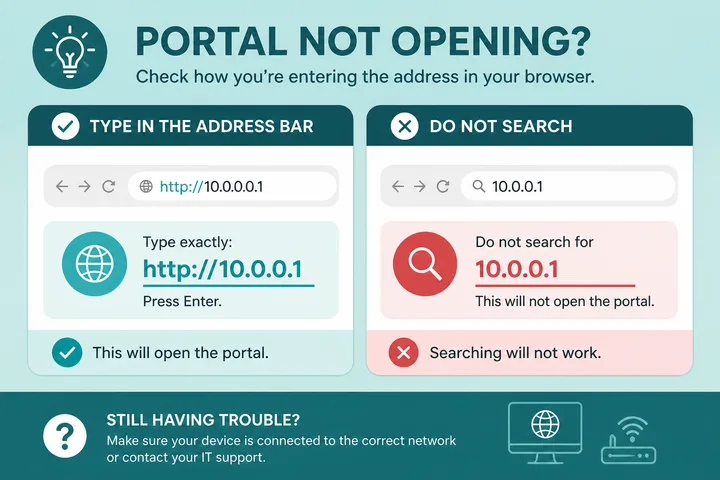
- Open Chrome / Safari → type
http://10.0.0.1sa address bar, hindi sa Google search box. - Kung blank / SSL error: tanggalin ang
https://, subukan ulit. - Try Incognito / clear site data / another browser.
- Kung failed pa rin: open the gateway checker or check Default Gateway in WiFi details.
Mobile Data off Muna
Many Android phones silently fall back to mobile data when the captive portal has “no internet.” The portal then never loads because traffic left the LAN.
Checklist Bago Mag-reload
- Mobile data → OFF
- Smart Network Switch / Adaptive WiFi → OFF
- VPN → disconnect
- Airplane mode ON → turn WiFi back ON only (optional hard reset of radios)
After data is off, reload http://10.0.0.1. For pause issues after the portal opens, see pause time.
Troubleshooting Table — Mabilisang Ayos
| Problem | Likely cause | Fix |
|---|---|---|
| Page never loads | Mobile data on | Data OFF; stay on WiFi only |
| “No internet” then blank | Wrong WiFi / guest network | Reconnect to the Piso SSID |
| Google search results | Typed IP in search, not URL bar | Address bar → http://10.0.0.1 |
| Invalid / not found | Typo 10.0.0.0.1 | Use exactly four parts: 10.0.0.1 |
| Privacy / SSL error | https vs http | Force http:// |
| Old login page stuck | Cache | Incognito or clear cache |
| Works on laptop, not phone | VPN / Private DNS | Disable VPN & private DNS |
| All IPs fail | Wrong gateway | Gateway checker |
Maling IP — Common Typos
| What people type | Correct |
|---|---|
| 10.0.0.0.1 | 10.0.0.1 |
| 10.0.0.l (letter L) | 10.0.0.1 (number one) |
| 10.0.o.1 (letter O) | 10.0.0.1 |
| https://10.0.0.1 | http://10.0.0.1 |
| 10001 or 10.0.0.1.com | http://10.0.0.1 (local only) |
Kapag Open Na Ang Portal Pero May Ibang Issue
- Pause button missing → pause time guide
- Need the real gateway IP → gateway checker
- General Piso / coin / voucher help → Piso WiFi · homepage
Kapag Bayad Na Pero Walang Internet
Split the problem by symptom. If no sign-in page appears, read captive portal. If the session runs but will not end, read Piso WiFi logout. If you were told to install an app to fix pausing, check Piso WiFi pause time app first. Community hotspots follow operator policy rather than vendo rules — see WiFi ng Bayan — and the free tools hub lists the browser-side checks, including the pause time helper.
Ihiwalay ang payment issue sa portal at uplink issue. Kung nadagdagan ang timer pero walang browsing, maaaring active ang local session pero down ang ISP, mali ang DNS, o may device-binding problem. Kung walang nadagdag na oras, huwag agad maghulog ulit: i-record ang amount, oras, voucher code o transaction reference at kausapin ang operator.
| Nakikita mo | Mas malamang na issue | Susunod na hakbang |
|---|---|---|
| May timer, walang websites | Uplink/DNS/session authorization | Reload status, reconnect once, then ask if the vendo ISP is down |
| Coin accepted, walang credit | Coin pulse, calibration or controller fault | Stop inserting coins and report exact amount/time |
| Voucher “used” pero walang oras | Wrong device, prior redemption or delayed status | Keep the code private and ask owner to inspect voucher/session logs |
| GCash/Maya paid, walang code | Operator sales fulfillment, not the local portal | Contact the named seller using the transaction reference; never share MPIN/OTP |
| Time nasa ibang phone | Device-bound session | Return to the original device or request owner-supported transfer |
Bakit Kumain Ng Pera Pero Walang Oras?
Posibleng hindi nabasa nang tama ang coin pulse, offline ang controller, o jammed ang acceptor. Huwag sunod-sunod na maghulog. Isulat ang oras at halaga, kuhanin ang operator contact na naka-post sa machine, at humingi ng verification o refund ayon sa store policy.
Connected Pero “No Internet” — Sira Ba Phone Ko?
Hindi agad. Ang phone ay maaaring connected sa WiFi radio habang offline ang ISP uplink. Kung bumubukas ang portal at may timer pero walang external site, malamang network-side ang issue. Try reconnect once; kung lahat ng users affected, operator ang kailangang mag-check.
Bakit Bumalik Sa Insert Coin Kahit May Time Pa Ako?
Maaaring nagbago ang private/randomized MAC, ibang SSID ang nasamahan, nag-expire ang paused session, o na-clear ang session record. Bumalik sa same device at same hotspot, huwag palit-palit ng private MAC setting, then ask the owner to check the active-session record.
Sources, Scope, and Corrections
Claim basis: Network behavior is separated from common portal defaults. Addresses, buttons, rates, credentials, and session behavior can vary by firmware, platform, owner configuration, and device. See our Editorial Policy for claim labels and source priorities.
Found a mismatch? Send the page URL and privacy-safe evidence using the correction process. This block does not claim a hands-on test or a fact-review date.
Related Guides
- Piso WiFi guide — Understand the portal, sessions, rates and owner side
- Piso WiFi pause time — Pause and resume a paid session without losing minutes
- Captive portal guide — Understand redirects and force a sign-in page to open
- Gateway checker — Find the correct local router or portal address
FAQ — Hindi Gumagana Ang Piso WiFi
Bakit Hindi Gumagana Ang 10.0.0.1?
Usually mobile data is still on, you are on the wrong WiFi, you typed 10.0.0.0.1, or you used https. Fix those first, then try incognito and the gateway checker.
Ayaw Mag-open Ng Piso WiFi Portal — Ano Unang Gawin?
Connect to the vendo SSID, turn mobile data off, type http://10.0.0.1 in the address bar (not Google search), and wait a few seconds.
May Internet Ba Dapat Bago Mag-open Ang 10.0.0.1?
No. The portal is a local page on the LAN. You only need WiFi association to the Piso network — not working mobile data or prepaid load.
VPN Ba Ang Problema?
Sometimes. Disconnect VPN / private DNS extras, then reload http://10.0.0.1.
Paano Kung Hindi 10.0.0.1 Ang Gateway?
Use the gateway checker or WiFi details to find the real router IP (192.168.1.1, 192.168.0.1, etc.), then open that address instead.