
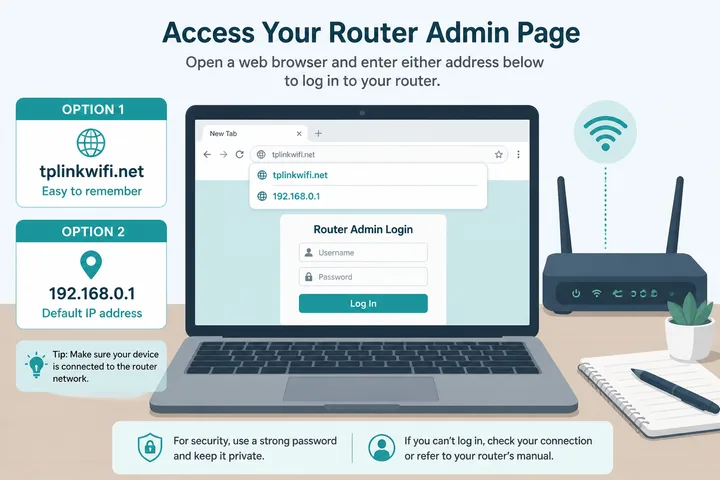
TP-Link router login: connect to your TP-Link WiFi or LAN, then open http://tplinkwifi.net. If that does not load, try http://192.168.0.1 or http://192.168.1.1. Older models often use admin / admin; newer models usually use the administrator password the owner created during first setup.
Key Takeaways
- TP-Link router login: connect to your TP-Link WiFi or LAN, then open http://tplinkwifi.net .
- If that does not load, try http://192.168.0.1 or http://192.168.1.1 .
- Older models often use admin / admin ; newer models usually use the administrator password the owner created during first setup.
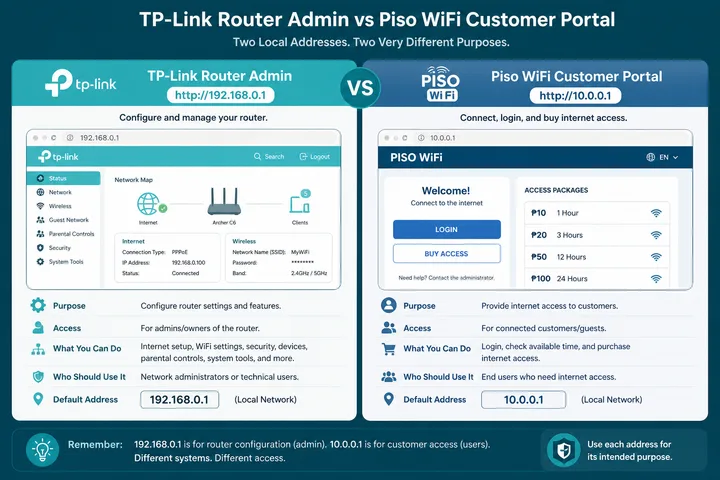
- TP-Link Piso WiFi is a two-system setup: TP-Link may be the router or access point, but customers normally buy or pause time at the separate Piso captive portal, typically http://10.0.0.1 .
TP-Link Piso WiFi is a two-system setup: TP-Link may be the router or access point, but customers normally buy or pause time at the separate Piso captive portal, typically http://10.0.0.1.
On this page: Login steps · Addresses · Credentials · Browser vs Tether · Change WiFi · TP-Link + Piso WiFi · Admin vs portal · Not working · 10.0.0.0.1 typo · After login · FAQ
How to Log in to a TP-Link Router
The login page is local to the router, so you must be connected to that TP-Link network. Internet service itself is not required.
- Connect by TP-Link WiFi or Ethernet. Turn off mobile data, VPN, and any automatic network switching.
- Open Chrome, Edge, Safari, or Firefox.
- Type
http://tplinkwifi.netin the address bar, not a search box. - If it fails, try
http://192.168.0.1, thenhttp://192.168.1.1. - Enter admin / admin only on an older model that still uses that default. On newer models, enter the local password created during setup.
- If none of the addresses respond, use the gateway checker while still connected to the TP-Link network.
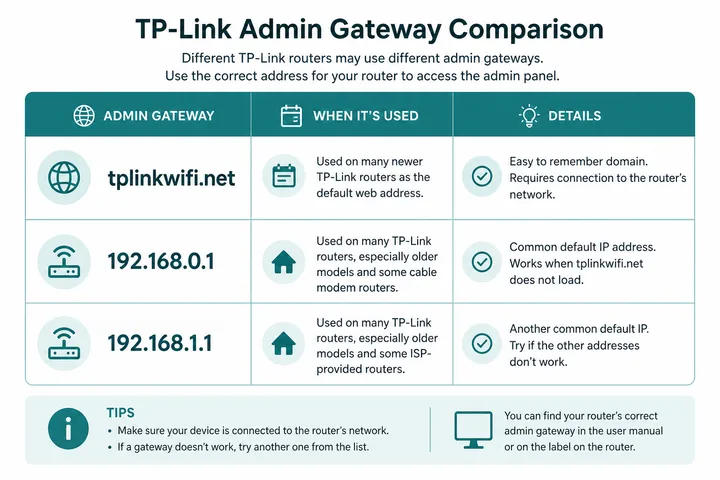
TP-Link Login Addresses: Which One Should You Use?
| Address | Typical use | What to know |
|---|---|---|
tplinkwifi.net | TP-Link local hostname | Works only while connected to the router; it is not a public account website |
| 192.168.0.1 | Common TP-Link home-router gateway | Frequent default on Archer and older home models |
| 192.168.1.1 | Alternate or ISP-configured gateway | May be used after LAN changes or on ISP equipment |
| Current device gateway | Most reliable after customization | Find it in WiFi details or with the gateway checker |
Do not add www. Start with http://; a supported router may redirect to HTTPS. If another modem already owns the same IP, connect directly to the TP-Link LAN before trying again.
TP-Link Username and Password: Old vs New Models
There is no single credential pair for every TP-Link router. The setup generation matters.
| Router state | Username | Password |
|---|---|---|
| Older model, factory default | admin | admin was common |
| Newer model, first setup | Often no separate username | Owner creates a local administrator password |
| Already configured | Model-dependent | Previously changed local password |
| ISP-managed or business unit | Sticker / provider / administrator | Do not assume consumer defaults |
- The WiFi password joins the wireless network; the admin password opens router settings.
- A TP-Link ID signs in to cloud/app features; it may differ from the local router password.
- Check the router label and quick-start card, but remember a changed password overrides printed defaults.
- Factory reset erases settings. Use it only if you own or administer the router and can reconfigure the internet connection.
Browser Login vs TP-Link Tether App
| Method | Best for | Login identity |
|---|---|---|
| Browser at tplinkwifi.net / gateway | Full local menus and setup | Local administrator password |
| TP-Link Tether app | Phone-friendly status, WiFi and supported controls | Local password and, for cloud features, TP-Link ID |
| Piso WiFi portal | Customer time, voucher, pause/resume | Portal flow—not Tether or router admin |
Install Tether only from the official app store. If the app cannot discover the router, give it local-network permission, stay on TP-Link WiFi, disable mobile data/VPN, and try the browser gateway. Some older or business TP-Link products are not managed by Tether.
Change the TP-Link WiFi Name and Password
- Log in with the browser or open the supported router in Tether.
- Open Wireless, Wi-Fi Settings, or Basic → Wireless.
- Change the SSID (network name) for 2.4 GHz and 5 GHz. Smart Connect may present one shared name.
- Set a strong WPA2 or WPA3 wireless password. Avoid WEP and open security.
- Save or Apply. The WiFi radio may restart.
- Reconnect phones, laptops, TVs, and Piso controller uplinks with the new SSID/password.
Changing the router WiFi details does not automatically change a separate Piso portal name, voucher database, or customer login page.
How TP-Link Is Used Behind Tp Link Piso WiFi
TP link piso wifi usually describes the hardware role, not a special TP-Link captive portal product. A TP-Link router or access point supplies LAN routing and wireless coverage while a vendo controller supplies coin, voucher, session, and Pause Time features.
| Component | Typical address | Job |
|---|---|---|
| TP-Link router / access point | tplinkwifi.net, 192.168.0.1, or 192.168.1.1 | Internet uplink, LAN, DHCP, WiFi radio |
| Piso WiFi controller / captive portal | 10.0.0.1 is common | Customer payment, vouchers, time, pause/resume |
| Customer phone | Receives a local IP | Opens the portal and uses paid access |
For the customer workflow, use the Piso WiFi guide. Owners should document which box runs DHCP to avoid address conflicts.
Router Admin vs Captive Portal: Do Not Confuse Them
If the page that loads asks for coins or a voucher, you are on a hotspot portal rather than router admin. Other brands sharing the same gateways behave differently — see Tenda router login — and 192.168.10.1 covers a business and repeater address often paired with these units. The free tools hub helps confirm which address is actually live.
Router admin is private configuration for the owner: WAN, LAN, DHCP, WiFi, firmware, and security. A captive portal is the customer page for Insert Money, vouchers, remaining time, and Pause/Resume. Seeing the Piso page at 10.0.0.1 does not log you in to the TP-Link router.
- Need to rename the TP-Link radio? Use tplinkwifi.net or the router gateway.
- Need to buy or pause Piso time? Use the portal address shown by the operator, commonly 10.0.0.1.
- Need the actual network route? Use gateway checker rather than guessing.
TP-Link Login Not Working: Fixes in Order
| Symptom | Likely cause | Fix |
|---|---|---|
| tplinkwifi.net shows search results | Typed into search or not on TP-Link LAN | Use address bar; connect directly to TP-Link WiFi |
| 192.168.0.1 times out | Router uses another LAN IP | Try 192.168.1.1 or detect the gateway |
| Login page opens but password fails | Newer owner-created or changed password | Use saved local admin password; reset only as last resort |
| Tether cannot find device | Unsupported model, permission, VPN, or wrong WiFi | Allow local network access; disable VPN/data; use browser |
| Piso portal opens | You reached the controller, not TP-Link admin | Connect to the router management LAN and use its gateway |
| Two devices answer unpredictably | Gateway/IP conflict | Disconnect upstream overlap; assign unique LAN management addresses |
10.0.0.0.1 Is a Typo, Not a TP-Link Address
10.0.0.0.1 is invalid because it contains five octets. The intended Piso address is usually 10.0.0.1. Neither address is a universal TP-Link default.
| Typed value | Use instead |
|---|---|
| 10.0.0.0.1 | 10.0.0.1 for a typical Piso portal |
| 192.168.O.1 | 192.168.0.1 (zero, not letter O) |
| tplinkwifi.net in Google | http://tplinkwifi.net in the address bar |
| Unknown TP-Link IP | Detect the active gateway |
What to Do after TP-Link Login
- Replace any remaining default admin password with a unique one.
- Use WPA2-AES or WPA3 and a separate strong WiFi password.
- Update firmware from the exact model and hardware-version support page.
- Disable remote administration unless you intentionally need and secure it.
- Back up the configuration after changes, especially on a Piso WiFi deployment.
- Do not expose the router admin page to Piso customers.
Sources, Scope, and Corrections
Claim basis: Login addresses and menu paths are common defaults, not universal settings. Confirm them on the device label, portal, official documentation, or provider support because firmware and owner configuration can differ. See our Editorial Policy for claim labels and source priorities.
Independence: 10001ip.co is not affiliated with, sponsored by, or an official support channel for the brand, ISP, or platform discussed on this page.
Found a mismatch? Send the page URL and privacy-safe evidence using the correction process. This block does not claim a hands-on test or a fact-review date.
Related Guides
- Router IP address list — Compare common and uncommon private gateways
- Default gateway guide — Find the router address used by your device
- Gateway checker — Find the correct local router or portal address
- 192.168.1.1 login — Open the common home-router admin gateway
TP-Link Router Login FAQ
What Address Do I Use for TP-Link Router Login?
While connected to the TP-Link network, try http://tplinkwifi.net first. Common numeric gateways are http://192.168.0.1 and http://192.168.1.1. The correct address depends on the model and current LAN configuration.
What Is the TP-Link Default Admin Password?
Older TP-Link routers commonly used admin for both username and password. Newer models usually ask the owner to create an administrator password during setup, so there may be no universal default. Check the label and setup card before resetting anything.
Can I Log in with the TP-Link Tether App?
Yes, supported home routers can be discovered and managed in the TP-Link Tether app. Local browser login at tplinkwifi.net or the gateway still works on many models. A TP-Link ID used by the app is not necessarily the same as the router local admin password.
Is TP-Link Piso WiFi Login the Same as TP-Link Router Login?
No. A TP-Link device may provide the WiFi radio or upstream router, but the Piso WiFi customer portal is usually hosted by a separate controller at http://10.0.0.1. Router admin changes hardware settings; the captive portal buys, pauses, or resumes time.
Why Does 10.0.0.0.1 Not Open?
10.0.0.0.1 has five number groups and is not a valid IPv4 address. For a typical Piso WiFi customer portal use http://10.0.0.1. For TP-Link admin use tplinkwifi.net, 192.168.0.1, or your detected gateway.
How Do I Change My TP-Link WiFi Name and Password?
Log in through the browser or Tether, open Wireless or Wi-Fi Settings, edit the SSID and wireless password for each band, then save. Reconnect every device using the new details.