
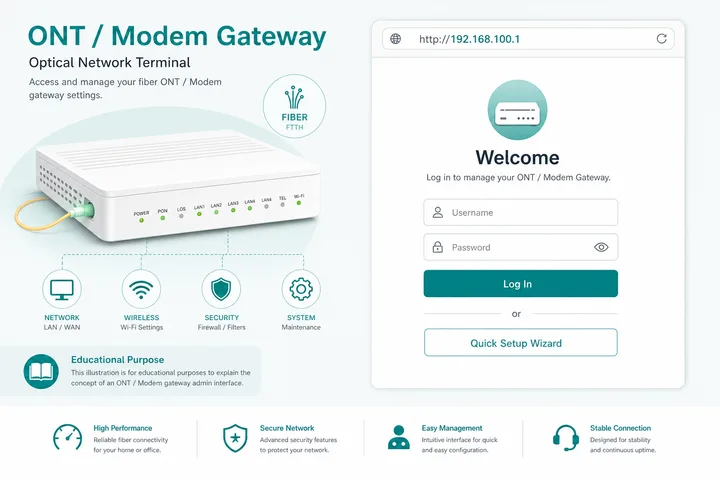
192.168.100.1 is a common private admin gateway on Huawei ONTs, fiber modems, and some ISP CPE units. Type http://192.168.100.1 in your browser (on that network) to open the login page.
Key Takeaways
- 192.168.100.1 is a common Huawei/ONT admin gateway — open with
http://192.168.100.1. 192.168.100.1.1is invalid — use four octets only.- A second WiFi router may use 192.168.1.1 or 192.168.0.1 while the ONT stays on 192.168.100.1.
- Related: 10.0.0.1 · Piso WiFi · Gateway checker · 192.168.0.1
This guide covers what 192.168.100.1 is, how to log in, default passwords, the 192.168.100.1.1 typo, fixes when it will not load, and how it compares to 10.0.0.1, 192.168.1.1, and 192.168.0.1.
On this page: What it is · How to log in · Default passwords · Typos · vs other gateways · Not working · FAQ
What Is 192.168.100.1?
192.168.100.1 is a private IPv4 address in the 192.168.0.0/16 range. Many Huawei ONTs and fiber modems use it as the default management / LAN admin address.
It is not a public website. It only works when your device is connected to that ONT or modem. ISP-branded fiber gateways in several markets (including some PH installs) ship with this address.
How to Log in to 192.168.100.1
Connect to the ONT/modem network, open a browser, type http://192.168.100.1 in the address bar, then enter the username and password from the sticker or ISP documentation.
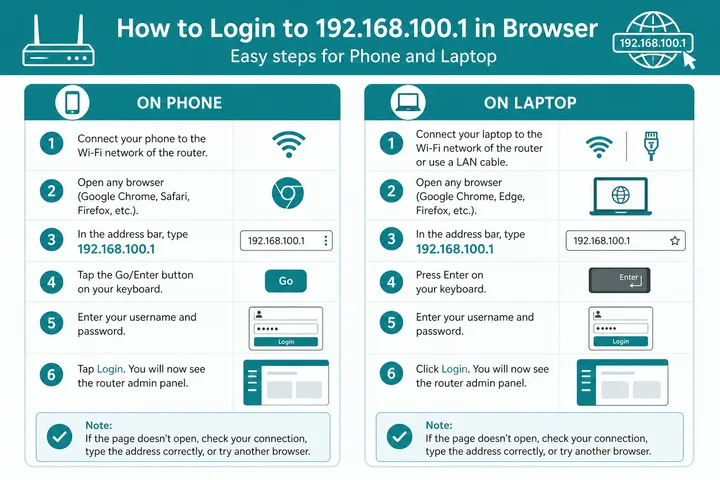
- Connect to the ONT/modem WiFi or Ethernet (not a different router’s WiFi).
- Turn off VPN and mobile data.
- Open a browser.
- Type
http://192.168.100.1→ Enter. - Sign in with credentials on the device label or ISP sheet.
If nothing loads, your LAN gateway may be 192.168.1.1, 192.168.0.1, or 10.0.0.1 instead — use the gateway checker.
Default Passwords for 192.168.100.1
Huawei and ISP units often print unique credentials. Check the label first:
| Brand / type | Username | Password |
|---|---|---|
| Huawei ONT / modem | printed on sticker | printed on sticker |
| Common Huawei default (older) | root / telecomadmin | adminHW / admintelecom (varies) |
| Generic admin pair | admin | admin |
| ISP-branded CPE | printed / ISP sheet | printed / ISP sheet |
| Some fiber gateways | user / admin | user / printed |
telecomadmin-class accounts (when present) are for advanced ISP settings — do not change WAN/optical settings unless you know the impact. Admin password ≠ WiFi password.
192.168.100.1 Typos and Mistypes
Extra octets and letter substitutes are invalid. The correct address is four numbers: 192.168.100.1.
| Typed | Use |
|---|---|
| 192.168.100.1.1 | 192.168.100.1 |
| 192.168.100.l (letter L) | 192.168.100.1 |
| 192 168 100 1 / 192-168-100-1 | 192.168.100.1 |
| https://192.168.100.1 | Try http:// first |
| 192.168.1.100 / 192.168.10.1 | Different gateways — confirm with checker |
192.168.100.1 vs 10.0.0.1 / 192.168.1.1 / 192.168.0.1
Pick the gateway your device actually uses. Huawei ONT management often stays on 192.168.100.1 even when a second router uses another LAN.
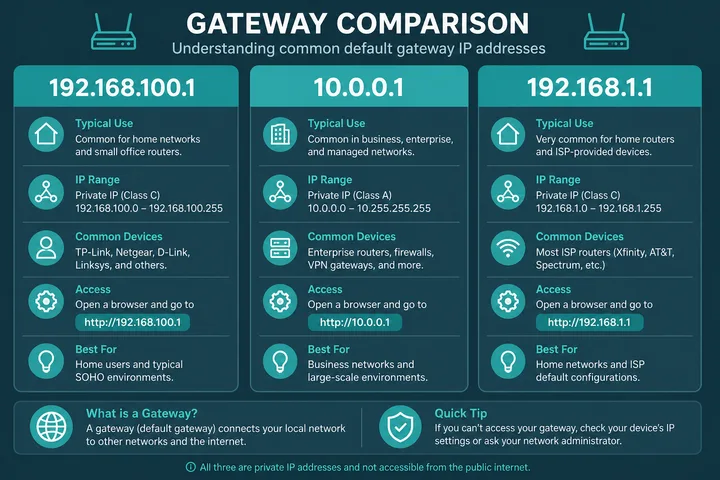
| Address | Typical use | Note |
|---|---|---|
| 192.168.100.1 | Huawei ONT / fiber modem admin | Primary focus of this page |
| 192.168.1.1 | Home / ISP WiFi routers | Often the WiFi router behind an ONT |
| 192.168.0.1 | Many home routers | See dedicated guide |
| 10.0.0.1 | Some routers + Piso portals | See Piso WiFi |
192.168.100.1 Not Working
ONT admin only loads when you can reach that management LAN. Check these first:
| Problem | Fix |
|---|---|
| Typed 192.168.100.1.1 | Remove the fifth octet → 192.168.100.1 |
| Page will not load | Connect to ONT WiFi/LAN; try http; disable VPN |
| Wrong device | You may be on a second router — check its gateway separately |
| Wrong gateway | Use gateway checker or WiFi details |
| Login rejected | Use sticker / ISP credentials; avoid random resets on fiber ONTs |
Fibre ONT and Cable Modem Context
192.168.100.1 commonly opens the management interface of a fibre ONT or cable modem, not always the main WiFi router. An ONT converts the optical fibre signal into Ethernet and may also provide WiFi, telephone, and status controls.
Huawei EchoLife units such as the HG8145V5 and related ISP-supplied models may use this address, but firmware and provider configuration differ. Check the label and the Huawei router login guide before trying credentials. Optical power, LOS status, and device information are generally safe to view; changing WAN, VLAN, VoIP, LOID, or GPON authentication can take the connection offline.
PLDT, Globe, and Converge Differences
ISP-supplied units on this gateway are often rebranded, so the provider guide is the faster path: check Globe At Home admin or Converge admin for account-side menus. If the sticker names a hardware vendor instead, the Huawei router login guide covers ONT and CPE variants. Address-agnostic checks live in the free tools hub.
PLDT, Globe, and Converge can supply ONTs that expose 192.168.100.1, but the address is not guaranteed for every installation. The device brand, model, firmware, and whether a separate router is connected all affect which page opens.
| ISP | What to check | Guide |
|---|---|---|
| PLDT Home Fibre | ONT label and assigned gateway; some units use 192.168.1.1 | PLDT admin |
| Globe At Home | Sticker credentials, provider app, or gateway shown by the device | Globe admin |
| Converge | ONT/router model and the local gateway; access levels vary | Converge admin |
If a second router handles your home WiFi, its admin page may be 192.168.1.1 while the fibre ONT remains at 192.168.100.1. Connect directly to the correct device when troubleshooting.
How to Change WiFi Settings after Login
Open WLAN, WiFi, or Wireless settings to change the network name and password. Edit the SSID for the visible name and the WPA/WPA2/WPA3 passphrase for the password, then choose Save or Apply.
- Select the 2.4 GHz or 5 GHz wireless profile.
- Enter a clear SSID and a unique password of at least 12 characters.
- Use WPA2-AES or WPA3 if supported; avoid open security and obsolete WEP.
- Save, wait for WiFi to restart, and reconnect devices with the new credentials.
Some ISP accounts provide read-only access or hide advanced menus. Contact the provider rather than factory-resetting the ONT, because a reset can erase service provisioning.
Why 192.168.100.1.1 Is Invalid
192.168.100.1.1 is not a valid IPv4 address because it contains five number groups, called octets. IPv4 uses exactly four octets from 0 to 255. Remove the final .1 and enter http://192.168.100.1.
The typo 192 l.168.100.1 is also invalid: the first group must be the digits 192, with no letter L or spaces. If the corrected address still fails, verify the default gateway instead of trying more variations.
When This Is Not the Piso WiFi Portal
192.168.100.1 is normally an ONT or modem admin page, not the portal where a Piso WiFi customer inserts coins, pauses time, or checks minutes. Many Piso WiFi systems use 10.0.0.1 or redirect customers automatically after they join the hotspot.
If you are a hotspot customer, reconnect to the Piso WiFi SSID, disable mobile data, and open a normal non-HTTPS page to trigger the captive portal. Only use 192.168.100.1 when you own or are authorized to manage the fibre or cable equipment.
Sources, Scope, and Corrections
Claim basis: Network behavior is separated from common portal defaults. Addresses, buttons, rates, credentials, and session behavior can vary by firmware, platform, owner configuration, and device. See our Editorial Policy for claim labels and source priorities.
Found a mismatch? Send the page URL and privacy-safe evidence using the correction process. This block does not claim a hands-on test or a fact-review date.
Related Guides
- Router IP address list — Compare common and uncommon private gateways
- Default gateway guide — Find the router address used by your device
- Gateway checker — Find the correct local router or portal address
- What is an IP address? — Understand IPv4, IPv6, public and private addresses
FAQ
What Is 192.168.100.1?
192.168.100.1 is a private IPv4 address often used as the admin gateway on Huawei ONTs, fiber modems, and some ISP CPE devices.
How Do I Log in to 192.168.100.1?
Connect to the ONT/modem WiFi or LAN, type http://192.168.100.1 in the browser address bar, then enter the admin credentials from the device sticker or ISP sheet.
Is 192.168.100.1.1 a Valid IP?
No. An IPv4 address has four octets. Drop the extra .1 and use 192.168.100.1.
Is 192.168.100.1 the Same as 10.0.0.1?
No. Different private addresses. Huawei/ONT gear often uses 192.168.100.1; many Piso WiFi portals use 10.0.0.1.
192.168.100.1 Not Working — What Should I Try?
Confirm you are on that ONT’s network, try http not https, disable VPN and mobile data, and verify the gateway with WiFi details or the gateway checker.
Does the Huawei EchoLife Hg8145v5 Use 192.168.100.1?
Some HG8145V5 and related Huawei EchoLife ONTs can use 192.168.100.1, but ISP firmware may assign another address or restrict access. Check the device label and default gateway first.
Can PLDT, Globe, or Converge Use 192.168.100.1?
Yes, some ONTs supplied by these ISPs may expose 192.168.100.1, but it is model- and firmware-dependent. Use the provider-specific guide and sticker details for your installation.
How Do I Change the WiFi Password at 192.168.100.1?
Log in, open WLAN or Wireless settings, replace the WPA passphrase, and save. Reconnect your devices afterward, and do not alter WAN, VLAN, GPON, or optical settings.