
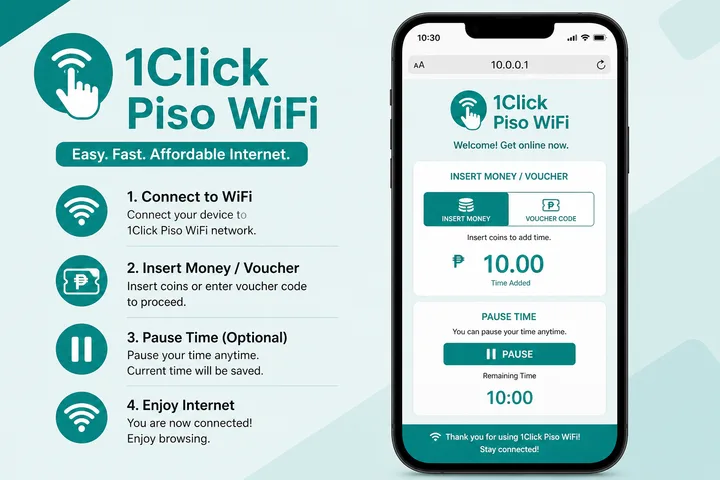
1Click Piso WiFi (also 1 Click / one click Piso WiFi) is a Philippine vendo portal brand. Connect to the hotspot, open http://10.0.0.1, pay with coins or a voucher, and use Pause Time when enabled.
Key Takeaways
- 1Click Piso WiFi (also 1 Click / one click Piso WiFi) is a Philippine vendo portal brand.
- Connect to the hotspot, open http://10.0.0.1 , pay with coins or a voucher, and use Pause Time when enabled.
- This page covers what 1Click is, login, pause, and how it differs from LPB and AdoPisoft — with hub links for deep tutorials.
- Quick path: Join SSID → mobile data OFF → http://10.0.0.1 → Insert Money / voucher → optional Pause.
This page covers what 1Click is, login, pause, and how it differs from LPB and AdoPisoft — with hub links for deep tutorials.
Quick path: Join SSID → mobile data OFF → http://10.0.0.1 → Insert Money / voucher → optional Pause.
On this page: What it is · Login · Pause time · vs LPB / AdoPisoft · Name variants · FAQ
What Is 1Click Piso WiFi?
1Click Piso WiFi is prepaid public WiFi software/hardware branded for coin and voucher sessions. Searchers also type 1 click piso wifi, one click piso wifi, and 1click piso wifi 10.0.0.1.
Like other Piso platforms, the machine acts as a local gateway. Until you pay, traffic is redirected to the captive portal. After payment, your device gets timed access.
- Category: Piso WiFi
- Common portal IP:
10.0.0.1 - Typical actions: Insert Money, voucher, Pause / Resume, logout
1Click Piso WiFi Login
Customer “login” is the portal page — not Facebook or Gmail. Open http://10.0.0.1 in the address bar.
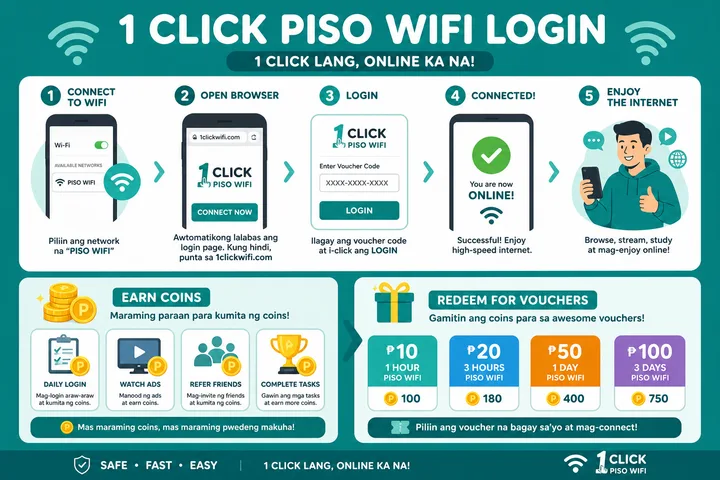
- Connect to the 1Click / Piso WiFi network.
- Turn mobile data OFF.
- Browser → type
http://10.0.0.1(avoid https and avoid searching the IP on Google). - Insert coins via Insert Money or redeem a voucher code.
- If the portal does not load, find the real gateway with the gateway checker.
| Action | Where |
|---|---|
| Pay / start session | User portal at 10.0.0.1 |
| Pause / Resume | Same portal, active session |
| Owner settings | Admin path on the vendo (credentials on sticker) |
General login + typo help: 10.0.0.1 guide.
1Click Piso WiFi Pause Time
1click piso wifi pause time: with paid minutes active, open http://10.0.0.1 → tap Pause Time. Resume later on the same device.
- Confirm you still have remaining time.
- Open the 1Click portal at
http://10.0.0.1. - Tap Pause — timer should freeze and internet for that session stop.
- Return → Resume on the same phone or laptop.
Missing Pause button usually means the owner disabled the feature. Brand-specific answer above; full troubleshooting (Chrome, Android, iPhone, MAC binding): Piso WiFi pause time.
1Click vs LPB vs AdoPisoft
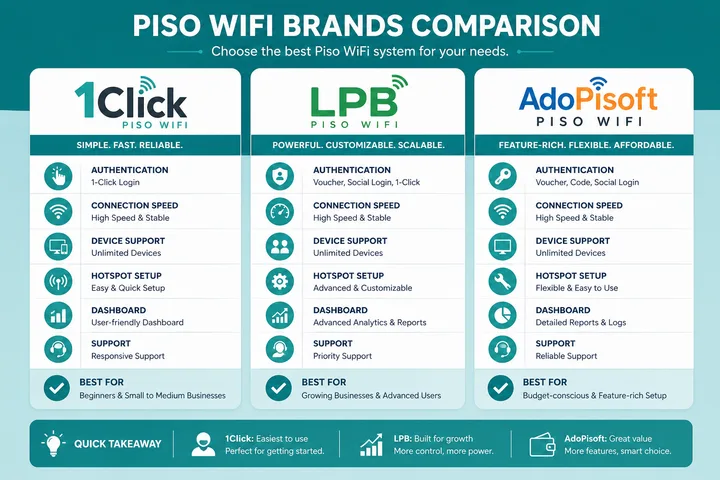
| 1Click | LPB | AdoPisoft | |
|---|---|---|---|
| What it is | Portal brand | Portal brand | Portal brand |
| User portal | Often 10.0.0.1 | Usually 10.0.0.1 | Usually 10.0.0.1 |
| Common admin defaults | Sticker / installer | admin / 123456789 | admin / admin |
| Pause | Portal Pause Time if enabled | Same pattern | Enable in session controls |
| Deep page | This page | LPB guide | AdoPisoft guide |
If you are unsure which brand the shop uses, look at the portal logo/title on 10.0.0.1 or the sticker on the vendo.
1Click Search Variants
| Typed | Means |
|---|---|
| 1click piso wifi | Primary brand query |
| 1 click piso wifi | Spaced spelling |
| one click piso wifi | Spoken/written variant |
| 1-click piso wifi | Hyphenated spelling of the same name |
| 1click piso wifi pause time | Pause on 1Click |
| 10.0.0.0.1 click piso wifi | Typo IP + 1Click |
1Click Admin Password and Default Credentials
There is no safe universal 1Click admin password to assume. The installer or machine owner may choose the credentials, customize the admin path, or change factory details during deployment. Check the controller label, setup card or installer handover record. Customer users do not need an admin password to insert coins, redeem vouchers or pause time.
| Situation | Correct action |
|---|---|
| Customer wants internet | Use the public portal at http://10.0.0.1; do not open admin |
| Owner has the setup label | Use its admin URL and credentials, then change any factory password |
| Owner forgot a changed password | Contact the installer or follow the official controller recovery process |
| Online list claims a default | Do not keep guessing; platforms and installer builds differ |
Repeated guesses may lock the account, and resetting hardware without the correct backup can erase rates, vouchers or network settings. LPB and AdoPisoft defaults shown in comparisons do not prove that a 1Click installation uses the same credentials.
Owner Setup Overview: Rates and Portal Buttons
For owners, setup usually means connecting the upstream internet, confirming the coin acceptor and controller, securing admin access, then configuring rate packages. Test every customer button from a separate phone before opening the vendo for paid use.
- Set the WiFi name and verify that unpaid devices reach the captive portal.
- Create clear rates, such as pesos to minutes or hours, without overlapping packages that confuse customers.
- Enable only the portal buttons you support: Insert Money, Voucher, Pause/Resume and Status.
- Choose whether Pause is allowed and document any maximum paused-session or auto-expiry period.
- Test coin pulses, voucher redemption, timer deduction, Pause, Resume and internet restoration.
- Change the admin password, store a backup securely and keep admin access off the public customer workflow.
The exact menu labels depend on the build. Owners comparing hardware, controller and startup needs can use the Piso WiFi machine guide; rate planning is available in the rate calculator.
Is 1Click Hardware or Firmware?
1Click is best treated as the branded vendo system or portal stack, not as one guaranteed hardware model. Sellers and installers may bundle a controller, coin acceptor, router/access point, enclosure and configured portal under the 1Click name. Two machines with the same portal branding can therefore use different component revisions or installer settings.
| Layer | What it controls |
|---|---|
| Portal / firmware | Rates, vouchers, session timer, Pause and admin menus |
| Controller and coin hardware | Reads payment pulses and starts the configured time |
| Router / access point | Provides the SSID, local gateway and internet connection |
| Installer configuration | Credentials, branding, enabled buttons and network layout |
The spellings 1click, 1 click, one click and 1-click normally describe the same name, not separate login sites. Check the logo on the local portal before paying.
What Makes a 1Click Installation Distinct
Packaged systems hide the underlying stack, so verify what you can actually administer. JuanFi and LBS Piso WiFi make useful comparisons. Before buying a bundle, run the numbers in Piso WiFi business and the free tools hub.
“1Click” may refer to a packaged controller/firmware offering sold with an enclosure or complete vendo, but the label alone does not identify one universal router, gateway or credential. Identify the unit by its boot screen, owner documentation, controller version and wiring diagram rather than assuming it is an LPB skin.
- An all-in-one package can still contain separate coin, controller, router and uplink functions inside one enclosure.
- Portal buttons and package names are operator-configurable; missing Pause does not prove a different brand.
- Use the installer’s documented update and backup path, because controller images are not interchangeable.
- For generic user pause steps, link to Pause Time; this page focuses on identifying and administering 1Click.
Sources, Scope, and Corrections
Claim basis: Login addresses and menu paths are common defaults, not universal settings. Confirm them on the device label, portal, official documentation, or provider support because firmware and owner configuration can differ. See our Editorial Policy for claim labels and source priorities.
Independence: 10001ip.co is not affiliated with, sponsored by, or an official support channel for the brand, ISP, or platform discussed on this page.
Found a mismatch? Send the page URL and privacy-safe evidence using the correction process. This block does not claim a hands-on test or a fact-review date.
Related Guides
- Piso WiFi guide — Understand the portal, sessions, rates and owner side
- Piso WiFi pause time — Pause and resume a paid session without losing minutes
- Piso WiFi machine — Compare hardware, startup cost and owner requirements
- Piso WiFi rate calculator — Model timer rates, sales and potential income
1Click Piso WiFi FAQ
What Is 1Click Piso WiFi?
1Click (also 1 Click or one click) Piso WiFi is a coin/voucher hotspot portal brand used on Philippine vendo machines. Users usually open http://10.0.0.1 to pay, pause, or check status.
How Do I Log in to 1Click Piso WiFi?
Connect to the 1Click / Piso WiFi SSID, turn mobile data off, open http://10.0.0.1 in the browser address bar, then insert coins or redeem a voucher.
How Do I Pause 1Click Piso WiFi Time?
On an active paid session, open http://10.0.0.1 and tap Pause Time, then Resume on the same device. Deep guide: /piso-wifi-pause-time/
Is 1Click the Same as LPB or AdoPisoft?
No. 1Click, LPB, and AdoPisoft are different portal platforms. The customer flow is similar (local portal, often 10.0.0.1), but admin menus and defaults differ.
What Is One Click Piso WiFi at 10.0.0.1?
Same product as 1Click / 1 Click Piso WiFi. Type http://10.0.0.1 while connected to that hotspot to reach the captive portal.
What Is the Default 1Click Piso WiFi Admin Password?
There is no reliable universal default. Owners should use the controller label, setup card or installer handover details, then change any factory password. Customers do not need admin access.
Is 1Click Piso WiFi Hardware or Firmware?
It is best understood as a branded vendo portal/system that sellers may bundle with controller, coin and router hardware. Components and settings can vary between installations.
Why Is the 1Click Pause Time Button Missing?
Pause may be disabled by the owner, hidden until a paid session is active, or unavailable because the phone left the Piso WiFi network. Reconnect, turn mobile data off and check the portal timer.