
This gateway checker helps you find your device’s local IP clues and the most common router / Piso WiFi portal addresses — then open the right one. Your real gateway is whatever your current WiFi assigns (often 10.0.0.1, 192.168.1.1, or 192.168.0.1).
Key Takeaways
- This gateway checker helps you find your device’s local IP clues and the most common router / Piso WiFi portal addresses — then open the right one.
- Your real gateway is whatever your current WiFi assigns (often 10.0.0.1 , 192.168.1.1 , or 192.168.0.1 ).
- Because browsers block silent probes of private IPs over HTTPS, this tool combines local WebRTC hints with a guided checklist and one-tap portal links.
- The most reliable method is your device’s WiFi details — the field may say Gateway, Router, or Default gateway.
Because browsers block silent probes of private IPs over HTTPS, this tool combines local WebRTC hints with a guided checklist and one-tap portal links.
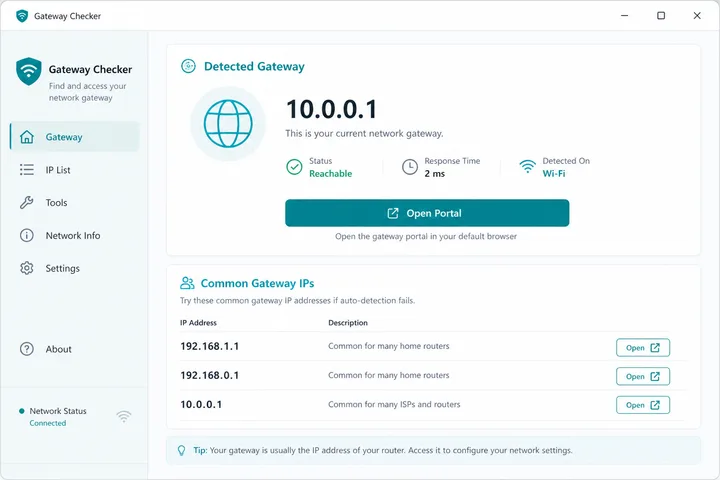
Run the Gateway Checker
Step 1: Stay connected to the WiFi you want to check. Turn mobile data off.
Step 2: Try the common portals (opens in a new tab — works only on that LAN):
On this page: Tool · Manual find · Common IPs · Piso note · FAQ
How to Find Your Default Gateway Manually
The most reliable method is your device’s WiFi details — the field may say Gateway, Router, or Default gateway.
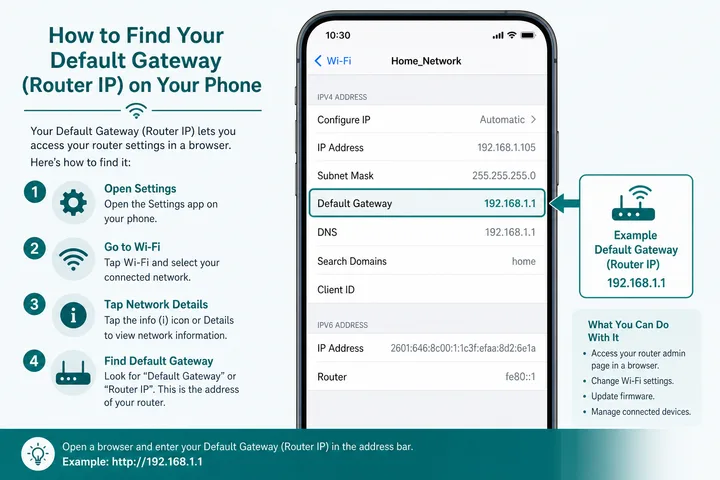
Android
- Settings → Network & internet → Internet → tap the connected WiFi.
- Open network details / pencil / Advanced.
- Find Gateway or Router IP.
- Type that IP in Chrome with
http://.
iPhone
- Settings → Wi-Fi → tap the “i” next to the network.
- Read the Router field.
- Open Safari →
http://<Router IP>.
Windows
Open Command Prompt and run ipconfig. Look for Default Gateway under the active adapter.
MAC
System Settings → Network → Wi-Fi → Details → TCP/IP → Router.
Common Gateway IP Addresses
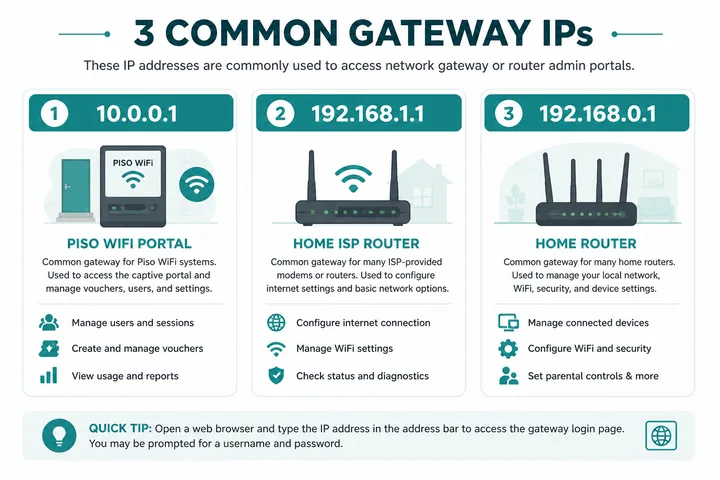
| Gateway | Typical use | Open |
|---|---|---|
| 10.0.0.1 | Piso WiFi portal + some routers | http://10.0.0.1 |
| 192.168.1.1 | Many ISP / home routers | http://192.168.1.1 |
| 192.168.0.1 | Many Netgear/D-Link/Tenda-style routers | http://192.168.0.1 (not letter-O 192.168.o.1) |
Piso WiFi Note
If this checker does not resolve the address, the background explainers usually do: what is an IP address covers private ranges, and TP-Link router login covers a brand whose hostname often replaces the numeric gateway. The other calculators live in the free tools hub.
On Piso hotspots, even if detection shows a device IP like 10.0.0.23, the portal is still usually http://10.0.0.1. For pause / voucher / entity guides: Piso WiFi, pause time, voucher code.
What If Your Gateway Is Not 10.0.0.1?
Open the address shown as Gateway or Router in your current WiFi details. 10.0.0.1 is common for Piso WiFi, but home routers and Philippine ISP modems often use a 192.168.x.x address. A different gateway does not mean the checker failed; it means your network uses another private subnet.
- Confirm you are connected to the intended WiFi, not mobile data, a neighbor’s SSID or a mesh guest network.
- Type
http://plus the gateway into the address bar. Do not search it on Google. - If the gateway opens a router admin page instead of a Piso portal, you are probably on a home/ISP network.
- If a Piso captive portal uses a different controller address, follow the sign-in notification or ask the operator.
Common Philippine ISP and Router Gateways
| Gateway to check | Common context | Guide |
|---|---|---|
192.168.1.1 | Common home-router default across many brands and ISP setups | Find your default gateway |
192.168.0.1 | Common D-Link, Tenda, TP-Link and other router subnet | Gateway troubleshooting |
192.168.254.254 | Used by some Philippine ISP modem/router configurations | 192.168.254.254 guide |
192.168.1.1 or ISP label address | PLDT modem administration varies by model and provisioning | PLDT admin guide |
10.0.0.1 | Piso WiFi customer portal or some router networks | 10.0.0.1 guide |
These are candidates, not guaranteed credentials or addresses. The Router/Gateway field assigned to your device is stronger evidence than a generic ISP list. Some modem models place administration on a different LAN IP, and mesh nodes may direct you to the main router or a mobile app.
Sources, Scope, and Corrections
Claim basis: Calculations and browser-detected values are explanatory outputs, not device certification. Confirm addresses, rates, and session behavior on your own device or portal. See our Editorial Policy for claim labels and source priorities.
Found a mismatch? Send the page URL and privacy-safe evidence using the correction process. This block does not claim a hands-on test or a fact-review date.
Related Guides
- Free tools hub — Choose a gateway checker, session helper or rate calculator
- Default gateway guide — Find the router address used by your device
- Router IP address list — Compare common and uncommon private gateways
- What is an IP address? — Understand IPv4, IPv6, public and private addresses
FAQ
Why Can’t a Website Auto-open My Router?
Modern browsers block cross-origin access to private LAN IPs from HTTPS pages for security. That is why this tool gives hints + manual links instead of silently scanning your network.
Detection Found Nothing — Is That Bad?
No. Many phones hide WebRTC candidates. Use WiFi details or try the common portal buttons.
Which IP Should Piso WiFi Users Try First?
http://10.0.0.1 — see the 10.0.0.1 login guide.