
Piso WiFi is coin- and voucher-operated public WiFi common in the Philippines. You connect to a vendo hotspot, open the captive portal (usually http://10.0.0.1), pay with coins or a voucher, then browse — and often pause remaining time for later.
Key Takeaways
- Piso WiFi is coin- and voucher-operated public WiFi common in the Philippines.
- You connect to a vendo hotspot, open the captive portal (usually http://10.0.0.1 ), pay with coins or a voucher, then browse — and often pause remaining time for later.
- This page is the entity hub for piso wifi , peso wifi , portal piso wifi , and piso wifi login — what it is, how it works, how to log in, rates, platforms, and where to go next for pause, vouchers, and tools.
- Piso WiFi (also searched as peso wifi or wifi piso ) is a prepaid public WiFi system where users buy short internet sessions — usually by inserting Philippine peso coins into a vendo machine or redeeming a…
This page is the entity hub for piso wifi, peso wifi, portal piso wifi, and piso wifi login — what it is, how it works, how to log in, rates, platforms, and where to go next for pause, vouchers, and tools.
On this page: What it is · How it works · Login / portal · Rates · Platforms · Name typos · vs home WiFi · FAQ
What Is Piso WiFi?
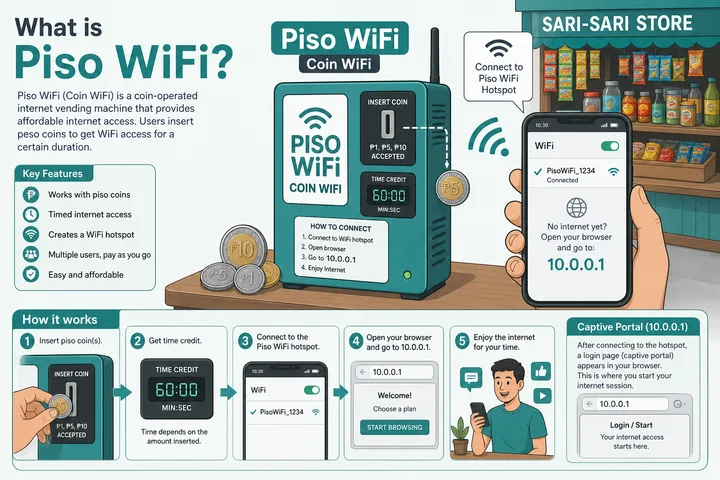
Piso WiFi (also searched as peso wifi or wifi piso) is a prepaid public WiFi system where users buy short internet sessions — usually by inserting Philippine peso coins into a vendo machine or redeeming a voucher code on a captive portal.
You find it at sari-sari stores, terminals, campuses, barangay halls, waiting sheds, and small shops. “Piso” refers to the peso coin model: pay a few pesos, get minutes of access, optionally pause unused time.
Entity stack in one line: Piso WiFi (service) → vendo / machine (hardware) → portal software (LPB, AdoPisoft, PisoFi, JuanFi, etc.) → gateway IP (often 10.0.0.1) → session (coins, voucher, pause, logout).
How Piso WiFi Works
You connect to the hotspot SSID, open the portal, pay, then the controller grants timed internet to your device. When time ends — or you pause — access stops until you pay again or resume.
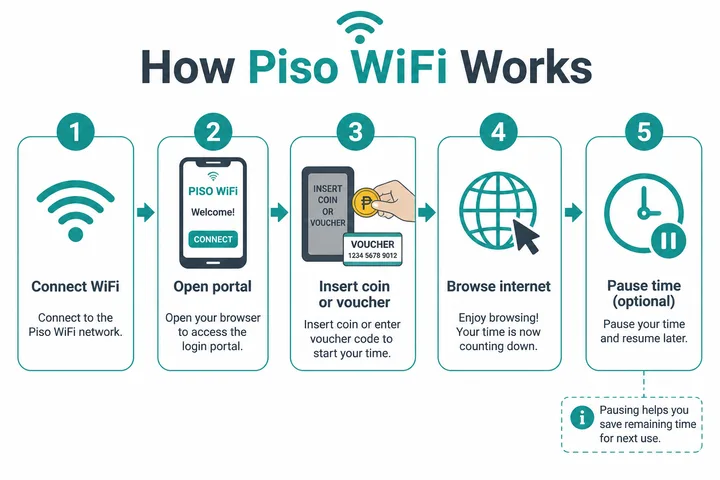
- Connect to the Piso WiFi SSID (often open).
- Open portal via captive redirect or type
http://10.0.0.1. - Pay with Insert Money (coins) or Voucher Code.
- Browse while the session timer counts down.
- Pause remaining time if the owner enabled Pause Time — see pause guide.
What Happens on the Network
The vendo acts as a local gateway and captive-portal controller. Until you pay, many sites are blocked or redirected to the portal. After payment, your device’s MAC/session is allowed for X minutes. Pause freezes that allowance; logout ends it per owner policy.
Piso WiFi Login and Portal
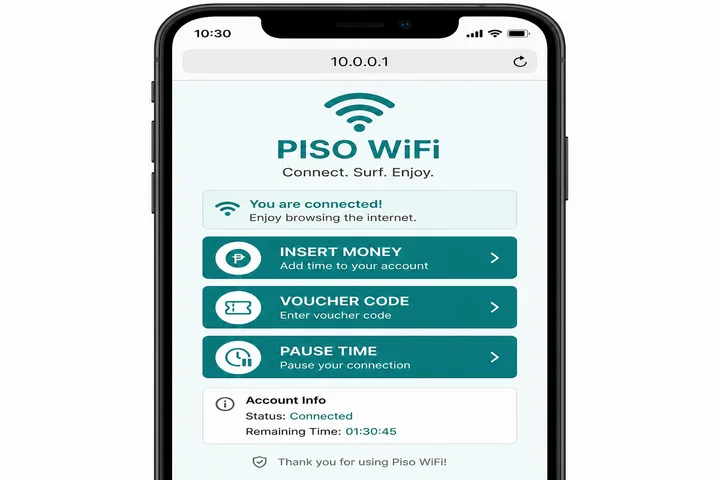
Piso wifi login for customers means opening the user portal — not the owner admin panel. Type http://10.0.0.1 in the browser address bar while connected to the hotspot.
| Intent | Where to go | Notes |
|---|---|---|
| Customer portal / sign in | http://10.0.0.1 | Insert money, voucher, pause |
| Owner admin | http://10.0.0.1/admin | Needs admin username/password |
| Status / session | Portal status pages | Varies by software build |
- Turn mobile data OFF or the phone may never reach the local portal.
- Use http://, not https://, for most vendo portals.
- Customer login is not your Facebook/Gmail password.
- Deep gateway + typo guide: 10.0.0.1 login.
Typical Piso WiFi Rates
Rates are set by each machine owner — there is no single national price. Common coin slots are ₱1 / ₱5 / ₱10 with minutes mapped in admin rate tables.
| Example payment | What you might get | Reality check |
|---|---|---|
| ₱1–₱5 coin | Short burst (minutes) | Depends on owner rate table |
| ₱10–₱20 | Longer session | Often sold as voucher packs too |
| Voucher code | Fixed minutes / hours | Printed slip or digital code from the store |
Owners change rates in admin under timer / rate / insert-coin settings. Users only see what that machine offers on its portal.
Piso WiFi Platforms and Brands
Platform names are labels on the portal, not guarantees of shared firmware. Beyond the major builds, LBS Piso WiFi and JuanFi each use different admin structures, and WiFi ng Bayan describes community and public hotspots that look similar to customers. Session and pricing aids are collected in the free tools hub, including the pause time helper.
“Piso WiFi” is the category. Software/hardware brands differ — LPB, AdoPisoft (AdoPisoFi), PisoFi, JuanFi, Inday, and custom MikroTik builds are common. The user experience still centers on a local portal IP.
| Platform | Typical user portal | Typical admin |
|---|---|---|
| LPB Piso WiFi | 10.0.0.1 | 10.0.0.1/admin — admin / 123456789 |
| AdoPisoft | 10.0.0.1 | admin / admin (or administrator / admin1234) |
| PisoFi | Local portal IP | administrator / admin12345 (varies) |
| JuanFi | MikroTik hotspot portal | admin / admin (varies) |
Not every SSID labeled “Piso WiFi” uses 10.0.0.1. If the portal fails, find the real gateway with our gateway checker.
Common Name and IP Typos
Search typos still mean this entity. Map them once so Google does not need five doorway pages.
| Typed | Means |
|---|---|
| peso wifi / wifi piso / piso.wifi | Piso WiFi |
| pisowife | Piso WiFi misspelling |
| portal piso wifi / chrome piso wifi | Open the captive portal in browser |
| 01.01.01 / 101 / 10101 piso wifi | Usually 10.0.0.1 portal shorthand |
| sign in piso wifi | Customer portal login |
Piso WiFi vs Home Router WiFi
| Piso WiFi | Home router WiFi | |
|---|---|---|
| Payment | Coins / vouchers per session | Monthly ISP plan |
| Portal | Captive portal required | Usually none after join |
| Common gateway | Often 10.0.0.1 | Often 192.168.1.1 or 192.168.0.1 |
| Pause feature | Common on vendo software | Not applicable the same way |
If you meant a home router address like 192.168.o.1 (letter O typo), see 192.168.0.1 guide.
A Short History and Meaning of Piso WiFi
“Piso WiFi” is a Philippine descriptive term for low-cost, metered public WiFi sold in peso-denominated increments. It developed from coin-operated internet and hotspot-vending setups rather than from one company or one standardized product. Today the label covers many independent operators, controller platforms, router combinations and custom portal skins. Because there is no single universal system, the portal address, packages and session rules must be confirmed on each hotspot.
Payment and Rate Attributes to Check
- Payment channel: coin acceptor, operator-issued voucher, or an operator/platform-supported digital payment flow.
- Time grant: minutes credited for each peso or package; larger packages may use a different effective hourly rate.
- Bandwidth rule: a time package may also have speed, data or fair-use limits.
- Session controls: pause, resume, logout, idle timeout, expiry and same-device binding vary by setup.
- Portal identity: 10.0.0.1 is common but not guaranteed; use the connected network’s gateway or sign-in prompt.
Bakit “Piso” Kahit Hindi ₱1 Ang Package?
Category name na ang “Piso WiFi.” Puwedeng may ₱1 coin step pero puwede ring ₱5, ₱10, voucher o ibang package ang operator. Basahin muna ang posted rate table bago maghulog.
Pare-pareho Ba Ang Piso WiFi Portal?
Hindi. Iba-iba ang controller, firmware, gateway, buttons at rules. Kung hindi gumagana ang 10.0.0.1, tingnan ang network gateway at sundin ang sign-in notification o operator instructions.
Sources, Scope, and Corrections
Claim basis: Network behavior is separated from common portal defaults. Addresses, buttons, rates, credentials, and session behavior can vary by firmware, platform, owner configuration, and device. See our Editorial Policy for claim labels and source priorities.
Found a mismatch? Send the page URL and privacy-safe evidence using the correction process. This block does not claim a hands-on test or a fact-review date.
Related Guides
- Piso WiFi pause time — Pause and resume a paid session without losing minutes
- Piso WiFi voucher codes — Redeem, troubleshoot and create voucher codes
- Piso WiFi not working — Fix portal, payment and connection problems
- Free tools hub — Choose a gateway checker, session helper or rate calculator
Piso WiFi FAQ
What Is Piso WiFi?
Prepaid public WiFi in the Philippines paid with coins or vouchers through a local portal, often at http://10.0.0.1.
How Do I Log in to Piso WiFi?
Connect to the SSID, turn mobile data off, open http://10.0.0.1, then insert coins or enter a voucher.
Is Piso WiFi Free?
No. Sessions are prepaid. “Free voucher” searches usually mean store-issued codes — not unlimited free internet.
Can I Pause Piso WiFi?
Yes on most machines if the owner enabled Pause Time. Full steps: Piso WiFi pause time.
Where Do I Enter a Voucher Code?
On the portal Voucher field. Guide: Piso WiFi voucher code.
Ano Ang Piso WiFi?
Ito ay coin- o voucher-operated na public WiFi sa Pilipinas. Kumonekta sa hotspot, buksan ang http://10.0.0.1, magbayad, tapos mag-internet.
Next Guides
- Pause time — freeze remaining minutes
- Voucher code — redeem codes at 10.0.0.1
- Piso WiFi machine — owner hardware and admin setup
- Piso WiFi business — costs, pricing and operating risk
- Pause time app — browser vs APK claims
- 10.0.0.1 login — gateway, typos, admin
- Gateway checker — find your real router IP