
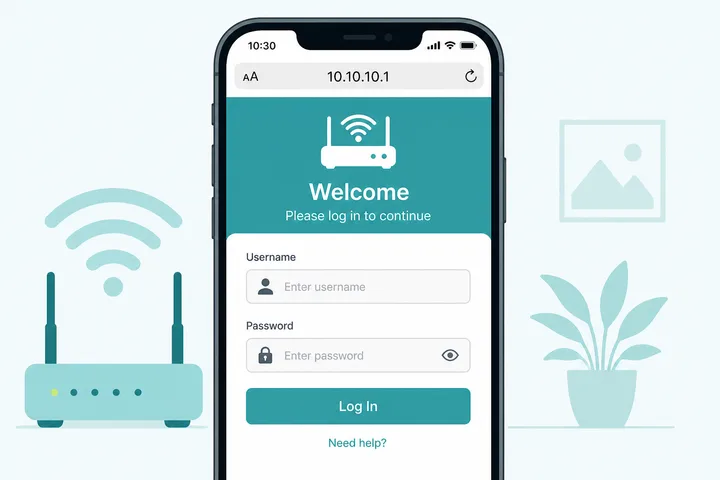
10.10.10.1 is a private address used as some router admin logins and as a captive-portal / custom gateway on certain Piso WiFi and hotspot setups. Type http://10.10.10.1 while connected to that network.
Key Takeaways
- 10.10.10.1 can be router admin or a custom/Piso-style portal — open with
http://10.10.10.1. 10.10.10.l(letter L) → use 10.10.10.1.- Standard Piso machines often use 10.0.0.1 — try that if this IP fails.
- Related: 10.0.0.1 · Piso WiFi · Gateway checker · 192.168.0.1
This page absorbs common searches like 10.10.10, 10.10.10.l (letter L), and 10.10.10.01. It covers login, portal context in the PH, typos, fixes, and how 10.10.10.1 differs from 10.0.0.1.
On this page: What it is · How to open / log in · Piso WiFi / portal · Typos (letter L) · vs 10.0.0.1 · Not working · FAQ
What Is 10.10.10.1?
10.10.10.1 is a private IPv4 address in the 10.0.0.0/8 RFC 1918 range. Some routers use it as the default gateway; some PH Piso WiFi / hotspot builds use it (or nearby 10.10.10.x) as a captive portal.
It is not a public website. It only works on the LAN or hotspot that owns that address. If you meant a coin WiFi pause or voucher screen, confirm whether your machine uses 10.0.0.1 or 10.10.10.1.
How to Open or Log in to 10.10.10.1
Stay on the target WiFi, open a browser, type http://10.10.10.1 in the address bar. For router admin you will get a username/password form; for a captive portal you may get a voucher, pause, or insert-coin screen.
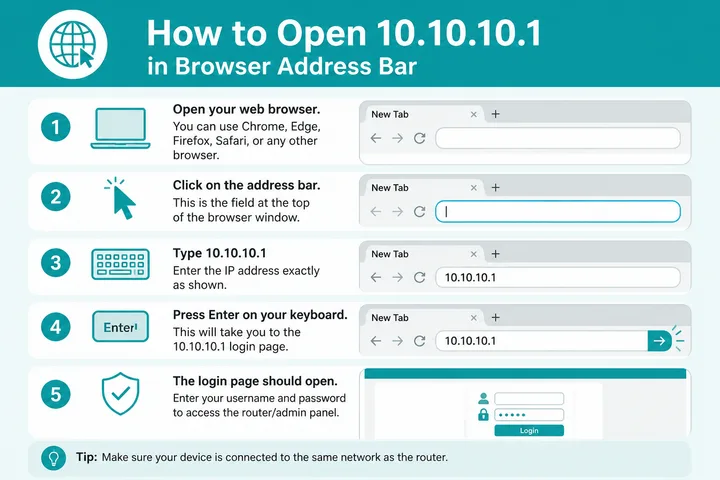
- Connect to the router or Piso/hotspot WiFi.
- Turn off VPN and mobile data.
- Open a browser.
- Type
http://10.10.10.1(digit 1, not letter L) → Enter. - Complete admin login or portal (voucher / pause / coin) as shown.
Still blank? Your portal may be 10.0.0.1 — try that or the gateway checker.
10.10.10.1 and Piso WiFi Portals
In the Philippines, many Piso WiFi machines use 10.0.0.1 as the captive portal. Some custom firmware or operators use 10.10.10.1 instead. Match the IP printed on the machine or shown after you join WiFi.
- Need pause / time controls? See Piso WiFi and related pause guides on this site.
- Voucher or coin insert still fails? Confirm portal IP first — wrong gateway looks like “WiFi is broken.”
- Admin panel ≠ customer portal. Operator logins are separate from pause/voucher screens.
If you only need to pause time on a standard Piso setup, start at Piso WiFi and try 10.0.0.1 before assuming 10.10.10.1.
10.10.10.l and Other Mistypes
The letter L looks like digit 1. 10.10.10.l is invalid — use 10.10.10.1.
| Typed | Use |
|---|---|
| 10.10.10.l / 10.10.10.L | 10.10.10.1 |
| 10.10.10 (missing .1) | 10.10.10.1 |
| 10.10.10.01 | 10.10.10.1 (same host; prefer .1) |
| 10 10 10 1 / 10-10-10-1 | 10.10.10.1 |
| https://10.10.10.1 | Try http:// first |
10.10.10.1 vs 10.0.0.1
Both are private. Most PH Piso portals use 10.0.0.1; some custom gateways and certain routers use 10.10.10.1.
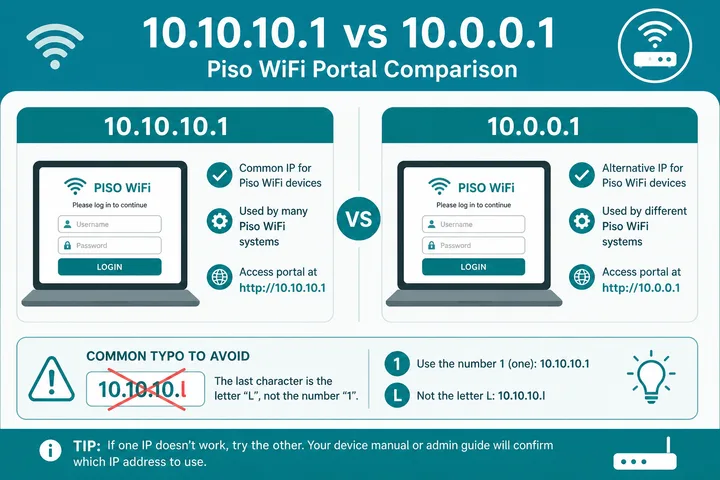
| Address | Typical use | PH note |
|---|---|---|
| 10.10.10.1 | Some routers + custom portals | Less common than 10.0.0.1 for Piso |
| 10.0.0.1 | Many routers + most Piso portals | Start here for standard Piso |
| 192.168.1.1 | Home / ISP routers | Admin, not usually coin WiFi portal |
| 192.168.0.1 | Many home routers | Admin gateway |
10.10.10.1 Not Working
Fix the network path before resetting anything:
| Problem | Fix |
|---|---|
| Typed 10.10.10.l | Replace letter L with digit 1 |
| Typed 10.10.10 only | Add .1 → 10.10.10.1 |
| Portal blank | Try 10.0.0.1; confirm SSID is the Piso/hotspot |
| Wrong gateway | Gateway checker or WiFi details |
| VPN / mobile data | Turn both off |
Sources, Scope, and Corrections
Claim basis: Network behavior is separated from common portal defaults. Addresses, buttons, rates, credentials, and session behavior can vary by firmware, platform, owner configuration, and device. See our Editorial Policy for claim labels and source priorities.
Found a mismatch? Send the page URL and privacy-safe evidence using the correction process. This block does not claim a hands-on test or a fact-review date.
10.10.10.1 Versus Nearby Private Addresses
If you are unsure why two addresses in the same 10.x range behave differently, what is an IP address covers private ranges and prefixes. When the browser shows a paid sign-in screen rather than router firmware, captive portal explains the redirect, and the free tools hub helps narrow which local address to try first.
10.10.10.1 belongs to the 10.0.0.0/8 private range, but it is not interchangeable with 10.0.0.1. Many Piso WiFi captive portals default to 10.0.0.1, while some routers, repeaters, or custom installs expose admin on 10.10.10.1. Confirm the live gateway on your device before changing WiFi names or passwords.
If a sticker shows 10.10.10.1 and the browser lands on a coin/voucher screen, you are on a portal path — stop and use the customer flow. If you see router firmware menus instead, treat credentials as device-dependent and change defaults after first login.
Related Guides
- Router IP address list — Compare common and uncommon private gateways
- Default gateway guide — Find the router address used by your device
- Gateway checker — Find the correct local router or portal address
- What is an IP address? — Understand IPv4, IPv6, public and private addresses
FAQ
What Is 10.10.10.1?
10.10.10.1 is a private IPv4 address used as a router admin gateway on some devices and as a captive-portal / custom gateway address on certain Piso WiFi and hotspot setups in the Philippines.
I Typed 10.10.10.l — What Should I Use?
The letter L is invalid in an IP. Replace it with the digit 1: 10.10.10.1.
Is 10.10.10 the Same as 10.10.10.1?
No. A full IPv4 address needs four octets. Add .1: 10.10.10.1.
Is 10.10.10.1 the Same as 10.0.0.1?
No. Different private addresses. Many Piso WiFi portals use 10.0.0.1; some custom portals or routers use 10.10.10.1.
How Do I Pause Piso WiFi If This Is a Portal?
If you are on a Piso captive portal, use the vendor pause/time controls or see the Piso WiFi pause guides. Opening 10.10.10.1 only helps if that is your portal IP.