
Piso WiFi pause time freezes your paid session timer so remaining minutes are not wasted while you step away. Connect to the hotspot, open http://10.0.0.1 in the browser address bar, tap Pause Time, then tap Resume on the same device when you return.
Key Takeaways
- Piso WiFi pause time freezes paid minutes at
http://10.0.0.1— no app required. - Use the same device to Resume; turn mobile data off to reach the portal.
- Missing button: no active session, owner disabled Pause, or wrong platform UI — see LPB / AdoPiSoft / PisoFi below.
- Pause is not logout, refund, voucher transfer, or multi-phone sharing.
- Typos like 10.0.0.0.1 still mean the same gateway: 10.0.0.1.
- Related: Piso WiFi · Voucher code · Pause helper · 10.0.0.1 login
This is the full Piso WiFi pause time guide for the Philippines: how pause works on LPB, AdoPiSoft, and PisoFi, Chrome / Android / Windows / iPhone steps, what to do when there is no Pause button, owner enable settings, MAC binding, reboot losses, and the typos people type for 10.0.0.1 piso wifi pause.
Quick path: WiFi connected → mobile data OFF → http://10.0.0.1 → active paid session → Pause Time → later Resume on the same phone or laptop. No APK required for standard pause.
On this page: What pause is · What it is not · How to pause · LPB / Ado / PisoFi · Resume · Chrome · Android · iPhone · Windows · Button missing · No-button options · Owner settings · IP typos · MAC issues · FAQ
What Is Piso WiFi Pause Time?
Piso WiFi pause time is a session control that temporarily freezes your prepaid countdown. While paused, internet access on that device stops and minutes stop deducting. When you resume, the timer continues from the saved remaining time.
People also search this as 10.0.0.1 piso wifi pause, 10.0.0.1 pause time, pause time wifi, and piso wifi vendo pause. Same intent: stop the meter without losing paid minutes.
Pause is not the same as logout. Logout ends or abandons the session rules set by the operator. Pause keeps your remaining balance tied to the device session until you resume or the pause limit expires.
| State | Timer | Internet | What you should do |
|---|---|---|---|
| Active | Counting down | On | Browse normally |
| Paused | Frozen | Off for that session | Leave and return later |
| Resumed | Continues from saved time | On again | Use remaining minutes |
| Expired / auto-ended | Zero or cleared | Off | Insert coins or redeem a voucher again |
What Piso WiFi Pause Time Does Not Do
Search results mix pause with refunds, transfers, and “hack” claims. Use this negative checklist so you do not waste coins chasing features the portal does not provide.
| Claim / expectation | Reality |
|---|---|
| Pause refunds coins | No. Coins already bought time; pause only freezes remaining minutes. |
| Pause moves time to another phone | Usually no. Sessions are device / MAC bound. |
| Pause works without paid time | No. You need an active session first. |
| Pause = logout | No. Logout can clear leftover minutes depending on owner policy. |
| You need a “pause password” or Gmail login | No for users. Only owners use admin credentials to enable the feature. |
| You must install a pause APK | No for standard portals. Browser at http://10.0.0.1 is enough — see pause time app. |
| Paused time lasts forever | No. Owners often set a max pause window (commonly about 1 hour; some allow longer). |
| Router reboot always keeps paused time | Not guaranteed. Power loss or firmware restart can clear sessions. |
How to Pause Piso WiFi Time at 10.0.0.1
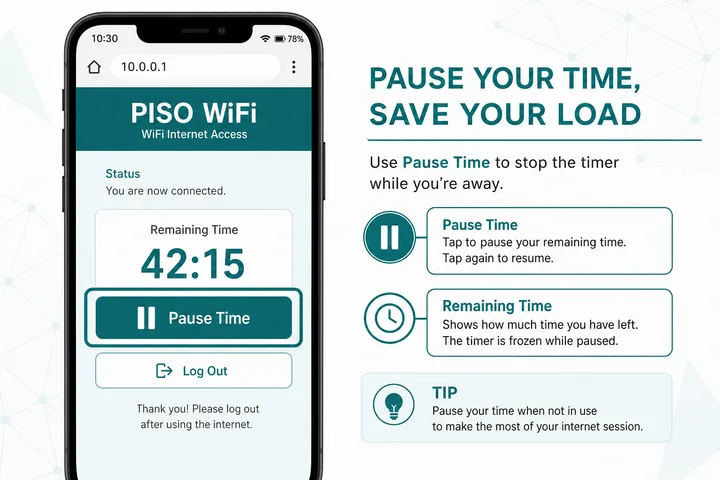
To pause, open the user portal at http://10.0.0.1 on an active paid session and tap Pause Time. You do not need admin login for normal pause/resume.
- Connect to the Piso WiFi / vendo SSID (often open, no WiFi password).
- Turn mobile data OFF and disable Smart Network Switch / auto-switch to mobile data.
- Open Chrome, Safari, Edge, or Firefox.
- Type
http://10.0.0.1in the address bar (not Google search). Avoidhttps://and avoid10.0.0.0.1. - If you have no time yet, insert coins or redeem a voucher first — Pause only appears on an active session.
- Tap Pause Time / Pause. Confirm the timer freezes.
Bookmark http://10.0.0.1 so you can pause in two taps next time.
Pause on LPB vs AdoPiSoft vs PisoFi
Button labels and admin menus differ by software. Use this compare so you know where Pause lives for users and where owners turn it on. Default passwords below are common factory defaults only — always confirm the sticker, installer sheet, or current admin UI on that machine.
| Platform | User portal pause | Typical admin path | Common default login (confirm on device) | Notes |
|---|---|---|---|---|
| LPB Piso WiFi | Pause Time / Resume on active session | Admin → Portal / Insert Coin & Voucher → enable Pause/Resume | Often admin / 123456789 | Enable for coin and voucher modes if toggles are separate |
| AdoPiSoft | Pause / Resume on user dashboard | Admin → User portal / session controls → Allow Pause Time | Often admin / admin or administrator / admin1234 | Look for pause duration limit |
| PisoFi / JuanFi / others | Pause control if owner enabled it | Session / captive portal options | Sticker or installer notes | UI names vary; ask the operator if unsure |
If you are not sure which software you are on, check the portal branding, the machine sticker, or the owner’s admin URL path. Platform hubs: LPB, AdoPiSoft, PisoFi.
How to Resume Piso WiFi after Pause
Resume on the same device you used to pause: reconnect to the same hotspot, open http://10.0.0.1, and tap Resume / Resume Time. Remaining minutes continue from the saved value.
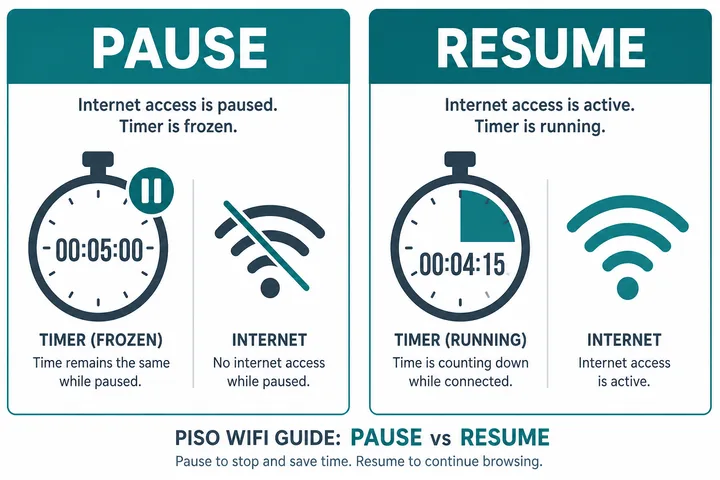
Most platforms bind the session to a device identifier (MAC address). Switching phones, using a different laptop, or enabling randomized MAC / private WiFi address can make Resume fail even if minutes remain.
Pause vs Resume vs Logout
| Action | Keeps remaining time? | Best when |
|---|---|---|
| Pause | Yes (until limit/expiry) | Short break, same device later |
| Resume | Uses saved time | You are back and ready to browse |
| Logout / disconnect | Often no / policy-dependent | You are done and do not need leftover minutes |
How to Pause Piso WiFi Time in Chrome
Chrome piso wifi pause time works the same as any browser: open Chrome, type http://10.0.0.1 in the omnibox address field, then tap Pause Time on an active session.
- Join the Piso WiFi network and turn mobile data off.
- Open Google Chrome.
- Tap the address bar at the top → type
http://10.0.0.1→ Enter. - If Chrome opens a Google search results page instead of the portal, you typed in the wrong place or Chrome treated it as a search — force the URL with
http://prefix. - Tap Pause Time.
On Android, also try the system notification Sign in to WiFi network — it often opens the captive portal without typing. After the session is active, return to http://10.0.0.1 for Pause.
If an old cached page blocks Pause, open an Incognito tab and retry.
Pause Time on Android Phone
On Android, pause from the browser portal — not from Settings WiFi. Connect to Piso WiFi, disable mobile data / smart switch, open http://10.0.0.1, then tap Pause Time.
- Samsung / Xiaomi / Oppo / realme: turn off mobile data and “switch to mobile data automatically.”
- Private MAC / randomized MAC: set the Piso network to Use device MAC so Resume still finds your session.
- Same phone required: do not pause on one Android and expect Resume on another.
Looking for an Android APK? See the dedicated guide: Piso WiFi pause time app — most “pause apps” are unnecessary because the portal already does it.
Pause Time on iPhone (Safari)
On iPhone, join the hotspot, turn off Cellular Data for the session, open Safari, go to http://10.0.0.1, and tap Pause Time. Resume later in Safari on the same iPhone.
- Turn off Auto-Join for other saved networks so iOS does not leave the Piso SSID.
- If the captive sheet appears, complete sign-in, then open Safari to the portal for Pause.
- Private WiFi Address can break Resume — disable it for that network if Pause/Resume fails after a reboot.
Pause Time on Windows PC / Laptop
For 10.0.0.1 piso wifi vendo pause windows, connect the PC to the vendo WiFi, open Edge or Chrome, visit http://10.0.0.1, and click Pause Time. Resume on that same PC.
- Connect to the Piso / vendo WiFi in Windows network settings.
- Disable Ethernet or other adapters if the PC is dual-homed and routing away from the hotspot.
- Open the browser address bar →
http://10.0.0.1. - Start a paid session if needed, then click Pause Time.
- Bookmark the portal for quick resume.
Pause Time Button Missing or Not Working
If Pause is genuinely absent on your portal, the realistic options are to finish the session or end it cleanly — Piso WiFi logout explains why disconnecting is not the same as logging out. When the portal will not load at all, captive portal covers forcing the sign-in page, and the free tools hub lists the session and gateway helpers.
If Pause Time is missing, the session is inactive, the owner disabled pause, or your device is not reaching the local portal. Fix connectivity first, then check owner settings.
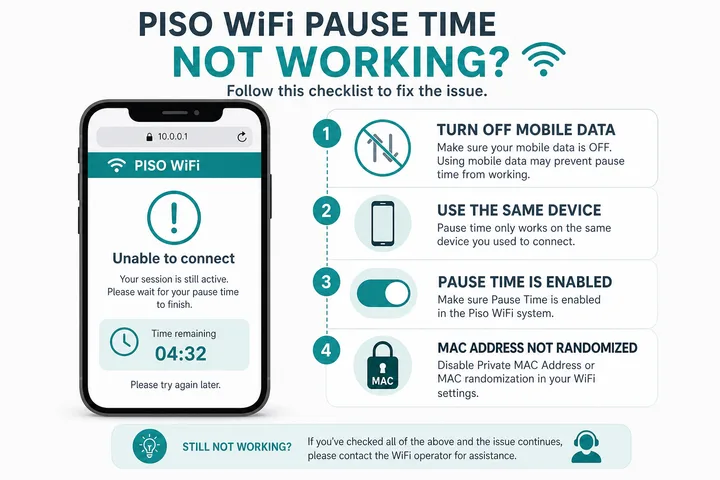
| Symptom | Likely cause | Fix |
|---|---|---|
| No Pause button | No active paid time | Insert coins or redeem voucher first |
| No Pause button (with time) | Owner disabled Pause/Resume | Ask the store operator to enable it in admin |
| Portal won’t open | Mobile data / wrong WiFi / typo IP | Data OFF, correct SSID, use http://10.0.0.1 |
| Resume fails | Different device or randomized MAC | Same device + device MAC |
| Paused then time gone | Pause limit / auto-expire hit | Pay again; ask owner about pause max duration |
| Pause works then internet still on | Cached page / wrong session | Incognito reload; confirm paused status on portal |
Does Pause Require a Password?
Regular users do not need the admin password to pause. Admin credentials are only for owners who enable Pause under portal settings. If someone asks for your Gmail password or “pause password,” that is not how the feature works.
No Pause Button? Practical Alternatives
If Pause is disabled or missing on that machine, you still have realistic options. Do not install random APKs that claim to “force pause.”
| Situation | Best next step |
|---|---|
| You only need a short session | Buy a small coin top-up and finish browsing instead of pausing. |
| You need time later today | Ask the operator for a voucher code with unused validity, or buy a short voucher now and redeem later if the machine supports it. |
| Button missing but you have time | Ask the store owner to enable Pause/Resume in admin (see owner section). |
| You must leave immediately | Use remaining minutes now, or accept that leftover time may burn — logout is not a pause substitute. |
| Portal will not load | Fix captive portal / mobile data first — captive portal guide and not working. |
| You want a sanity check before paying again | Use the pause time helper to estimate whether a paused session is still usable. |
Reboot, Power Loss, and “Time Disappeared”
Paused minutes live in the vendo controller’s session store. If the owner reboots the router, power flickers, or firmware restarts, some builds clear active and paused sessions. That is a machine/firmware behavior — not a browser bug. Confirm with the operator before assuming your phone “ate” the time.
- After a machine reboot, reopen
http://10.0.0.1on the same device and check for Resume. - If Resume is gone, ask whether the owner rebooted or changed rates/firmware recently.
- Do not keep toggling Private MAC after payment — that creates a new device identity and can make leftover time unreachable.
Owner Guide: Enable Pause Time on the Vendo
Owners enable Pause in the admin panel (usually http://10.0.0.1/admin), not on the public homepage of this site. Exact menus differ by platform — see the LPB / AdoPiSoft / PisoFi table above. Default passwords are common factory values only; change them after first login and confirm what is printed on that device.
- Connect a laptop to the vendo WiFi (or Ethernet if your build supports it).
- Open
http://10.0.0.1/admin(or the admin URL on the sticker). - Sign in with the device’s admin credentials.
- Find Portal / Session / Insert Coin / Voucher settings.
- Enable Pause Time / Pause/Resume for coin and voucher modes.
- Set a maximum pause duration so abandoned sessions do not lock inventory forever.
- Save. Test from a phone: buy a short session → Pause → Resume.
- Enable Pause for both coin mode and voucher mode if your software has separate toggles.
- Common pause limits sit around 60 minutes; some builds allow up to 24 hours — choose what matches your store traffic.
- Many LPB builds apply without reboot; if Pause still missing for users, clear portal cache / hard-refresh the phone browser.
Full portal entity guide: What is Piso WiFi. Business setup: Piso WiFi business. Login and gateway basics: 10.0.0.1 homepage.
Common IP Typos for Pause Searches
Huge pause volume sits on mistyped gateways. They are not different features — they all mean the same portal when corrected to 10.0.0.1.
| You searched / typed | Use this |
|---|---|
| 10.0.0.0.1 pause time | http://10.0.0.1 |
| 1.0.0.0.1 pause time / piso wifi pause | http://10.0.0.1 |
| 10.0.0..1 pause time | http://10.0.0.1 |
| 10.0 0.1piso wifi pause | http://10.0.0.1 |
| 10.0.01 pause / 10.0.1 pause | http://10.0.0.1 |
| 10001 piso wifi pause time | http://10.0.0.1 |
| https://10.0.0.1 pause | http://10.0.0.1 (http, not https) |
Private or Randomized MAC and Same-device Failures
Modern phones may use a private or randomized WiFi address per network. This improves privacy, but a portal that identifies the paid session by MAC address can treat a changed address as a new device. “Same phone” is therefore not always the same portal identity after forgetting the network, resetting network settings, changing the private-address mode, or using an operating-system feature that rotates the address.
- Before paying, keep the chosen private/device-address setting stable for that SSID.
- If Resume fails, compare the current WiFi address with the address shown in the phone’s saved-network details or ask the operator to inspect the session.
- Do not repeatedly toggle private MAC modes after payment; that can create more device identities.
- Changing browsers usually does not change the WiFi MAC, but clearing portal cookies can still remove a browser-side session token on some firmware.
Auto-expiry and Multiple Devices
Pause is not indefinite storage. The controller may enforce a maximum paused duration, voucher validity date, account expiry, session cleanup interval or owner-defined idle policy. When that limit passes, remaining time may be cleared automatically. Only the operator can confirm the rule for that machine.
A second phone is a separate device unless the controller explicitly supports account login, device transfer or a multi-device voucher. Hotspot sharing from the paid phone is also different from transferring the original portal session and may be blocked by platform policy. If two people need access, buy or request the appropriate multi-device package instead of assuming one paused balance can move between devices.
Sources, Scope, and Corrections
Claim basis: Network behavior is separated from common portal defaults. Addresses, buttons, rates, credentials, and session behavior can vary by firmware, platform, owner configuration, and device. See our Editorial Policy for claim labels and source priorities.
Found a mismatch? Send the page URL and privacy-safe evidence using the correction process. This block does not claim a hands-on test or a fact-review date.
Related Guides
- Piso WiFi guide — Understand the portal, sessions, rates and owner side
- Piso WiFi pause time app — Learn whether an app is required and what to use
- Pause time helper — Estimate whether a paused session is still usable
- Piso WiFi voucher codes — Redeem, troubleshoot and create voucher codes
Piso WiFi Pause Time FAQ
How Do I Pause Piso WiFi Time?
Open http://10.0.0.1 on an active session and tap Pause Time. Mobile data must be off and you must be on the Piso WiFi network.
How Do I Resume after Pause?
Return to http://10.0.0.1 on the same device and tap Resume. Do not switch phones mid-session.
Can I Pause without Admin Login?
Yes. Users pause from the public portal. Admin is only for owners enabling the feature.
Why Is There No Pause Time Button?
Either you have no active paid time, the machine owner disabled Pause in settings, or you are not reaching the local portal (mobile data still on, wrong SSID, or typo IP).
Does Pause Stop Downloads and Videos?
Yes. While paused, session internet is suspended, so streams and downloads stop until Resume.
Can I Resume on a Different Phone?
Usually no. Sessions are device-bound. Use the same phone or laptop.
How Long Can I Pause Piso WiFi?
It depends on the owner’s max pause setting. Many machines use about 60 minutes; some allow several hours. After the limit, remaining time may clear automatically.
Will My Paused Time Survive a Router Reboot?
Not guaranteed. Power loss or firmware restart can wipe active and paused sessions on some builds. Ask the operator if time disappeared after a blackout or reboot.
Is Pause Available on LPB, AdoPiSoft, and PisoFi?
Yes on most builds — if the owner enabled it. Button names and admin menus differ; use the platform compare section above and the dedicated LPB, AdoPiSoft, and PisoFi guides.
Is There a Pause Time App I Must Install?
No. The browser portal is enough. See pause time app if you are comparing APK claims.
What If I Typed 10.0.0.0.1 or 1.0.0.0.1?
Those are typos of the same gateway. Use http://10.0.0.1 with exactly four octets and http://, not https://.
Paano Mag-pause Ng Piso WiFi?
Kumonekta sa Piso WiFi, i-off ang mobile data, buksan ang http://10.0.0.1, tapos pindutin ang Pause Time. Para magpatuloy, bumalik sa same device at pindutin ang Resume. Kung walang button, tanungin ang owner kung naka-enable ang Pause, o gumamit ng short voucher / maliit na top-up.