
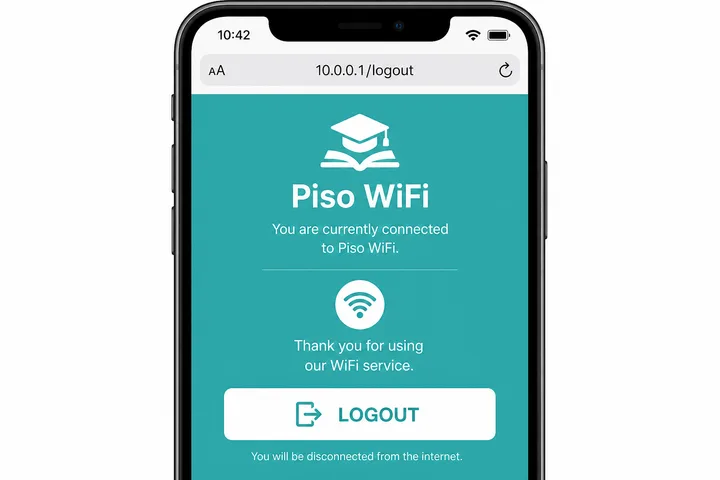
Piso WiFi logout ends your active portal session on that device. Open http://10.0.0.1, look for Logout, or try http://10.0.0.1/logout / /home/logout — this is not the same as Pause Time.
Key Takeaways
- Piso WiFi logout ends your active portal session on that device.
- Open http://10.0.0.1 , look for Logout , or try http://10.0.0.1/logout / /home/logout — this is not the same as Pause Time.
- Use logout when you are done browsing and want to leave the session.
- Use Pause Time when you will return and still need the remaining minutes.
Use logout when you are done browsing and want to leave the session. Use Pause Time when you will return and still need the remaining minutes.
On this page: Logout vs pause vs disconnect · How to logout · Portal paths · When to logout · Voucher & other devices · FAQ (Taglish)
Logout vs Pause vs Disconnect
Pick the right action so you do not waste paid minutes or lose a session by mistake.
| Action | Timer | Internet | Best for |
|---|---|---|---|
| Logout | Ends / abandons per rules | Off for that session | Done for the day |
| Pause | Frozen — minutes saved | Off until Resume | Short break, same device |
| Disconnect WiFi | May keep counting | Off until reconnect | Leaving the area casually |
| Turn off phone | Often keeps counting | Off | Prefer Pause first |
Remember: logout ≠ pause. Full steps for freezing time: Piso WiFi pause time guide.
How to Log out of Piso WiFi
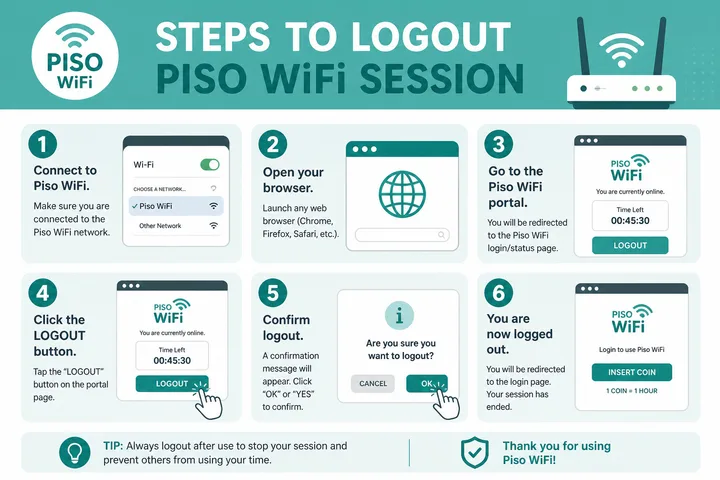
- Stay connected to the Piso / vendo WiFi.
- Turn mobile data OFF.
- Open the browser and go to
http://10.0.0.1. - Find Logout, Log out, or End session on the home / status screen.
- Confirm. You should return to the insert-coin / voucher landing page.
If the button is missing, try the direct paths below or ask the store — some builds hide logout and rely on timer expiry.
Common Logout Portal Paths
| URL | Use |
|---|---|
| http://10.0.0.1 | Main portal — look for Logout button |
| http://10.0.0.1/logout | Direct logout on many builds |
| http://10.0.0.1/home/logout | Alternate path on some firmware |
| http://10.0.0.1/status | Status page may include Logout |
Paths vary by LPB, AdoPisoft, PisoFi, and custom skins. If one 404s, go back to the main portal home.
When You Should Logout
- You finished using the internet and will not resume on that phone.
- You want a clean end before handing the device to someone else in the same household (still may not free transferable time).
- The store asks customers to logout when leaving a shared tablet.
- You accidentally stayed “online” after browsing and the UI offers Logout.
If you still have minutes and will return soon, choose Pause instead — see pause time.
Does Logout Free the Voucher for Another Device?
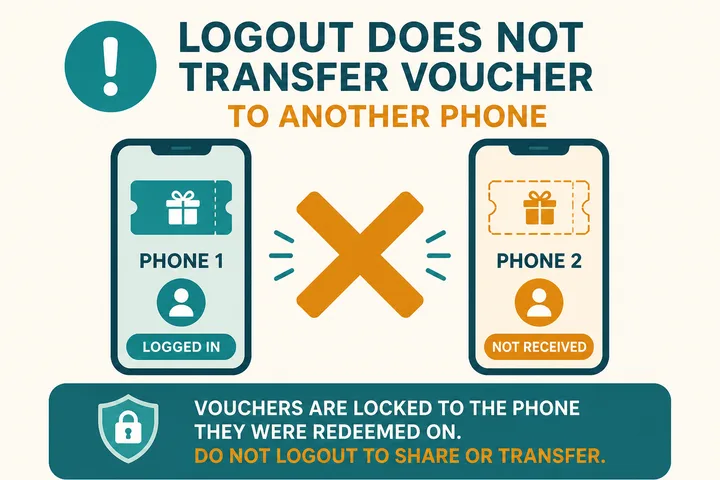
Usually no. Paid time is typically tied to the device MAC address. Logging out ends your session; it does not mint a new voucher code for a friend’s phone.
- To move time to another device, the owner must enable multi-device or transfer features (rare on basic vendo).
- Buying a new voucher / inserting coins on the second device is the normal path.
- Do not trust “logout then reuse code” tips from random Facebook comments.
Does Logout Free a User Slot?
If the portal never appears when you try to log out, captive portal covers forcing the sign-in page open. To freeze time instead of ending it, use the pause time helper checklist first. Public and community hotspots may not expose a logout control at all — see WiFi ng Bayan.
Logout may release an active-session or concurrent-user slot when the controller records the session as ended, but the exact effect is firmware-dependent. It does not necessarily refund minutes, reset a voucher, release a DHCP address immediately, or make the balance transferable. Disconnecting WiFi only breaks the radio connection; the controller may keep the session active until timeout. Pause intentionally preserves the session for later use and may therefore continue occupying whatever record the platform uses.
| Goal | Best action | What to verify |
|---|---|---|
| Save unused minutes | Pause | Portal confirms Paused and shows remaining time |
| End your authenticated session | Logout / End session | Portal returns to its public buy or sign-in state |
| Leave WiFi temporarily | Disconnect | Timer may still run; this is not a clean session end |
| Free a controller slot | Logout, then operator checks active users | Release behavior and timeout are platform-specific |
Na-free Ba Agad Ang Slot Kapag Nag-logout?
Depende sa firmware. Kapag successful ang Logout, puwedeng mawala agad ang active-session entry, pero may systems na naghihintay ng timeout o cleanup. Kung owner ka at puno pa rin ang client limit, tingnan ang Active Users o Sessions dashboard bago mag-delete ng record.
Kapag Dinisconnect Ko Lang Ang WiFi, Logout Na Ba Iyon?
Hindi palagi. Nawala lang ang wireless connection; puwedeng tuloy pa rin ang timer o active pa ang session sa controller. Gamitin ang portal Logout kung tapos ka na, o Pause kung gusto mong itabi ang natitirang oras.
Sources, Scope, and Corrections
Claim basis: Network behavior is separated from common portal defaults. Addresses, buttons, rates, credentials, and session behavior can vary by firmware, platform, owner configuration, and device. See our Editorial Policy for claim labels and source priorities.
Found a mismatch? Send the page URL and privacy-safe evidence using the correction process. This block does not claim a hands-on test or a fact-review date.
Related Guides
- Piso WiFi guide — Understand the portal, sessions, rates and owner side
- Piso WiFi pause time — Pause and resume a paid session without losing minutes
- Piso WiFi not working — Fix portal, payment and connection problems
- Captive portal guide — Understand redirects and force a sign-in page to open
FAQ — Piso WiFi Logout (Taglish)
Paano Mag-logout Sa Piso WiFi?
Connect to the hotspot, open http://10.0.0.1 (or /logout / /home/logout), then tap Logout / Log out. Confirm your session ends on that device.
Logout Ba Ang Pause Time?
Hindi. Pause freezes remaining minutes so you can resume later. Logout ends or abandons the session per operator rules — usually not the same as Pause.
Pwede Bang Gamitin Ng Ibang Phone Ang Voucher Ko after Logout?
Usually hindi. Most Piso systems bind remaining time to the device MAC. Logout does not turn your voucher into a free transferable code for another phone.
What Is 10.0.0.1/logout?
It is a common portal path that jumps straight to the logout action or confirmation page on some Piso / captive-portal firmware.
Logout vs Disconnect WiFi — Ano Difference?
Disconnecting WiFi only leaves the radio link; the portal session may keep counting or stay “online” until timeout. Logout tells the controller to end the session cleanly.
Related: Pause time · Piso WiFi · 10.0.0.1