
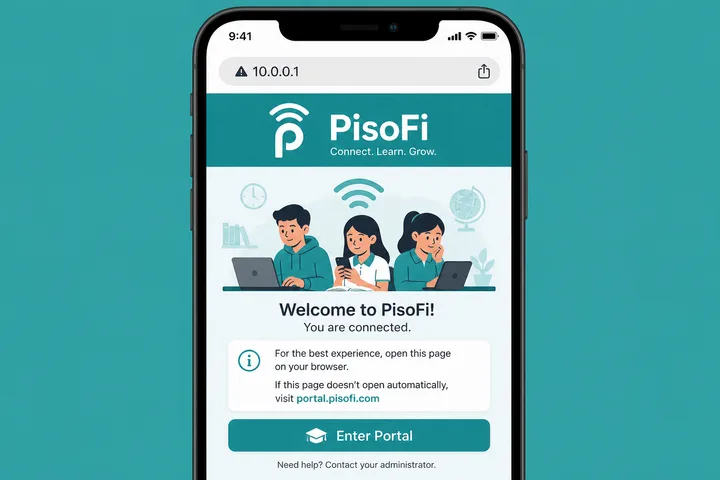
PisoFi (pisofi) is a Piso WiFi portal platform. Open the hotspot portal at http://10.0.0.1 (some machines also use portal.pisofi.com). Owner admin often defaults to administrator / admin12345.
Key Takeaways
- PisoFi ( pisofi ) is a Piso WiFi portal platform.
- Open the hotspot portal at http://10.0.0.1 (some machines also use portal.pisofi.com ).
- Owner admin often defaults to administrator / admin12345 .
- This page covers PisoFi login, pause, admin credentials, and portal.pisofi.com — with links to category and pause hubs.
This page covers PisoFi login, pause, admin credentials, and portal.pisofi.com — with links to category and pause hubs.
Quick path: Connect → mobile data OFF → http://10.0.0.1 or portal.pisofi.com → pay / pause → admin: administrator / admin12345.
On this page: What is PisoFi · Portal / login · Pause time · Admin password · Names & URLs · FAQ
What Is PisoFi / PisoFi?
PisoFi is software used to run coin- and voucher-based public WiFi. It sits in the same category as LPB and AdoPisoft: connect → portal → pay → browse → optional pause.
Many PisoFi builds are associated with compact controllers (including Raspberry Pi–style setups). End users still mostly interact with a local browser portal.
- Entity names: PisoFi, pisofi, portal.pisofi.com
- Category: Piso WiFi
- Typical gateway:
10.0.0.1
PisoFi Portal Login (10.0.0.1 & Portal.pisofi.com)
For customers, open the captive portal while on the PisoFi SSID. Prefer typing http://10.0.0.1 in the address bar.
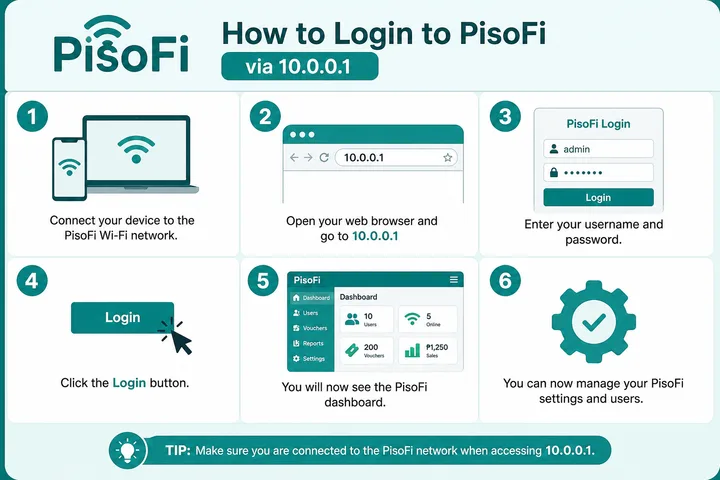
- Join the PisoFi / Piso WiFi network.
- Disable mobile data / auto network switch.
- Try
http://10.0.0.1first. - If the machine documents it, try portal.pisofi.com while still on that WiFi.
- Pay with coins or enter a voucher code to start time.
| Entry point | Who | Notes |
|---|---|---|
http://10.0.0.1 | Customers | Most reliable local portal IP |
| portal.pisofi.com | Customers | Works when local DNS maps it |
| Admin panel | Owners | Default often administrator / admin12345 |
Gateway troubleshooting: 10.0.0.1 · gateway checker.
PisoFi Pause Time
pisofi pause: with an active session, open the PisoFi portal → tap Pause Time → later Resume on the same device.
- Confirm paid minutes are running.
- Open
http://10.0.0.1(or portal.pisofi.com on LAN). - Tap Pause Time.
- Resume on the same phone/laptop — randomized MAC can break resume.
Do not expect a separate “PisoFi-only” pause app. Browser portal is the standard path. Deep guide: Piso WiFi pause time.
PisoFi Default Admin Password
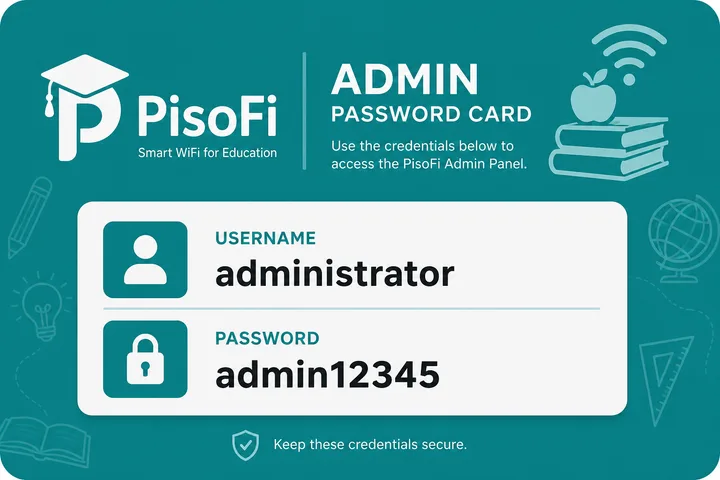
A widely reported PisoFi default is:
| Field | Common default |
|---|---|
| Username | administrator |
| Password | admin12345 |
| Note | Varies by build — check sticker |
- Admin credentials are for owners, not customers paying for minutes.
- Admin password is not the WiFi SSID password.
- Reset help: 10.0.0.1 password reset.
PisoFi Names and Related Queries
| Typed | Means |
|---|---|
| pisofi | Brand / platform |
| pisofi 10.0.0.1 | Local portal |
| portal.pisofi.com 10.0.0.1 | Hostname + IP combo search |
| pisofi piso wifi pause | Pause on PisoFi |
| 10.0.0.1 admin pisofi | Owner login intent |
Compare brands: LPB · AdoPisoft · 1Click.
PisoFi-specific Architecture and Access Notes
If you are still choosing a stack, compare this against JuanFi and LBS Piso WiFi on admin access and payment options. Owner economics are covered separately in Piso WiFi business, and rate modelling lives in the free tools hub.
PisoFi installations are commonly discussed as Raspberry Pi-based controller systems, which distinguishes the controller role from the separate router/access point and ISP modem. A local address and a named portal can lead to different interfaces depending on firmware and network design; neither should be treated as a universal cloud dependency or universal local default.
- Controller storage and clean shutdown matter on small-computer deployments; owners should use the vendor-supported backup and update process.
- The customer portal, local owner dashboard and any remote-management service serve different roles and may not all be enabled.
- Router replacement can change DHCP, gateway and captive-portal behavior even when the controller software stays the same.
- Confirm the installed image/version and owner records before applying credentials or paths from another machine.
Sources, Scope, and Corrections
Claim basis: Login addresses and menu paths are common defaults, not universal settings. Confirm them on the device label, portal, official documentation, or provider support because firmware and owner configuration can differ. See our Editorial Policy for claim labels and source priorities.
Independence: 10001ip.co is not affiliated with, sponsored by, or an official support channel for the brand, ISP, or platform discussed on this page.
Found a mismatch? Send the page URL and privacy-safe evidence using the correction process. This block does not claim a hands-on test or a fact-review date.
Related Guides
- Piso WiFi guide — Understand the portal, sessions, rates and owner side
- Piso WiFi pause time — Pause and resume a paid session without losing minutes
- Piso WiFi machine — Compare hardware, startup cost and owner requirements
- Piso WiFi rate calculator — Model timer rates, sales and potential income
PisoFi FAQ
What Is PisoFi?
PisoFi (pisofi) is a Piso WiFi portal platform used on Philippine hotspots. Users often reach it at http://10.0.0.1; some installs also reference portal.pisofi.com.
What Is the PisoFi Admin Password?
A common default is username administrator and password admin12345. Always check the device sticker — owners may have changed it.
How Do I Open the PisoFi Portal?
Connect to the PisoFi / Piso WiFi SSID, turn mobile data off, then open http://10.0.0.1 in the browser address bar. Some setups use portal.pisofi.com while on that LAN.
Can I Pause PisoFi Time?
Yes if the owner enabled Pause. Open the portal on an active session and tap Pause Time, then Resume on the same device. Full guide: /piso-wifi-pause-time/
Is Portal.pisofi.com the Same as 10.0.0.1?
They can point to the same local captive portal depending on DNS/hosts on the vendo. If one fails, try http://10.0.0.1 while connected to that WiFi.