
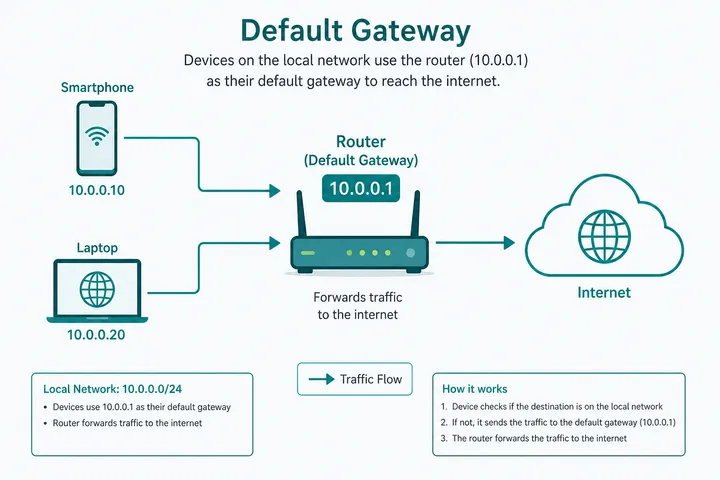
A default gateway is the local router or interface that forwards traffic when your device has no more-specific route for the destination. On a typical LAN it is the next hop from your phone or computer toward the internet. 10.0.0.1 is a common private gateway, especially on some routers and Piso WiFi networks.
Key Takeaways
- A default gateway is the local router or interface that forwards traffic when your device has no more-specific route for the destination.
- On a typical LAN it is the next hop from your phone or computer toward the internet.
- 10.0.0.1 is a common private gateway, especially on some routers and Piso WiFi networks.
- Your device IP, gateway, and DNS server have different jobs.
Your device IP, gateway, and DNS server have different jobs. Find the gateway in the current WiFi or Ethernet details rather than guessing an address.
On this page: What it is · Why 10.0.0.1 · Find it by device · Gateway vs IP and DNS · Common gateways · Piso WiFi context · Gateway not working · Use the checker · FAQ
What Is a Default Gateway?
A host compares each destination with its local routes. If the destination is on the same local subnet, the host can send directly. If no specific route matches, the host sends the packet to the default gateway. The gateway then forwards it according to its own routing table, often through an ISP.
| Destination example | Device decision | Next step |
|---|---|---|
| Another client on the same subnet | Local route matches | Send directly on the LAN |
| A public website | No local route; default route matches | Send to default gateway |
| A network with a specific VPN route | More-specific route matches | Send through VPN interface |
| Gateway itself | Local address | Communicate directly with router/interface |
“Default” does not mean the gateway is used for every packet. More-specific routes take priority. It is the fallback route, usually represented as 0.0.0.0/0 for IPv4 or ::/0 for IPv6.
Why 10.0.0.1 Is Used as a Gateway
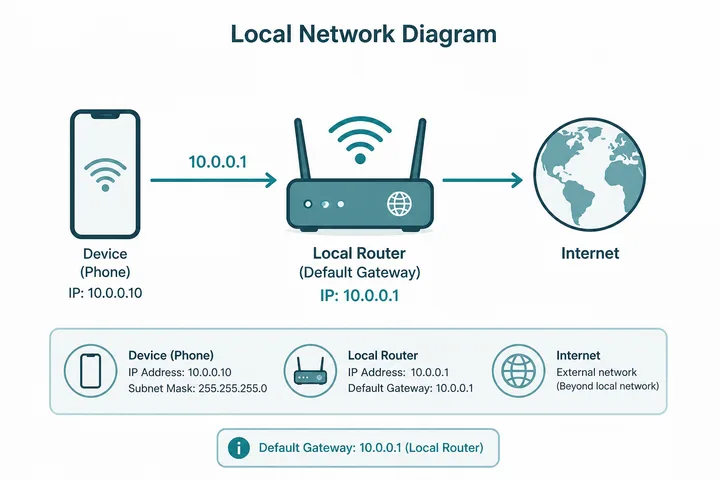
10.0.0.1 is inside the private 10.0.0.0/8 range. Administrators often assign the first usable-looking address in a subnet to the router interface, so .1 is easy to remember. This is a convention: another network may use 10.0.0.254, 192.168.1.1, or another valid host address.
| Setting | Example value | Meaning |
|---|---|---|
| Client IPv4 | 10.0.0.25 | Address assigned to the phone or PC |
| Prefix / mask | /24 or 255.255.255.0 | Local network is commonly 10.0.0.0–10.0.0.255 |
| Default gateway | 10.0.0.1 | Next-hop router/controller |
| DNS | 10.0.0.1 or another resolver | Name resolution service |
The gateway may also host an admin or captive portal at 10.0.0.1, but routing and web hosting are separate functions.
How to Find the Default Gateway
Android
- Open Settings → Network & internet / Connections → WiFi.
- Tap the connected network or its gear icon.
- Expand Advanced / Network details.
- Read Gateway. Labels vary by Android vendor.
iPhone or iPad
- Open Settings → Wi-Fi.
- Tap the information (i) button beside the connected network.
- Under IPv4 Address, read Router. That is the IPv4 default gateway.
Windows 10 or 11
- Open Command Prompt or Windows Terminal.
- Run
ipconfig. - Find the active Wi-Fi or Ethernet adapter.
- Read Default Gateway. Ignore disconnected adapters.
macOS
- Open System Settings → Network → the active connection → Details → TCP/IP.
- Read Router.
- Terminal alternative:
route -n get defaultand readgateway.
Read the active connection, not a dormant VPN, virtual machine, Bluetooth, or disconnected adapter. The gateway checker provides a guided shortcut.
Default Gateway vs Device IP vs DNS vs MAC
| Value | Question it answers | Typical example |
|---|---|---|
| Device IP | Where is this interface logically addressed? | 10.0.0.25 |
| Default gateway | Where should unmatched/non-local traffic go next? | 10.0.0.1 |
| DNS server | Who resolves names into IP addresses? | 10.0.0.1 or public resolver |
| MAC address | Which interface is this on the local link? | 48-bit link-layer identifier |
| Public IP | Which internet-facing address represents this connection? | ISP-assigned or carrier-NAT address |
A router can be both gateway and DNS proxy, so the displayed numbers may match. That does not merge their roles: routing can work while DNS fails, and DNS can answer locally while the ISP route is down.
Common Default Gateway Addresses and Guides
These are common defaults, not a guessing order. Use the address shown by the current network. Every existing 10001ip IP guide is linked below.
| Gateway | Common context | Dedicated guide |
|---|---|---|
10.0.0.1 | Some routers and many Piso WiFi portals | 10.0.0.1 guide |
192.168.0.1 | Many home routers; common Tenda default | 192.168.0.1 guide |
192.168.1.1 | Very common home and ISP router default | 192.168.1.1 guide |
192.168.8.1 | Huawei mobile WiFi and 4G CPE | 192.168.8.1 guide |
192.168.18.1 | Huawei-class home routers and CPE | 192.168.18.1 guide |
192.168.10.1 | Some home routers and ISP devices | 192.168.10.1 guide |
10.10.10.1 | Some routers and custom hotspot portals | 10.10.10.1 guide |
192.168.100.1 | Huawei ONT and fiber modem management | 192.168.100.1 guide |
192.168.254.254 | Some ISP modems and CPE | 192.168.254.254 guide |
For a category view, open router IP addresses.
Default Gateway in a Piso WiFi Network
A Piso WiFi controller commonly gives clients an address such as 10.0.0.x and advertises 10.0.0.1 as the default gateway. The same controller may host the captive portal used to insert money, enter vouchers, pause time, or view status.
- WiFi connected does not guarantee internet authorization; the captive portal may still block forwarding.
- A reachable gateway with no internet can mean the paid session expired or the ISP uplink failed.
- A gateway that does not respond can indicate the wrong SSID, wrong IP, client isolation, or controller outage.
- Use the customer portal—not an owner admin page—to manage time.
Start with Piso WiFi for service context or Piso WiFi not working for portal and session troubleshooting.
Default Gateway Not Working
| Symptom | Interpretation | Next action |
|---|---|---|
| Gateway field is blank | DHCP/configuration incomplete or local-only setup | Reconnect; renew DHCP; verify static settings |
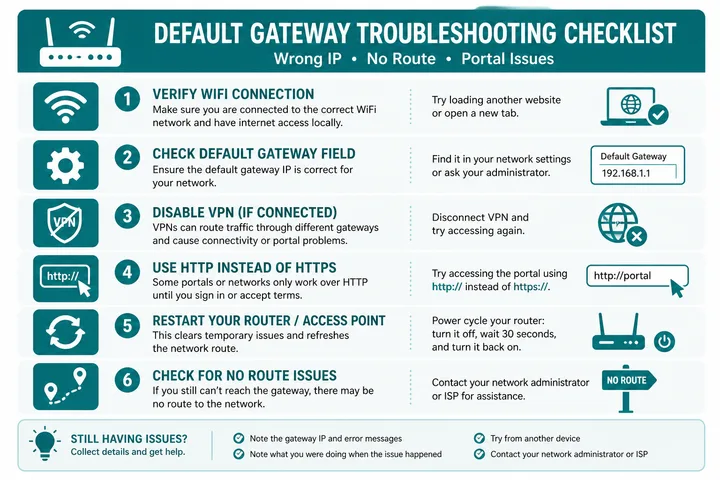
| Gateway IP will not open in browser | Web admin may be disabled, HTTPS/HTTP differs, or it is not a web host | Try http://; verify address; do not assume every gateway hosts a page |
| Gateway responds but internet fails | WAN, DNS, authorization, or upstream issue | Test portal/session; compare IP reachability and DNS |
| Gateway changed | Joined another SSID or DHCP configuration changed | Use the current network’s displayed gateway |
| 10.0.0.0.1 was typed | Invalid five-octet address | Use 10.0.0.1 if that is the assigned gateway |
| Login rejected | Admin credentials differ from WiFi password | Check device label; avoid reset unless configuration loss is acceptable |
Quick Network Checks
- Confirm the device has a valid local IP—not a self-assigned
169.254.x.xIPv4 address. - Confirm the gateway belongs to the same local subnet under the configured mask.
- Disable VPN and mobile fallback while testing the local route.
- Reconnect to renew DHCP.
- Test the gateway address, then a public IP, then a domain name to separate LAN, WAN, and DNS failures.
Use the Gateway Checker Instead of Guessing
The gateway checker guides you to the active router address on your device. Browser JavaScript cannot reliably read every operating system routing table, so follow its device-specific steps and compare the result with the router label.
After finding the value, type http:// plus the numeric address in the browser address bar. Local admin and captive portal pages generally work only while connected to that network.
Gateway, DHCP, Subnet and NAT Relationships
Once the gateway is known, the next step depends on what answers it. Router firmware means a brand guide such as TP-Link router login; a paid sign-in screen means captive portal. The free tools hub collects the checks used throughout this page.
DHCP commonly gives a client its IP address, subnet prefix, default gateway and DNS settings. The subnet tells the device which destinations are local; the default gateway receives packets for destinations outside that local range. On many home networks, the same router also performs network address translation (NAT), but gateway and NAT are separate functions and need not live on the same system in larger networks.
- A device can have an IP address but no usable default gateway, allowing local access while internet access fails.
- The gateway can be reachable even when DNS or the ISP uplink is down.
- Several interfaces can have different gateways; the operating system chooses routes by prefix and route preference/metric.
- A captive portal may run on the gateway or another local controller, so “portal address” and “default gateway” are related but not guaranteed to be identical.
Sources, Scope, and Corrections
Claim basis: Standards-based networking behavior is treated as Protocol fact; addresses, redirects, labels, and menus are marked as common or device-dependent where they can vary. See our Editorial Policy for claim labels and source priorities.
Found a mismatch? Send the page URL and privacy-safe evidence using the correction process. This block does not claim a hands-on test or a fact-review date.
Related Guides
- Free tools hub — Choose a gateway checker, session helper or rate calculator
- Router IP address list — Compare common and uncommon private gateways
- Gateway checker — Find the correct local router or portal address
- What is an IP address? — Understand IPv4, IPv6, public and private addresses
Default Gateway FAQ
What Is a Default Gateway?
A default gateway is the local router or interface to which a device sends traffic when no more-specific local route exists. It commonly forwards LAN traffic toward the internet.
Is 10.0.0.1 a Default Gateway?
It can be. 10.0.0.1 is a valid private IPv4 address often assigned to a router or Piso WiFi controller. Confirm the gateway shown in your device’s current network details.
How Do I Find My Default Gateway?
Open the connected WiFi network details on Android or iPhone and look for Gateway or Router. On Windows run ipconfig; on Mac view Network > Details > TCP/IP or run route -n get default.
Is the Default Gateway the Same as My IP Address?
No. Your device IP identifies your interface; the default gateway identifies the next-hop router. They are normally different addresses in the same local subnet.
Is the Default Gateway the Same as DNS?
No. A gateway forwards packets; DNS resolves names to addresses. A router may appear in both fields because it can proxy DNS, but the roles remain different.
Why Is My Default Gateway Blank or Unavailable?
The device may not have completed DHCP, may be disconnected, may use a static configuration without a gateway, or may be on an isolated/local-only network. Reconnect and renew the network configuration before resetting hardware.
Related Gateway Resources
- Gateway checker — find the active local gateway
- Router IP addresses — compare common gateway defaults
- 10.0.0.1 — gateway, router, and Piso portal guide