
Piso WiFi rate calculator: enter pesos paid and minutes received to get ₱/hour, ₱/minute, minutes per ₱5/₱10/₱20, and suggested retail markup examples for owners.
Key Takeaways
- Piso WiFi rate calculator: enter pesos paid and minutes received to get ₱/hour , ₱/minute , minutes per ₱5/₱10/₱20, and suggested retail markup examples for owners.
- This tool lives at /tools/piso-wifi-rate-calculator/ .
- After you pick numbers, set the same rows in your vendo admin (LPB, AdoPisoft, PisoFi, and similar).
- The calculator only suggests numbers.
This tool lives at /tools/piso-wifi-rate-calculator/. After you pick numbers, set the same rows in your vendo admin (LPB, AdoPisoft, PisoFi, and similar).
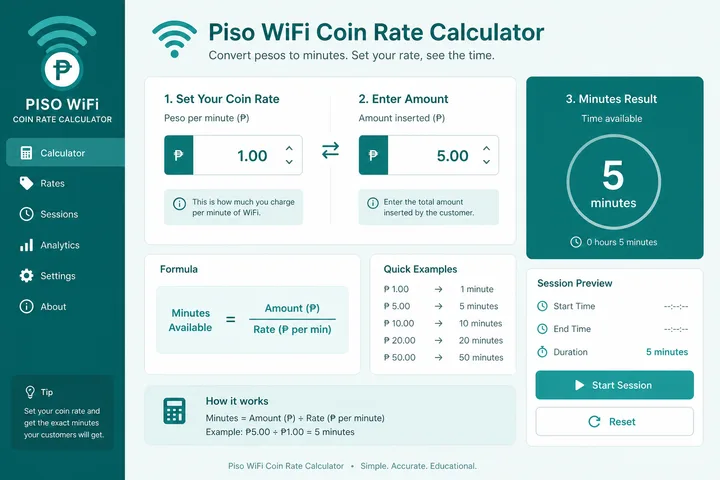
Run the Rate Calculator
Piso WiFi rate calculator: enter how much customers pay and how many minutes that buys. Results update instantly — ₱/hour, ₱/minute, minutes per ₱5/₱10/₱20, and sample retail markups for owners.
Or load a common row:
Suggested retail markup examples (on top of your current ₱/hour cost to the customer):
Estimates only — set final rates in your vendo admin (LPB, AdoPisoft, PisoFi, etc.). Fair pricing depends on your ISP plan and location.
On this page: Calculator · Set rates in admin · Fair pricing notes · Example rate tables · FAQ
How Owners Set Rates in Admin
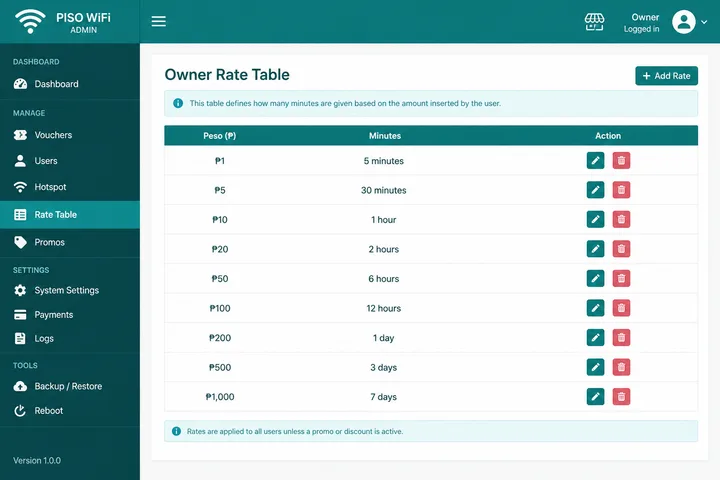
The calculator only suggests numbers. You still save the live rate table inside the controller:
- Connect to the machine WiFi (or LAN).
- Open owner admin — often
http://10.0.0.1/admin(brand path may differ). - Find Rates, Insert Coin, Time Settings, or Voucher packages.
- Add or edit rows: pesos → minutes (and optional pause rules).
- Save, then test: insert a coin or redeem a voucher on a customer phone.
- Adjust if nearby stores undercut you or if your ISP cost rose.
Brand hubs: LPB Piso WiFi · overview: Piso WiFi · hardware: Piso WiFi machine.
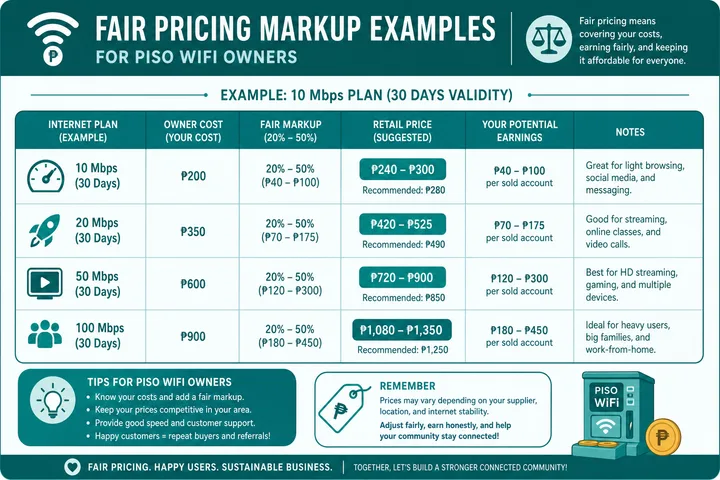
Fair Pricing Notes for Owners
- Cover ISP monthly fee + electricity + machine amortization before chasing maximum ₱/hour.
- Match or slightly beat the nearest vendo — empty machines earn ₱0.
- Offer clearer packages (₱5 / ₱10 / ₱20) rather than tiny awkward minute counts.
- Pause Time (if enabled) increases perceived value; do not price as if every minute is always consumed.
- Revisit rates when your Fiber plan or barangay competition changes.
More context: Piso WiFi · LPB · machine buying notes.
Example Rate Table (Static SEO)
Illustrative only — compute your own with the tool above before copying into admin:
| Pesos | Minutes | ≈ ₱/hour | Notes |
|---|---|---|---|
| ₱1 | 10 | ₱6.00 | Common coin step on many vendos |
| ₱5 | 60 | ₱5.00 | Simple hour package |
| ₱10 | 150 | ₱4.00 | Volume discount |
| ₱20 | 360 | ₱3.33 | Long-session promo |
How to Interpret the Rate Results
The effective ₱/hour figure is a comparison unit, not a promise that every customer will buy exactly one hour. It lets you compare packages with different prices and durations on the same basis. A lower ₱/hour for larger packages is a volume discount; it also creates a longer liability for service time and may increase peak-hour usage.
- Compare rows consistently: if ₱5 buys 60 minutes, the effective customer rate is ₱5/hour. If ₱10 buys 150 minutes, it is ₱4/hour.
- Round deliberately: friendly minute values are easier to post and audit, but rounding changes the effective rate.
- Separate speed from time: identical minutes can have different value if one package has a different bandwidth cap.
- Check pause and expiry: saved minutes, idle timeouts and voucher validity affect customer value even when the table is unchanged.
Costs, Revenue and Assumptions
Pricing is only one variable in an operation. Location demand, ISP capacity, and risk are handled in Piso WiFi business, and the controller you run — for example JuanFi — determines which package structures you can actually configure. The other calculators are in the free tools hub.
Calculator output describes the customer rate. It does not calculate owner profit. Gross revenue is money collected before costs; an operating estimate subtracts the portion of ISP service, electricity, repairs, payment fees, refunds, rent, labor, taxes and equipment recovery attributable to the vendo. Use actual records for those inputs.
Illustrative estimate: 40 paid transactions averaging ₱5 produce ₱200 gross sales for that day. This does not mean ₱200 profit and does not imply the same demand tomorrow. If downtime, weather, school schedules or a competing hotspot reduces transactions, revenue changes even though the rate table stays fixed.
State assumptions beside any forecast: days open, transactions per day, average sale, expected uptime and all recurring costs. Review the owner hardware and maintenance context in the Piso WiFi machine guide. No separate business page is linked because none is required to use this calculator.
Sources, Scope, and Corrections
Claim basis: Calculations and browser-detected values are explanatory outputs, not device certification. Confirm addresses, rates, and session behavior on your own device or portal. See our Editorial Policy for claim labels and source priorities.
Found a mismatch? Send the page URL and privacy-safe evidence using the correction process. This block does not claim a hands-on test or a fact-review date.
Related Guides
- Free tools hub — Choose a gateway checker, session helper or rate calculator
- Piso WiFi guide — Understand the portal, sessions, rates and owner side
- Piso WiFi machine — Compare hardware, startup cost and owner requirements
- Piso WiFi business — Model owner economics, costs, pricing and operating risk
FAQ — Piso WiFi Rate Calculator
What Is a Piso WiFi Rate Calculator?
It converts a coin or package price and the minutes it buys into ₱/hour, ₱/minute, and equivalent minutes for ₱5, ₱10, and ₱20 so owners can compare and set fair retail rates.
How Do Owners Set Rates in Piso WiFi Admin?
Log in to the vendo admin (often http://10.0.0.1/admin), open Rates / Insert Coin / Time settings, enter pesos-to-minutes rows, save, then test with a real coin or voucher on a customer device.
What Is a Fair Piso WiFi Price?
It depends on your ISP plan cost, location, and competition. Many small stores land near a few pesos per hour equivalent; use the calculator, then stay close to nearby vendos so customers do not bounce.
Should I Mark up Rates for Profit?
Yes — include ISP, electricity, machine cost, and maintenance. The markup slider shows example packages; avoid extreme prices that empty the machine while a neighbor is cheaper.
Where Can I Learn More About Piso Machines and Brands?
See /piso-wifi-machine/, /piso-wifi/, and /lpb-piso-wifi/ for hardware, portal, and LPB-specific admin notes.
Related: Piso WiFi machine · Piso WiFi · LPB Piso WiFi · Gateway checker