
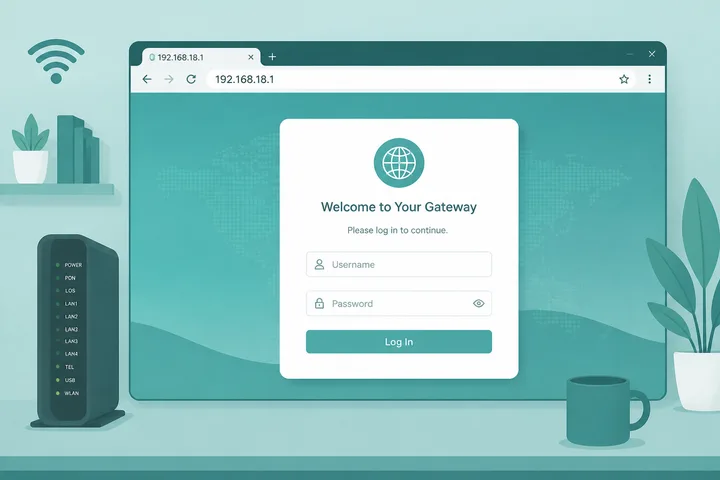
192.168.18.1 is a private admin gateway often used on Huawei-class home routers and CPE. Type http://192.168.18.1 in your browser while connected to that network to open the login page.
Key Takeaways
- 192.168.18.1 is a common Huawei-class home/CPE admin gateway — open with
http://192.168.18.1. - It is not the same as 192.168.1.1 or 192.168.8.1.
- If it fails, verify the real gateway before factory reset.
- Related: 192.168.1.1 · 192.168.8.1 · Gateway checker · Router IP addresses
This guide covers what 192.168.18.1 is, how to log in, default passwords, common typos, fixes when it will not load, and how it compares to 192.168.1.1, 192.168.8.1, and 10.0.0.1.
On this page: What it is · How to log in · Default passwords · Typos · vs other gateways · Not working · FAQ
What Is 192.168.18.1?
192.168.18.1 is a private IPv4 address in the 192.168.0.0/16 range. Many Huawei and Huawei-class home routers and ISP CPE units use it as the default LAN admin / gateway.
It is not a public website. It only works when your device is on that router’s WiFi or Ethernet. If the sticker lists 192.168.18.1, use this address — do not assume 192.168.1.1.
How to Log in to 192.168.18.1
Connect to the router network, open a browser, type http://192.168.18.1 in the address bar, then enter the username and password from the sticker or ISP documentation.
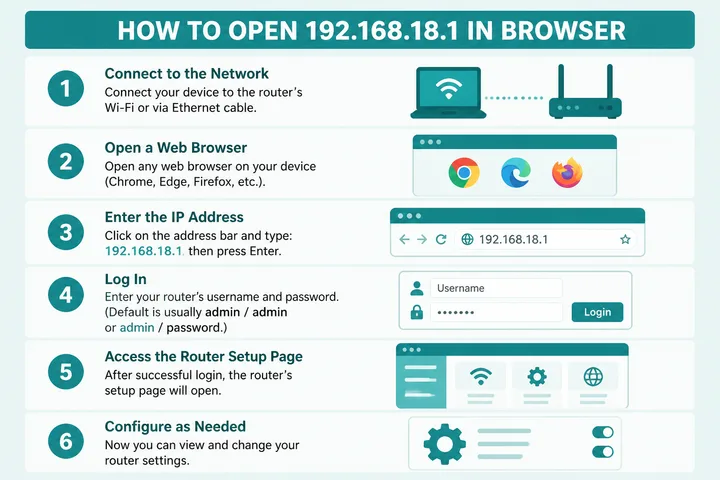
- Connect to the Huawei-class router WiFi or LAN cable.
- Turn off VPN and mobile data.
- Open a browser.
- Type
http://192.168.18.1→ Enter. - Sign in with credentials on the device label or ISP sheet.
If nothing loads, your gateway may be 192.168.1.1, 192.168.8.1, or 192.168.0.1 — use the gateway checker.
Default Passwords for 192.168.18.1
Huawei and ISP units often print unique credentials. Check the label first:
| Brand / type | Username | Password |
|---|---|---|
| Huawei home router / CPE | printed on sticker | printed on sticker |
| Common Huawei default (older) | admin / root | admin / printed |
| ISP-branded Huawei-class | printed / ISP sheet | printed / ISP sheet |
| Generic fallback | admin | admin |
Admin password ≠ WiFi password. Avoid changing WAN/optical settings unless you know the impact.
192.168.18.1 Typos and Mistypes
Spaces, letter L, and swapped octets send you to the wrong place. Use 192.168.18.1 exactly when that is your gateway.
| Typed | Use |
|---|---|
| 192.168.18.l (letter L) | 192.168.18.1 |
| 192.168. 18.1 / 192.168.18 .1 | 192.168.18.1 |
| 192 168 18 1 / 192-168-18-1 | 192.168.18.1 |
| https://192.168.18.1 | Try http:// first |
| 192.168.8.1 / 192.168.1.1 | Different gateways — confirm with checker |
192.168.18.1 vs 192.168.1.1 / 192.168.8.1 / 10.0.0.1
Huawei-class devices use several nearby defaults. Match the sticker — do not guess from brand alone.
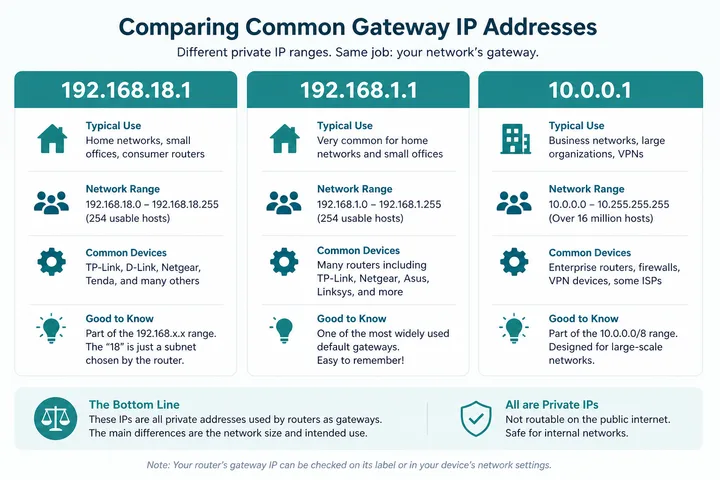
| Address | Typical use | Note |
|---|---|---|
| 192.168.18.1 | Huawei-class home / CPE admin | Primary focus of this page |
| 192.168.1.1 | Most home / ISP WiFi routers | Most common default |
| 192.168.8.1 | Huawei mobile WiFi / 4G CPE | Pocket WiFi / LTE routers |
| 10.0.0.1 | Some routers + Piso portals | See Piso WiFi |
192.168.18.1 Not Working
Fix the network path before resetting anything:
| Problem | Fix |
|---|---|
| Typed letter L or spaces | Use 192.168.18.1 exactly |
| Page will not load | Stay on this device’s WiFi; try http; disable VPN |
| Habit of typing 192.168.1.1 | Confirm sticker / WiFi gateway first |
| Wrong gateway | Gateway checker or WiFi details |
| Login rejected | Use sticker password; reset only if you accept wiping settings |
Sources, Scope, and Corrections
Claim basis: Network behavior is separated from common portal defaults. Addresses, buttons, rates, credentials, and session behavior can vary by firmware, platform, owner configuration, and device. See our Editorial Policy for claim labels and source priorities.
Found a mismatch? Send the page URL and privacy-safe evidence using the correction process. This block does not claim a hands-on test or a fact-review date.
192.168.18.1 on Huawei-Class Gateways
For model-specific menus and ONT versus CPE differences, continue in the Huawei router login guide. If the unit was supplied by an ISP, the account-side path may be documented under Converge admin instead. Readers new to private ranges should start with what is an IP address.
192.168.18.1 is commonly associated with selected Huawei-class home gateways and ONT/router combos. It is still a private admin address: use it only on the device WiFi or Ethernet LAN, with mobile data off. Default usernames and passwords vary by ISP image, so treat sticker text as primary evidence.
If you expected a Piso WiFi coin portal and landed on 192.168.18.1 firmware menus, you are in router admin, not the vendo customer portal. Switch SSIDs or open the portal address the machine advertises. Keep ISP admin changes separate from vendo rate and pause settings.
Related Guides
- Router IP address list — Compare common and uncommon private gateways
- Default gateway guide — Find the router address used by your device
- Gateway checker — Find the correct local router or portal address
- What is an IP address? — Understand IPv4, IPv6, public and private addresses
FAQ
What Is 192.168.18.1?
192.168.18.1 is a private IPv4 address used as the admin gateway on many Huawei-class home routers, CPE units, and some ISP-branded WiFi devices.
How Do I Log in to 192.168.18.1?
Connect to that device’s WiFi or Ethernet, type http://192.168.18.1 in the browser address bar, then enter the admin credentials from the sticker or ISP sheet.
Is 192.168.18.l a Valid IP?
No. The letter L is invalid. Use digits only: 192.168.18.1.
Is 192.168.18.1 the Same as 192.168.1.1 or 192.168.8.1?
No. Different private gateways. 192.168.1.1 is the most common home default; 192.168.8.1 is common on Huawei mobile WiFi / 4G CPE; 192.168.18.1 is used on many Huawei-class home gateways.
192.168.18.1 Not Working — What Should I Try?
Confirm you are on that device’s WiFi, try http not https, disable VPN and mobile data, and verify the real gateway with WiFi details or the gateway checker.